
What is SysTools SSD Data Recovery 12.2?
**SysTools SSD Data Recovery 12.2** is a professional software solution designed to **recover lost, deleted, or formatted data from SSD drives**. Whether your data was removed accidentally, corrupted due to system crashes, or lost after formatting, this version offers a safe, accurate, and high-speed recovery process.
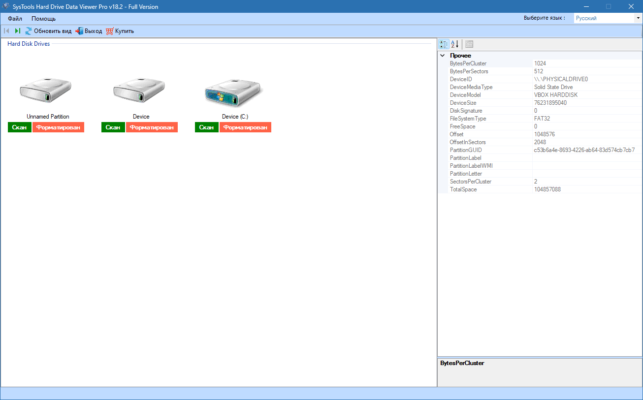
The tool supports both M.2 and NVMe SSDs, making it compatible with modern computers and laptops. Its intelligent scanning engine ensures that even the most deeply buried files can be retrieved without affecting the original drive structure.
Key Features of SysTools SSD Data Recovery 12.2
1. Complete Data Recovery from SSD Drives
The software can restore **deleted, corrupted, or inaccessible files and folders** from any SSD. It works with both internal and external solid-state drives, supporting all major file systems, including **FAT, exFAT, and NTFS**.
2. Two Powerful Scan Modes
SysTools SSD Data Recovery 12.2 includes **Quick Scan** for instantly finding recently deleted files, and **Deep Scan** for recovering files from formatted or damaged partitions. Both methods guarantee maximum file retrieval accuracy.
3. Recover All File Types
This version supports recovery of various file formats such as **documents, photos, videos, audio, compressed files, and more**. It ensures the file names and folder hierarchy are preserved, which helps maintain organization after recovery.
4. Preview Before Saving
Before final recovery, users can **preview the content** of each file directly inside the program. This ensures you only restore the data you need, saving both time and disk space.
5. Works with Corrupted and Formatted SSDs
Even if your SSD is **corrupted or reformatted**, the software can still access and extract lost data using advanced algorithms. It also helps bypass bad sectors and recover partial data from physically degraded drives.
6. User-Friendly Interface
SysTools designed this tool with simplicity in mind. The interface is **intuitive and beginner-friendly**, making professional-grade recovery possible for any user, regardless of technical skill.
What’s New in Version 12.2?
The latest release introduces significant performance upgrades. **Version 12.2** improves recovery speed by up to 40%, adds **NVMe SSD optimization**, and includes enhanced file preview capabilities for large data volumes.
It also offers improved stability when scanning high-capacity SSDs exceeding 2TB, ensuring no interruption during the recovery process.
Why Choose SysTools SSD Data Recovery?
SysTools has long been a trusted brand in data recovery solutions. The **SSD Data Recovery 12.2** edition continues this legacy with a focus on **safety, precision, and speed**. Unlike many other tools, it performs non-destructive scans, meaning your original drive content remains untouched during the process.
Whether you’re a home user, IT technician, or data recovery specialist, this tool ensures accurate restoration of files from any SSD brand, including Samsung, Crucial, Kingston, and WD.
Conclusion
In conclusion, **SysTools SSD Data Recovery 12.2** is an essential utility for recovering data from damaged, deleted, or formatted SSDs. Its combination of powerful scanning technology, broad format support, and user-friendly design makes it one of the **best SSD recovery tools of 2025**.
No matter how severe your data loss is, this program offers a reliable way to restore valuable files quickly and securely.
✔ Tested: This software was tested on Windows 10 & Windows 11 and works smoothly without issues.
Frequently Asked Questions
- Is this software free?
Yes, it can be downloaded and used for free. - Does it support Windows 11?
Yes, it works perfectly on Windows 10 and 11. - Is it safe to use?
Yes, the software was scanned and tested before publishing.
Last updated: January 2026