
Overview of TextCrawler Pro 3.1.3
TextCrawler Pro 3.1.3 is a professional utility designed to search, replace, and edit text across multiple files simultaneously. It’s a must-have tool for programmers, web developers, writers, and system administrators who often deal with large volumes of text or code.
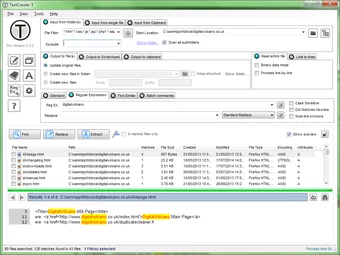
Developed by DigitalVolcano Software, TextCrawler Pro combines speed, precision, and flexibility in one lightweight package. It’s particularly powerful for making batch edits, updating code, or cleaning text data without manually opening every file.
Key Features
Advanced Search and Replace
TextCrawler Pro offers a robust search and replace engine that supports both plain text and regular expressions (RegEx). Users can search through hundreds or even thousands of files at once, locate matching patterns, and perform instant replacements with high accuracy.
This feature is ideal for software developers managing source code, as it helps modify variable names, file paths, or repetitive syntax across multiple directories.
Batch File Editing
One of TextCrawler’s biggest advantages is its ability to edit files in bulk. Users can apply changes to multiple documents simultaneously, saving countless hours compared to manual editing. The preview function allows you to review all potential modifications before applying them, reducing the risk of unintended changes.
Real-Time Preview and Highlighting
The program includes a live preview window that highlights search matches and replacement results before execution. This helps users verify accuracy and avoid costly mistakes — a valuable feature for anyone editing production files.
Regex Tester and Custom Scripts
TextCrawler Pro comes with a built-in regular expression tester that allows you to create and test complex search patterns. For advanced users, it also supports custom scripts to automate repetitive text processing tasks, making it one of the most flexible tools for data cleaning or code refactoring.
Built-In Backup System
Before performing any batch operation, TextCrawler automatically creates backups of your files. This ensures you can revert changes instantly if necessary, providing a layer of safety for critical projects.
Benefits of Using TextCrawler Pro 3.1.3
Save Time on Large Projects
Whether you’re refactoring hundreds of source files or cleaning up text data, TextCrawler’s batch processing engine can complete tasks in seconds. It’s perfect for developers maintaining large codebases or websites.
High Precision with Regex
Thanks to its powerful regex engine, TextCrawler allows you to perform extremely precise text searches and replacements. This makes it ideal for structured text editing, such as XML, HTML, or programming code.
Lightweight and Portable
The software is lightweight, fast, and can even run as a portable application. It doesn’t require installation, making it convenient to carry on USB drives for on-site work or system maintenance.
Clear and Intuitive Interface
Despite its advanced capabilities, TextCrawler Pro remains user-friendly. The clean layout, syntax highlighting, and organized panels make it easy to locate functions and manage complex search operations without confusion.
Ideal Use Cases
For Developers
Quickly rename functions, update file paths, or modify code patterns across projects.
For Writers and Editors
Find and correct repetitive mistakes or format text consistently across multiple documents.
For Data Analysts
Clean and structure large text datasets with consistent formatting using batch replacements.
Conclusion
TextCrawler Pro 3.1.3 is an essential productivity tool for anyone working with large text collections or complex codebases. Its combination of speed, precision, and versatility makes it far superior to traditional editors for search-and-replace operations.
Whether you’re a developer, writer, or data specialist, TextCrawler Pro empowers you to manage text editing efficiently, accurately, and safely — turning tedious, repetitive work into a quick, controlled process.
✔ Tested: This software was tested on Windows 10 & Windows 11 and works smoothly without issues.
Frequently Asked Questions
- Is this software free?
Yes, it can be downloaded and used for free. - Does it support Windows 11?
Yes, it works perfectly on Windows 10 and 11. - Is it safe to use?
Yes, the software was scanned and tested before publishing.
Last updated: January 2026