
Remote Desktop Manager 2025.3.16 Overview
Remote Desktop Manager 2025.3.16 is the latest version of the popular all-in-one remote connection management software developed by Devolutions. It allows IT professionals, system administrators, and support teams to centralize, organize, and secure remote connections and credentials across multiple environments.
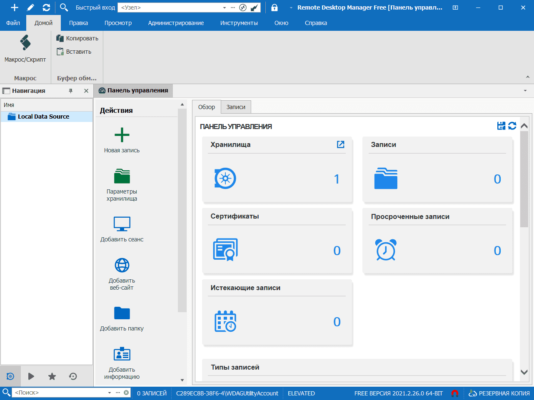
This version introduces performance optimizations, enhanced encryption, and a modernized interface, ensuring a faster and more secure experience for enterprise users.
Key Features of Remote Desktop Manager 2025.3.16
1. Centralized Connection Management
Remote Desktop Manager (RDM) unifies all remote sessions — including RDP, SSH, VPN, VNC, TeamViewer, and web-based logins — into a single dashboard.
Users can manage hundreds of connections effortlessly while maintaining full control over credentials, permissions, and logging.
2. Secure Credential Vault
Security is at the core of RDM. The built-in password vault encrypts all credentials using advanced AES-256 encryption and supports integration with third-party solutions such as LastPass, KeePass, and Azure Key Vault.
This ensures that sensitive information remains protected, even in large multi-user environments.
3. Role-Based Access Control
Administrators can assign user roles and set access permissions for specific folders or connections. This prevents unauthorized access and helps maintain compliance with enterprise-level security standards.
4. Advanced Session Types
RDM 2025.3.16 supports over 60 connection types, from remote desktops to cloud-based services. It also integrates with Amazon AWS, Microsoft Azure, Google Cloud, and other major platforms — making it ideal for hybrid infrastructures.
Performance and Stability Improvements
Optimized Loading and Sync
This version improves startup time and synchronization speed with cloud data sources such as Devolutions Hub, SQL Server, and Azure databases. Users experience smoother performance, even when managing thousands of entries.
Enhanced Multi-Tab Interface
The redesigned interface now supports faster switching between sessions with less memory usage. Multi-tab navigation lets users control multiple connections simultaneously, boosting productivity.
Security and Compliance
Zero Trust Architecture
Remote Desktop Manager 2025.3.16 aligns with Zero Trust security principles, verifying every user, device, and connection before granting access.
The platform also offers two-factor authentication (2FA) and audit logging, giving organizations full visibility over connection history and credential use.
Data Protection and Encryption
All stored information — including passwords, connection data, and notes — is encrypted locally and in transit. Administrators can enforce encryption policies to meet compliance standards such as GDPR, HIPAA, and SOC 2.
Integration and Compatibility
Supported Platforms
RDM 2025.3.16 runs on Windows 10, Windows 11, and Windows Server 2022. It is also available for macOS, iOS, Android, and Linux, ensuring cross-platform flexibility.
Cloud and Database Integration
Users can connect to Microsoft SQL Server, MySQL, Azure SQL, or Devolutions’ own cloud service for centralized data storage. Synchronization ensures all team members access the latest configuration.
Third-Party Integration
RDM integrates seamlessly with tools such as PowerShell, Active Directory, Bitwarden, Okta, and CyberArk, providing maximum interoperability for enterprise IT environments.
Use Cases
For IT Departments
Centralize remote access management, reduce connection errors, and monitor user activity across large networks.
For MSPs and Support Teams
Quickly switch between client systems and maintain a secure, organized list of credentials and connection details.
For Security-Conscious Organizations
Implement strong authentication, detailed auditing, and secure password policies to protect remote infrastructure.
User Experience and Interface
Streamlined Dashboard
The clean and intuitive dashboard allows users to launch sessions, manage credentials, and organize data efficiently. Customizable layouts and themes improve usability in both light and dark modes.
Quick Connect Feature
With Quick Connect, users can instantly establish ad-hoc sessions without needing to create permanent entries — perfect for temporary troubleshooting.
Conclusion
Remote Desktop Manager 2025.3.16 is a complete, secure, and high-performance solution for managing remote connections in modern IT environments.
With its centralized structure, advanced security, and seamless integrations, it empowers teams to work more efficiently while maintaining full control over their digital infrastructure.
For organizations seeking to improve security, streamline remote access, and simplify credential management, Remote Desktop Manager remains the industry standard.
✔ Tested: This software was tested on Windows 10 & Windows 11 and works smoothly without issues.
Frequently Asked Questions
- Is this software free?
Yes, it can be downloaded and used for free. - Does it support Windows 11?
Yes, it works perfectly on Windows 10 and 11. - Is it safe to use?
Yes, the software was scanned and tested before publishing.
Last updated: January 2026