LizardSystems Terminal Services Manager 25.05 is a professional utility designed to monitor, control, and manage Remote Desktop sessions across a Windows network. For IT administrators and organizations, this tool provides real-time insights into user activity, session performance, and system resource usage, all in one easy-to-use interface and buy.
Why Use Terminal Services Manager?
Remote Desktop Protocol (RDP) is widely used for remote access in businesses, schools, and IT infrastructures. However, managing multiple sessions simultaneously can be difficult without the right tools.
With Terminal Services Manager 25.05, administrators can:
Monitor all active, disconnected, and idle RDP sessions.
Remotely control or disconnect users.
Track system resource usage per session.
Improve security by identifying suspicious connections.
This makes it a powerful solution for both small offices and enterprise networks.
Key Features of LizardSystems Terminal Services Manager 25.05
📊 Session Monitoring
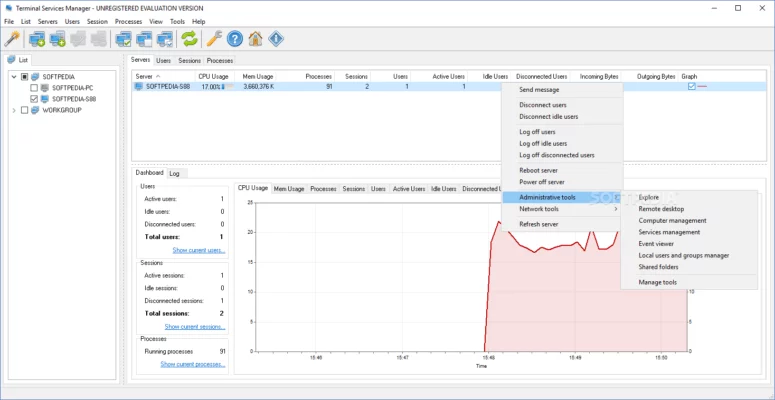
The software provides detailed information about all Remote Desktop sessions, including user names, login times, active processes, and resource usage.
🔒 Remote Control and Management
Admins can interact with sessions in real time — sending messages, disconnecting idle users, or even taking control of sessions when necessary.
⚡ Performance Optimization
By monitoring CPU and memory usage per session, IT staff can quickly detect and resolve bottlenecks that affect overall system performance.
🌍 Multi-Server Support
Terminal Services Manager allows you to manage sessions across multiple servers at once, making it ideal for large-scale networks.
🖥️ User-Friendly Dashboard
The clean and intuitive interface makes it simple to navigate between sessions, servers, and user activity, even for administrators who are new to RDP management.
Benefits for IT Administrators and Businesses
👨💻 For IT Professionals
The tool saves valuable time by centralizing the management of all remote sessions. Admins no longer need to manually log into each server, as everything can be controlled from one place.
🏢 For Businesses
Companies benefit from improved security, better resource allocation, and reduced downtime. By quickly detecting inactive or unauthorized sessions, organizations ensure a more stable and secure IT environment.
Compatibility and Ease of Use
LizardSystems Terminal Services Manager 25.05 supports all modern versions of Windows Server as well as Windows desktop operating systems with RDP enabled. Its lightweight design ensures minimal impact on performance while delivering maximum functionality.
The program requires little configuration, making it suitable for both small teams and large IT departments.
Final Verdict
If you are looking for a reliable and efficient tool to manage Remote Desktop sessions, LizardSystems Terminal Services Manager 25.05 is an excellent choice. With real-time monitoring, multi-server support, and strong management features, it gives IT administrators complete control over their RDP infrastructure.
By using this software, businesses can enhance security, optimize performance, and ensure smooth remote operations across their entire network.
✔ Tested: This software was tested on Windows 10 & Windows 11 and works smoothly without issues.
Frequently Asked Questions
- Is this software free?
Yes, it can be downloaded and used for free. - Does it support Windows 11?
Yes, it works perfectly on Windows 10 and 11. - Is it safe to use?
Yes, the software was scanned and tested before publishing.
Last updated: January 2026