
SILKYPIX RAW Converter 1.0.12.0: Unlock the Full Potential of Your RAW Photos 🖼️🔍
Are you capturing images in RAW format but struggling to get the most out of them? SILKYPIX RAW Converter 1.0.12.0 is a professional-grade application designed specifically for processing RAW image data from digital cameras, offering advanced controls and high-quality output to help photographers bring out the true potential of their shots.
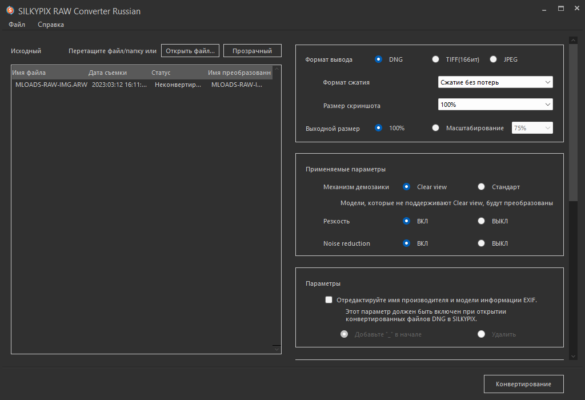
Whether you’re a professional photographer or a serious enthusiast, SILKYPIX provides the tools and precision needed to create stunning images from your camera’s RAW files.
🎯 Why Choose SILKYPIX RAW Converter?
- ✅ Dedicated RAW processing: Optimized specifically for RAW files
- ✅ High-quality image development: Superior noise reduction and color rendering
- ✅ Intuitive editing tools: Adjust exposure, contrast, color, and more with precision
- ✅ Support for multiple camera models: Compatible with a wide range of RAW formats
- ✅ Non-destructive editing: Preserves original RAW data
- ✅ Focus on image quality: Prioritizes detail and color accuracy
Perfect for photographers seeking professional-level RAW processing capabilities.
✨ Key Features of Version 1.0.12.0
📸 1. Advanced RAW Development
- Precise control over exposure, highlights, shadows, and whites
- Detailed noise reduction algorithms for cleaner images
- Accurate color correction and white balance adjustment
- Enhanced detail extraction for sharp, clear results
🎨 2. Professional Editing Tools
- Tone curve adjustment for fine-tuning contrast and brightness
- Color grading and saturation controls
- Lens aberration correction (distortion, chromatic aberration, vignetting)
- Local adjustment tools for targeted edits
🧩 3. Wide Camera Support
- Supports RAW formats from major camera manufacturers (Canon, Nikon, Sony, Fujifilm, etc.)
- Regular updates to include new camera models
- Accurate color profiles for each supported camera
🖼️ 4. High-Quality Output
- Export to TIFF, JPEG, and other formats
- Flexible output settings (resolution, color space, compression)
- Batch processing for handling multiple files efficiently
🛠️ 5. User-Friendly Workflow
- Streamlined interface designed for efficient RAW processing
- Non-destructive editing preserves original RAW data
- Preview capabilities to see changes in real-time
🛠️ Ideal For:
- Professional Photographers: Needing reliable, high-quality RAW processing
- Photography Enthusiasts: Looking to enhance their post-processing skills
- Anyone: Who shoots in RAW format and wants professional results
💡 Tip: Use the noise reduction tools effectively to clean up high-ISO shots without losing detail.
🆚 SILKYPIX vs. Other RAW Processors
SILKYPIX offers a robust, dedicated RAW processing experience with a focus on quality and control.
💡 Final Thoughts: Develop Your RAW Files Like a Pro
SILKYPIX RAW Converter 1.0.12.0 empowers photographers to extract the maximum quality from their RAW images. With its advanced tools, high-quality output, and focus on detail, it’s a valuable addition to any photographer’s workflow.
📷 Process. Enhance. Create.
🌐 Official website: https://www.silkypix.com (Note: Verify exact product page for SILKYPIX RAW Converter 1.0.12.0)
💻 Compatible with Windows and macOS.
✔ Tested: This software was tested on Windows 10 & Windows 11 and works smoothly without issues.
Frequently Asked Questions
- Is this software free?
Yes, it can be downloaded and used for free. - Does it support Windows 11?
Yes, it works perfectly on Windows 10 and 11. - Is it safe to use?
Yes, the software was scanned and tested before publishing.
Last updated: January 2026