
When Microsoft introduced new versions of Windows with modernized Start Menus, many users missed the simplicity and familiarity of the classic design. Open Shell 4.4.196 is the perfect solution, bringing back the traditional Start Menu experience with extensive customization options for Windows 10 and Windows 11 users.
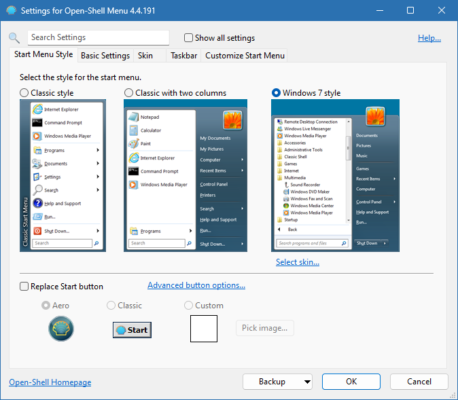
As an open-source continuation of the popular Classic Shell project, Open Shell provides flexibility, performance, and personalization, helping users boost productivity while enjoying a familiar interface.
What is Open Shell?
Open Shell is a free, open-source Start Menu replacement for Windows. Originally developed as Classic Shell, the project was later revived and enhanced by the community under the new name Open Shell.
It restores the classic Windows Start Menu layouts (XP, Vista, 7-style), while adding advanced customization features that the stock Windows menu lacks.
Key Features of Open Shell 4.4.196
1. Classic Start Menu Styles
Choose from classic Windows XP, Vista, or 7 layouts.
Retain a familiar design while working on modern systems.
2. Full Customization
Change menu skins, button styles, and transparency.
Reorganize items, pin apps, and create custom shortcuts.
3. Search Functionality
Enhanced search box for quick access to files and programs.
More reliable than the default Windows search in some cases.
4. Taskbar and Explorer Integration
Additional settings for Windows File Explorer.
Options to tweak taskbar behavior and usability.
5. Lightweight and Free
Open-source and completely free to use.
Runs smoothly with minimal system resources.
What’s New in Version 4.4.196?
Improved compatibility with Windows 11 updates.
Bug fixes for Start Menu skin rendering.
Optimized performance for faster response times.
Benefits of Using Open Shell
For Windows 11 Users
Enjoy a Start Menu that feels intuitive and closer to classic Windows design.
For Productivity Seekers
Save time with quick access, advanced search, and customizable menus.
For Personalization Enthusiasts
Create a Start Menu that reflects your workflow and design preferences.
How to Use Open Shell
Step 1: Download and Install
Download Open Shell 4.4.196 from the official project page or trusted sources.
Step 2: Choose a Start Menu Style
Pick your favorite style – Windows XP, Vista, or 7.
Step 3: Customize Settings
Adjust skins, transparency, menu size, and shortcuts.
Step 4: Explore Advanced Options
Enable File Explorer tweaks and fine-tune taskbar settings.
Why Choose Open Shell Over the Default Start Menu?
While Windows 10 and 11 provide modern interfaces, Open Shell 4.4.196 offers:
Familiarity – Classic layouts that feel natural for long-time Windows users.
Customization – Personalize the Start Menu far beyond the built-in options.
Efficiency – Faster access to apps, files, and settings.
Community Support – Actively maintained by an open-source community.
Conclusion
Open Shell 4.4.196 is more than just a Start Menu replacement—it’s a productivity tool that gives Windows users control over their interface. By restoring the classic look and adding powerful customization options, it bridges the gap between nostalgia and modern functionality.
For those who prefer efficiency, familiarity, and personalization, Open Shell 4.4.196 is a must-have tool for Windows 10 and Windows 11.
✔ Tested: This software was tested on Windows 10 & Windows 11 and works smoothly without issues.
Frequently Asked Questions
- Is this software free?
Yes, it can be downloaded and used for free. - Does it support Windows 11?
Yes, it works perfectly on Windows 10 and 11. - Is it safe to use?
Yes, the software was scanned and tested before publishing.
Last updated: January 2026