
Stereoscopic Player 2.5.1 is a robust Windows application designed for playing stereoscopic (3D) videos, DVDs, and live camera feeds. It supports a wide range of 3D formats and hardware — from anaglyph glasses to Oculus headsets — and includes advanced playback features like folder playback order sorting, DMX integration, and customizable viewing methods, making it ideal for both entertainment and professional 3D setups and buy.
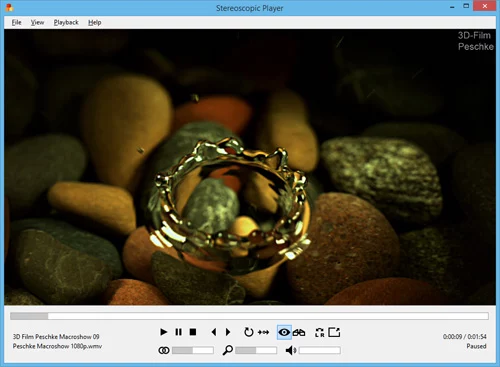
🔑 Key Features
Broad 3D Format Support: Handles side-by-side, over/under, anaglyph, interlaced, frame-sequential, and MPO image files.
3D DVD & Blu-ray Playback: Play native 3D optical discs and standard DVDs using supported decoders.
Live Camera/TV Input: View stereoscopic content directly from capture devices like webcams and TV cards.
Optimized Viewing Methods: Includes multiple display methods such as quad-buffered DirectX/OpenGL, anaglyph, and autostereoscopic modes.
Hardware Compatibility: Works with a variety of 3D hardware—from shutter and polarized glasses to Oculus Rift & 3D TVs.
Folder Playback Sort Option: New in version 2.5.1 — allows sorting content by name, date or other criteria when playing entire folders.
DMX Console Control: Supports synchronized lighting and effects via DMX512 during playback.
Oculus Rift Enhancements: Includes head-tracking support and bug fixes for Rift DK2.
Installer Upgrades: Updated with Wix installer, .NET 4 and LAV filters, and signed executables.
Playback Tweaks & Bug Fixes: Resolved deadlocks, cursor issues, playback stability, and DirectX/OpenGL glitches.
🆕 Highlight: Version 2.5.1 (Nov 29, 2019)
Added option to change folder playback sort order.
Migrated code to Visual Studio 2019 and LAV Filters v0.73.1.
Fixed a deadlock triggered by the format-selection dialog reopening in the background.
🎯 Why It Matters
Ultimate 3D Playback: Supports nearly all stereoscopic formats and hardware setups.
Real-Time Conversion: Transforms 3D input into your display format on the fly—no separate encoding needed.
Professional & Creative Use: DMX integration and precise folder control suit installations and live events.
VR Readiness: Oculus enhancements improve immersive playback.
Stability & Modernization: Latest build cleans up previous bugs and updates core frameworks.
👥 Ideal Users
3D Enthusiasts: Enjoy Blu-ray films, webcasts, and stereo videos with high fidelity.
VR Users: Use with Oculus Rift for immersive stereo playback.
Professional AV Setups: Synchronize light shows via DMX during presentations.
Creative Studios: Showcase stereoscopic reels across various display setups.
Event, Lab & Research Settings: Utilize live 3D feeds and playback sorts reliably.
🛠 How to Use
Install the app (requires .NET 4 and LAV filters included).
Load a file or folder—player auto-detects stereo formatting.
Select viewing method: anaglyph, quad-buffer, VR, etc.
Customize playback: adjust sort order, lighting, DMX parameters, and window mode.
Play back 3D content, control playback live, or capture stills as needed.
Enjoy synchronized effects through DMX, head-tracking, or custom plugins.
✅ Final Summary
Stereoscopic Player 2.5.1 stands out as a powerful, versatile solution for stereoscopic video playback. With its broad format and hardware support, real-time rendering, DMX integration, and VR-ready features, it’s perfect for both casual viewing and professional 3D applications. Version 2.5.1 refines usability further with smarter file-sorting, installer upgrades, and critical stability fixes—making it a compelling choice for any 3D media workflow.
✔ Tested: This software was tested on Windows 10 & Windows 11 and works smoothly without issues.
Frequently Asked Questions
- Is this software free?
Yes, it can be downloaded and used for free. - Does it support Windows 11?
Yes, it works perfectly on Windows 10 and 11. - Is it safe to use?
Yes, the software was scanned and tested before publishing.
Last updated: January 2026