Modern gaming laptops are not only about performance—they are also about personalization. RGB lighting has become a signature feature for gamers who want their devices to reflect their style. TUF Aura Core 2.0.4.0 is a dedicated software solution developed by ASUS that allows users to control and customize RGB lighting effects on TUF gaming laptops.
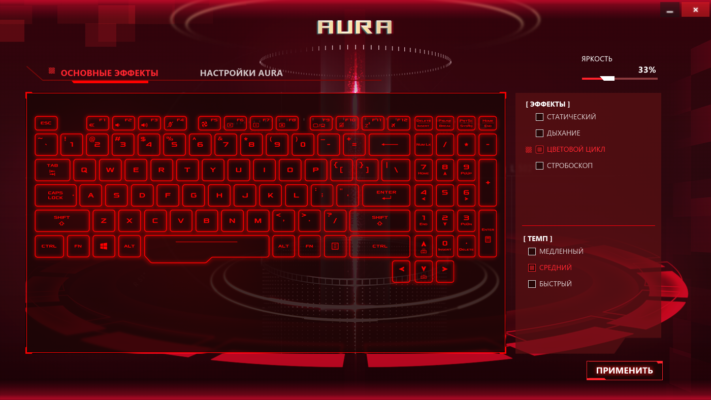
With this tool, you can personalize your keyboard backlighting, apply unique lighting patterns, and synchronize effects across supported devices. TUF Aura Core is designed to give ASUS gamers maximum flexibility while maintaining lightweight performance.
Why TUF Aura Core Matters
Full Control Over RGB Lighting
Instead of being stuck with default lighting settings, TUF Aura Core allows you to choose how your keyboard and compatible components look. You can select colors, create effects, or even match lighting to your mood or gaming environment.
Seamless ASUS Integration
Unlike third-party RGB apps, Aura Core is built specifically for ASUS TUF laptops. It integrates seamlessly with the system, ensuring smooth performance without compatibility issues.
Key Features of TUF Aura Core 2.0.4.0
RGB Customization
Choose from millions of colors to personalize your device.
Apply effects like breathing, strobing, or cycling.
Preset Lighting Modes
Quickly switch between preset profiles for gaming, work, or entertainment.
Per-Key Lighting (on supported models)
Customize each key individually for maximum control and style.
Synchronization with Aura Sync
Sync your laptop lighting with other ASUS Aura Sync-supported devices such as mice, keyboards, and headsets.
Lightweight & User-Friendly
Simple interface designed for gamers who want fast adjustments without complicated menus.
Benefits of Using TUF Aura Core
For Gamers 🎮
Highlight important keys such as WASD or hotkeys with unique lighting for better gameplay.
For Creators 🎨
Set up professional lighting effects that match your workspace theme.
For Everyday Users 💻
Personalize your laptop to stand out while maintaining a clean and stylish look.
How to Use TUF Aura Core 2.0.4.0
Download and install the software from ASUS support or official sources.
Launch TUF Aura Core and select your preferred lighting effect.
Adjust brightness, speed, and color patterns to your liking.
Save custom profiles for gaming or productivity sessions.
With just a few clicks, you can completely transform the look of your ASUS TUF laptop.
Final Thoughts
TUF Aura Core 2.0.4.0 is more than just an RGB tool—it is a personalization platform for ASUS TUF laptop users. By combining powerful customization features, seamless ASUS integration, and lightweight performance, it provides everything gamers need to take their experience to the next level.
If you own a TUF gaming laptop, installing TUF Aura Core 2.0.4.0 is the best way to unlock the full potential of your RGB lighting system.
✔ Tested: This software was tested on Windows 10 & Windows 11 and works smoothly without issues.
Frequently Asked Questions
- Is this software free?
Yes, it can be downloaded and used for free. - Does it support Windows 11?
Yes, it works perfectly on Windows 10 and 11. - Is it safe to use?
Yes, the software was scanned and tested before publishing.
Last updated: January 2026