FORScan 2.3.64 Overview
FORScan 2.3.64 is a powerful diagnostic software tool designed specifically for Ford, Mazda, Lincoln, and Mercury vehicles. It allows users to access, scan, and configure onboard vehicle systems beyond what standard OBD2 tools can offer.
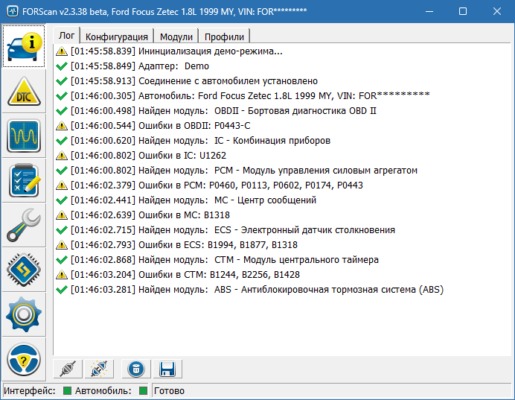
Unlike traditional diagnostic software that reads only generic codes, FORScan provides manufacturer-level diagnostics, offering detailed insights into each vehicle module such as PCM, ABS, TCM, and more. This makes it an essential tool for both professional mechanics and automotive enthusiasts.
Key Features of FORScan 2.3.64
1. Full System Scanning
FORScan can scan all modules in supported vehicles and retrieve fault codes, live sensor data, and system parameters. It reads manufacturer-specific codes that are often invisible to standard OBD2 readers.
2. Advanced Configuration and Programming
Users can access hidden features or perform advanced configurations such as:
Enabling or disabling functions (auto-lock, DRL, etc.)
Resetting adaptive learning parameters
Programming new keys or modules
This level of control gives users flexibility and precision in vehicle maintenance and customization.
3. Service Procedures
The tool includes built-in service functions for system resets, module programming, and maintenance routines. Common examples include DPF regeneration, ABS bleeding, and battery registration.
4. Real-Time Data Monitoring
FORScan displays real-time data streams from sensors, allowing users to monitor engine performance, temperature, and transmission behavior with high accuracy.
You can record logs, compare readings, and export data for further analysis — ideal for troubleshooting complex issues.
Performance and Reliability
Lightweight and Fast
FORScan 2.3.64 runs smoothly even on low-end PCs and doesn’t require large system resources. It’s optimized for Windows and uses efficient communication protocols to minimize lag during data reading.
Accurate Diagnostics
This version includes improved communication algorithms with ECUs, providing faster response times and more stable data transfer. It ensures that users receive precise readings from every module.
Supported Adapters and Devices
Compatible Hardware
FORScan supports a wide range of adapters, including ELM327, OBDLink EX, OBDLink MX+, and vLinker FS. Using a high-quality adapter is essential for full compatibility and reliable performance.
The program can communicate via USB, Bluetooth, or Wi-Fi, depending on the hardware used.
Mobile and Desktop Versions
While this article focuses on the Windows desktop version (2.3.64), FORScan is also available for Android and iOS, providing flexibility for mobile diagnostics.
User Interface and Usability
Simple and Intuitive Layout
FORScan’s interface is designed for ease of use. The dashboard presents modules, fault codes, and sensor data in an organized way, making it accessible even for beginners.
Tabs for diagnostics, service procedures, and configuration ensure smooth navigation without confusion.
Logging and Reports
Users can generate detailed diagnostic reports or export data logs in text or CSV format. This is helpful for tracking vehicle performance over time or sharing results with other technicians.
System Requirements and Compatibility
Operating Systems
FORScan 2.3.64 supports Windows 7, 8, 10, and 11 (both 32-bit and 64-bit). It’s a lightweight program that installs quickly and works offline once activated.
Supported Vehicles
The software works with most Ford, Mazda, Lincoln, and Mercury vehicles produced since 1996. It provides full module access for CAN and older J1850 protocols.
Conclusion
FORScan 2.3.64 is one of the most powerful and versatile diagnostic tools available for Ford and Mazda vehicles. It provides deeper access than typical OBD2 scanners, offering configuration, programming, and service features normally reserved for dealership tools.
✔ Tested: This software was tested on Windows 10 & Windows 11 and works smoothly without issues.
Frequently Asked Questions
- Is this software free?
Yes, it can be downloaded and used for free. - Does it support Windows 11?
Yes, it works perfectly on Windows 10 and 11. - Is it safe to use?
Yes, the software was scanned and tested before publishing.
Last updated: January 2026