🕹️ What is RetroArch?
RetroArch is an advanced multi-system emulator frontend designed to bring the best of retro gaming to modern platforms. It uses the Libretro API to provide access to a vast library of emulation cores, allowing users to emulate consoles like the NES, SNES, PlayStation, Game Boy, Sega Genesis, and many more — all from one unified interface.
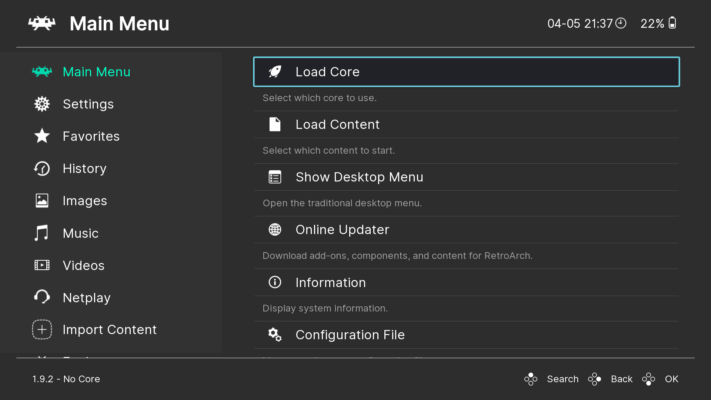
With version 1.19.1, RetroArch brings new improvements and enhanced support for existing platforms, ensuring smoother gameplay, more compatibility, and better user control.
🚀 What’s New in Version 1.19.1?
✅ Improved Stability and Performance
RetroArch 1.19.1 fixes several bugs from previous versions, resulting in a much more stable experience across all supported platforms. Whether you’re playing on Windows, macOS, Linux, or even mobile, performance is noticeably better.
🎮 Expanded Core Support
This version adds updates to various cores, improving support for popular consoles and enabling more accurate emulation. Gamers can expect better compatibility, smoother frame rates, and improved save state functionality.
🌐 Modernized UI
The user interface has been enhanced for better accessibility and responsiveness. Menus are cleaner, transitions are smoother, and customization options have increased, allowing users to tailor the experience to their liking.
🛠️ Key Features of RetroArch
Unified Interface: Manage all your emulators and games in one place.
Shader Support: Apply visual filters to recreate CRT effects or enhance image clarity.
Netplay: Play multiplayer games online with friends using rollback support.
Achievements: Unlock classic-style achievements for retro titles.
Cross-platform: Available on Windows, macOS, Linux, Android, iOS, and more.
Rewind/Slow Motion: Unique features to enhance gameplay and training.
💡 Who Should Use RetroArch?
If you’re a retro game enthusiast, developer, speedrunner, or casual gamer interested in exploring classics from past generations, RetroArch is the perfect solution. It saves you from installing multiple emulators and brings everything under one roof — with consistent updates and a powerful community.
📦 Installation and Compatibility
RetroArch 1.19.1 can be installed easily on any modern operating system. It supports:
Windows 7/8/10/11
macOS (Intel & Apple Silicon)
Linux distributions (Ubuntu, Fedora, Arch)
Android & iOS
Game consoles and single-board computers like Raspberry Pi
Installation is straightforward via its official setup or portable versions. The software remains open-source and free to use.
🎯 Final Thoughts
RetroArch 1.19.1 continues to set the standard in emulator frontends. With its sleek interface, wide compatibility, and robust feature set, it’s the top choice for retro gaming lovers. Whether you’re revisiting childhood favorites or discovering retro classics for the first time, RetroArch provides the tools to make every experience smooth, customizable, and nostalgic.
✔ Tested: This software was tested on Windows 10 & Windows 11 and works smoothly without issues.
Frequently Asked Questions
- Is this software free?
Yes, it can be downloaded and used for free. - Does it support Windows 11?
Yes, it works perfectly on Windows 10 and 11. - Is it safe to use?
Yes, the software was scanned and tested before publishing.
Last updated: مايو 2026
Frequently Asked Questions
- هل هذا البرنامج مجاني؟ نعم، مجاني للاستخدام الشخصي.
- هل يعمل على Windows و Mac و Android؟ نعم، متوافق مع أغلب الأنظمة.
- هل الملفات آمنة؟ نعم، جميع الملفات يتم فحصها قبل النشر.