In today’s digital workplace, protecting sensitive information is more important than ever. Whether you’re sharing financial reports, legal contracts, confidential proposals, or personal documents, ensuring that only authorized users can access and modify your PDFs is critical and buy.
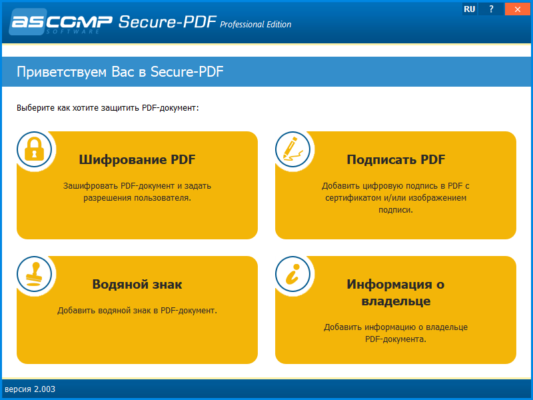
Enter ASCOMP Secure-PDF Professional 2.012 — a dedicated, lightweight, and highly effective tool designed specifically for PDF security and document protection . Developed by ASCOMP Software GmbH, this professional-grade software gives you full control over who can open, edit, print, or copy content from your PDF files.
Unlike general-purpose PDF editors, Secure-PDF Professional 2.012 focuses exclusively on privacy, encryption, and access control , making it ideal for businesses, government agencies, legal professionals, and anyone who handles confidential data.
Let’s explore why this tool stands out in the world of PDF security.
📌 What Is ASCOMP Secure-PDF Professional 2.012?
ASCOMP Secure-PDF Professional 2.012 is a Windows-based application that allows users to encrypt and protect PDF documents using advanced security settings. It supports both user passwords (to open files) and owner passwords (to restrict actions) , giving you dual-layer control over your documents.
The software works independently — no need for Adobe Acrobat, Reader, or third-party plugins — and processes files quickly while maintaining their original layout and quality.
It’s perfect for securing:
- Contracts and agreements
- Financial statements
- Legal filings
- HR documents
- Academic records
- Proposals and bids
All without altering the visual appearance of the file.
🛠️ Key Features of ASCOMP Secure-PDF Professional 2.012
1. 🔐 Strong PDF Encryption
Apply AES-256 bit encryption — one of the strongest available standards — to prevent brute-force attacks and unauthorized decryption.
Meets high-security requirements for enterprise and government use.
2. 🚫 Restrict Copying & Text Extraction
Block users from selecting or copying text, images, or data from your PDFs — ideal for protecting intellectual property.
3. 🖨️ Disable Printing Options
Prevent printing entirely or allow low-resolution printing only — stops recipients from creating physical copies.
4. ✏️ Block Editing & Modifications
Stop others from adding annotations, filling forms, or modifying content in your PDFs.
You can choose which permissions to allow or deny individually.
5. 🧩 Batch Processing Support
Protect multiple PDF files at once using batch mode — save time when securing large volumes of documents.
Just drag and drop all files into the interface and apply uniform security settings.
6. 🖥️ Works Without Adobe Acrobat
Runs as a standalone tool — no dependency on external software like Adobe Reader or Pro.
7. 🧼 Lightweight & Fast
Small installation size and rapid processing make it suitable even for older PCs or portable use (e.g., USB drives).
8. 📁 Preserve Original Quality
Security is applied without changing fonts, images, or formatting — the protected PDF looks identical to the original.
9. 💾 Save Settings as Templates
Create custom security profiles (e.g., “Confidential”, “Internal Use Only”) and reuse them across projects.
Great for consistent branding and compliance.
10. 🌍 Multi-Language Interface
Available in English, German, French, Spanish, Italian, and other languages — accessible to international teams.
👥 Who Should Use ASCOMP Secure-PDF Professional 2.012?
- Legal Professionals: Protect client data and court documents.
- Business Executives: Secure financial reports and strategic plans.
- HR Departments: Safeguard employee records and contracts.
- Government Agencies: Comply with data privacy regulations.
- Freelancers & Consultants: Share proposals securely with clients.
- Academics & Researchers: Prevent plagiarism and unauthorized use of publications.
🖥️ System Requirements
- Operating System: Windows 11, 10, 8.1, 8, 7 (32-bit & 64-bit)
- RAM: 512 MB minimum (1 GB recommended)
- Hard Disk Space: 20 MB free space
- No .NET or Java Required
- Administrator Rights: Needed for installation
✅ Fully portable version also available for USB use.
📈 Why Choose ASCOMP Secure-PDF Professional 2.012?
- ✅ Specialized in Security Only – No bloat or unnecessary features
- ✅ Military-Grade AES-256 Encryption
- ✅ Batch Protection Saves Time
- ✅ Offline Operation Ensures Privacy
- ✅ Trusted by Enterprises Since 2000
- ✅ Simple Drag-and-Drop Workflow
✅ Final Thoughts
ASCOMP Secure-PDF Professional 2.012 may not be a full PDF editor, but it excels where it matters most: keeping your documents safe . With its robust encryption, granular permission controls, and efficient batch processing, it’s an essential tool for anyone serious about PDF security.
If you regularly send sensitive PDFs and want to ensure they stay private and tamper-proof, ASCOMP Secure-PDF Professional 2.012 is a reliable, professional choice .
For ultimate peace of mind when sharing critical documents, this tool delivers exactly what it promises — true PDF protection .
✔ Tested: This software was tested on Windows 10 & Windows 11 and works smoothly without issues.
Frequently Asked Questions
- Is this software free?
Yes, it can be downloaded and used for free. - Does it support Windows 11?
Yes, it works perfectly on Windows 10 and 11. - Is it safe to use?
Yes, the software was scanned and tested before publishing.
Last updated: January 2026