
In a world crowded with heavy, subscription-based PDF editors, LightPDF Editor 2.15.8.6 stands out as a refreshing alternative: a fast, lightweight, and fully functional desktop tool that gets the job done without slowing down your PC or demanding a monthly fee.
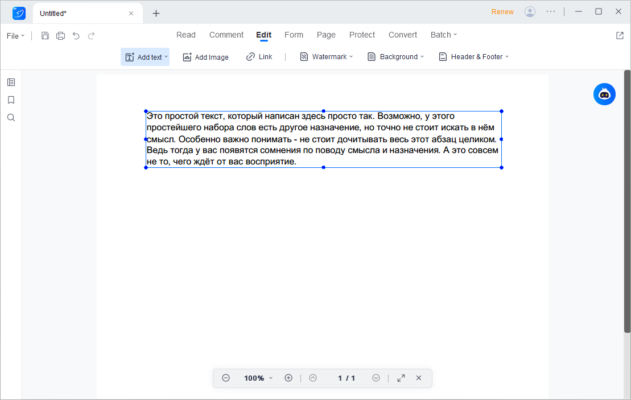
Developed by the team behind the popular online platform LightPDF.com , this desktop version 2.15.8.6 brings core PDF editing capabilities offline — allowing users to edit, convert, annotate, and protect PDF files directly on their Windows computers, safely and efficiently.
Whether you’re a student, office worker, or home user, LightPDF Editor 2.15.8.6 delivers professional-grade functionality in a compact, easy-to-use package.
Let’s dive into what makes it one of the best lightweight PDF tools available in 2025.
📌 What Is LightPDF Editor 2.15.8.6?
LightPDF Editor 2.15.8.6 is a standalone Windows application designed to provide essential PDF editing features without the overhead of large software suites like Adobe Acrobat. Unlike the web version, which requires uploading files, this desktop edition works completely offline , ensuring your documents stay private and secure.
It’s ideal for users who want:
- Quick access to PDF editing
- No cloud uploads or data sharing
- Minimal system resource usage
- A clean interface with zero ads or toolbars
Perfect for older PCs, portable use, or anyone tired of bloated software.
🛠️ Key Features of LightPDF Editor 2.15.8.6
1. ✏️ Edit Text & Images Directly
Modify existing text (font, size, color) and move or resize images within a PDF — no need to recreate the entire document.
2. 🔁 Convert PDFs to Multiple Formats
Convert PDF files to:
- Microsoft Word (.docx)
- Excel (.xlsx)
- PowerPoint (.pptx)
- TXT, HTML, JPG, PNG
And convert other formats back into high-quality PDFs while preserving layout and formatting.
3. 💬 Annotate & Comment
Add highlights, sticky notes, underlines, stamps, arrows, and freehand drawings to clarify content or leave feedback.
4. 🖋️ Fill & Sign PDF Forms
Fill out interactive forms electronically and add digital signatures to finalize contracts, applications, or agreements.
5. 🔐 Password Protection & Permissions
Secure your PDFs with passwords to restrict:
- Opening (user password)
- Editing, printing, copying (permissions password)
Uses AES-128 encryption for strong security.
6. 🧩 Merge & Split PDF Files
Combine multiple PDFs into one document or split large files into smaller sections by page range.
7. 🖥️ Works Fully Offline
No internet connection needed — all processing happens locally on your machine. Your data never leaves your control.
8. 🧼 Lightweight & Fast
Tiny installation size (~50 MB), quick startup time, and low RAM usage make it perfect for older systems or USB drives.
9. 📎 Drag-and-Drop Support
Easily import files by dragging them into the interface — intuitive and efficient.
10. 🌍 Multi-Language Interface
Available in English, Spanish, French, German, Portuguese, Russian, Arabic, Chinese, and more.
👥 Who Should Use LightPDF Editor 2.15.8.6?
- Students: Convert lecture notes, annotate research papers, submit assignments.
- Office Workers: Edit reports, sign contracts, share secure documents.
- Freelancers: Deliver clean PDF deliverables without extra software.
- Home Users: Handle bills, manuals, receipts, and personal forms.
- Privacy-Conscious Users: Avoid uploading sensitive files to online converters.
🖥️ System Requirements
- Operating System: Windows 10 / 11 (64-bit recommended)
- RAM: 2 GB minimum (4 GB suggested)
- Hard Disk Space: 100 MB free space
- No .NET or Java Required
- Internet Connection: Optional (only for updates or help resources)
✅ Fully portable — can run from a USB flash drive.
📈 Why Choose LightPDF Editor 2.15.8.6?
- ✅ Fast & Lightweight – Starts in seconds, uses minimal resources
- ✅ Truly Offline – No file uploads, maximum privacy
- ✅ All Core PDF Tools in One Place
- ✅ Free from Ads, Bloatware, and Watermarks
- ✅ Simple UI Like Microsoft Office – Easy for beginners
- ✅ Excellent Alternative to Heavy PDF Suites
✅ Final Thoughts
LightPDF Editor 2.15.8.6 proves that a small app doesn’t have to mean limited features. With its balanced mix of speed, functionality, and privacy, it’s an excellent choice for anyone looking for a no-nonsense, reliable, and efficient PDF editor .
If you’re tired of slow launch times, forced subscriptions, or complicated interfaces, LightPDF Editor 2.15.8.6 offers a breath of fresh air — light on your system, but powerful where it counts.
For simple, secure, and speedy PDF management, LightPDF Editor 2.15.8.6 is definitely worth installing .
✔ Tested: This software was tested on Windows 10 & Windows 11 and works smoothly without issues.
Frequently Asked Questions
- Is this software free?
Yes, it can be downloaded and used for free. - Does it support Windows 11?
Yes, it works perfectly on Windows 10 and 11. - Is it safe to use?
Yes, the software was scanned and tested before publishing.
Last updated: January 2026