X-plore File Manager 4.44.4 is a feature-rich, dual-pane file manager for Android that transforms how you browse, organize, and manage files on your device. Known for its powerful functionality, clean interface, and extensive connectivity options, X-plore is a favorite among power users, developers, and anyone seeking full control over their Android file system.
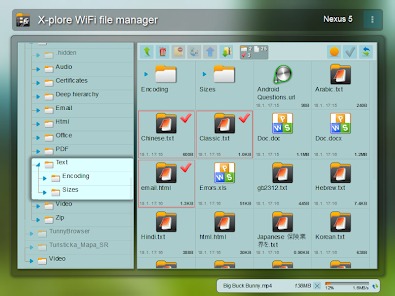
Whether you’re managing local files, accessing cloud storage, transferring data over a network, or exploring system directories with root access, X-plore 4.44.4 delivers a desktop-like file management experience on your smartphone or tablet and see NP Manager APK .
Why Use X-plore File Manager?
Unlike basic file explorers, X-plore offers advanced tools typically found in PC software — all optimized for mobile. With its dual-pane layout, network sharing, and support for multiple file systems, it’s ideal for users who want more than just copy-paste functionality.
Key Advantages of X-plore 4.44.4:
- Dual-pane file browsing for easy transfers
- Supports root, SFTP, FTP, SMB, and cloud services
- Built-in archive manager (ZIP, RAR, 7z)
- LAN sharing – access files from your PC via Wi-Fi
- Tabbed browsing and customizable layout
- Lightweight, fast, and ad-free (Pro version)
Key Features of X-plore File Manager 4.44.4
1. Dual-Pane Interface
The hallmark of X-plore is its two-pane file browser, inspired by classic desktop managers like Total Commander. This allows you to:
- Copy, move, or compare files between folders with ease
- Drag and drop items across panes
- View different directories side by side
Perfect for organizing media, managing app data, or syncing files.
2. Root Access & System Exploration
With root permissions, X-plore becomes a full-featured root browser, letting you access protected system folders like /system, /data, and /proc. You can:
- Modify system files
- Backup app data
- Delete bloatware cache
- Change file permissions (chmod)
⚠️ Warning: Root access can damage your system if used incorrectly — always proceed with caution.
3. Cloud Storage Integration
X-plore supports major cloud platforms, including:
- Google Drive
- Dropbox
- OneDrive
- Box
- Mega
Browse and manage your cloud files alongside local storage in a unified interface — no need to switch apps.
4. LAN (Wi-Fi) Sharing
Turn your Android device into a file server using built-in SMB (Windows sharing) support. Simply enable the server in X-plore and access your phone’s storage from any computer on the same network via \\your-phone-ip in File Explorer.
Great for:
- Transferring large videos or documents
- Backing up photos to your PC
- Streaming media without USB cables
5. Archive Support (ZIP, RAR, 7z, TAR, GZ)
X-plore can open, create, and extract compressed files — no additional app needed. Use it to:
- Extract APKs or game data
- Compress folders for backup
- Browse contents of ZIP files before extracting
6. FTP & SFTP Client
Connect securely to remote servers using FTP or SFTP. Ideal for web developers or IT professionals managing files on hosted servers directly from their Android device.
7. Customizable Interface & Themes
Choose between light and dark themes, adjust icon size, enable tree view, and customize toolbars to match your workflow.
How to Install X-plore File Manager 4.44.4 APK
- Download the X-plore 4.44.4 APK from a trusted source.
- On your Android device, go to Settings > Apps > Special Access > Install Unknown Apps and allow your browser/file manager to install APKs.
- Open the downloaded file and tap Install.
- Launch X-plore and grant necessary storage permissions.
- Explore local files, set up cloud accounts, or enable LAN sharing.
💡 Tip: The Pro version (paid) unlocks all features and removes ads. You can upgrade in-app or use a Pro APK (for offline activation).
Who Should Use X-plore?
✅ Power users who want full file control
✅ Developers needing FTP or root access
✅ Content creators managing large media libraries
✅ IT professionals accessing remote servers
✅ Anyone tired of basic file managers
Final Thoughts
X-plore File Manager 4.44.4 APK is one of the most capable and versatile file explorers available for Android. Its combination of dual-pane browsing, cloud sync, LAN sharing, and root support makes it an essential tool for advanced users who demand efficiency and flexibility.
Whether you’re cleaning up storage, transferring files wirelessly, or managing system data, X-plore delivers a professional-grade experience in a lightweight, intuitive app.
📁 Download X-plore File Manager 4.44.4 today and take complete control of your Android file system — one tap at a time.
✔ Tested: This software was tested on Windows 10 & Windows 11 and works smoothly without issues.
Frequently Asked Questions
- Is this software free?
Yes, it can be downloaded and used for free. - Does it support Windows 11?
Yes, it works perfectly on Windows 10 and 11. - Is it safe to use?
Yes, the software was scanned and tested before publishing.
Last updated: January 2026