
🗓️ Overview of Office Timeline Pro Plus 11.30
Office Timeline Pro Plus 11.30 is a professional add-in for Microsoft PowerPoint designed to create elegant and easy-to-understand timelines, Gantt charts, and project plans. Whether you’re preparing for a business meeting, project presentation, or status report, Office Timeline helps you turn complex project data into clear visuals that communicate progress and milestones effectively.
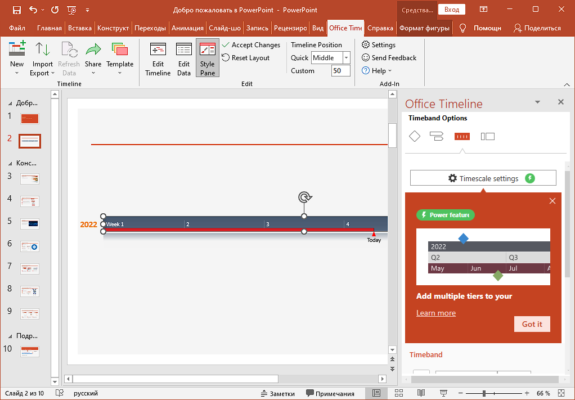
This tool is particularly useful for project managers, executives, and professionals who need to share project updates visually with stakeholders. By integrating directly into PowerPoint, it provides a smooth workflow and eliminates the need for complicated project management software.
🌟 Key Features
Powerful Timeline Creation: Instantly build visually stunning timelines, roadmaps, and Gantt charts directly in PowerPoint.
Templates Library: Choose from a wide range of professionally designed templates for projects, marketing campaigns, and strategic plans.
Drag-and-Drop Simplicity: Effortlessly rearrange milestones, tasks, and dates using an intuitive drag-and-drop interface.
Data Import & Synchronization: Import data from Excel or Microsoft Project and automatically synchronize updates.
Customization Tools: Personalize colors, shapes, fonts, and layouts to match your company’s branding.
Multi-Level Timelines: Create detailed timelines that include tasks, dependencies, and milestones at multiple levels.
Collaboration Made Easy: Share editable PowerPoint files or export timelines as images, PDFs, or presentations.
⚙️ What’s New in Version 11.30
The Office Timeline Pro Plus 11.30 update focuses on improving usability, speed, and design capabilities:
Enhanced timeline rendering performance for large projects.
New modern templates and design themes for professional reports.
Improved compatibility with Microsoft PowerPoint 2021 and Office 365.
More flexible date and time formatting options.
Fixed bugs and minor interface enhancements for smoother operation.
💼 Why Choose Office Timeline Pro Plus?
Unlike other project management tools, Office Timeline is designed for visual communication. It doesn’t overwhelm users with complex dashboards or technical data — instead, it simplifies project storytelling. Managers can highlight progress, delays, and future milestones in a format that’s visually engaging and easy to interpret.
It’s especially valuable during executive meetings, stakeholder reviews, or client presentations. Instead of showing spreadsheets or long reports, you can showcase the entire project plan in a single slide — beautiful, concise, and professional.
🧩 Integration and Compatibility
Office Timeline Pro Plus integrates seamlessly with Microsoft PowerPoint and supports various data sources. Users can pull data directly from Excel, Microsoft Project, or Smartsheet, keeping their visual timelines synchronized with real project updates.
You can also export your visuals in formats like .PPTX, .PDF, .PNG, or .JPG, ensuring compatibility with any sharing or publishing platform.
💻 System Requirements
Operating System: Windows 10 / 11 (64-bit)
Microsoft PowerPoint: 2016, 2019, 2021, or Microsoft 365
Processor: Dual-core or higher
Memory: 4 GB RAM minimum
Storage: 300 MB available space
🎯 Conclusion
Office Timeline Pro Plus 11.30 is an essential productivity tool for professionals who want to transform raw project data into meaningful visuals. Its intuitive interface, customizable templates, and deep PowerPoint integration make it ideal for project managers, marketers, and executives. With just a few clicks, you can design timelines and Gantt charts that not only inform but impress your audience.
If you frequently present project plans or updates, Office Timeline Pro Plus 11.30 will save you hours of manual design work while elevating the quality of your presentations.
🔗 Official Website
✔ Tested: This software was tested on Windows 10 & Windows 11 and works smoothly without issues.
Frequently Asked Questions
- Is this software free?
Yes, it can be downloaded and used for free. - Does it support Windows 11?
Yes, it works perfectly on Windows 10 and 11. - Is it safe to use?
Yes, the software was scanned and tested before publishing.
Last updated: January 2026