As artificial intelligence continues to evolve, developers and researchers increasingly rely on APIs to connect their apps with AI models. VovSoft AI Requester 4.0 offers a simple yet powerful way to send and manage AI-related API requests without complex coding or setups. Whether you’re testing OpenAI, Hugging Face, or other AI endpoints, this tool streamlines the process, making it fast and efficient.
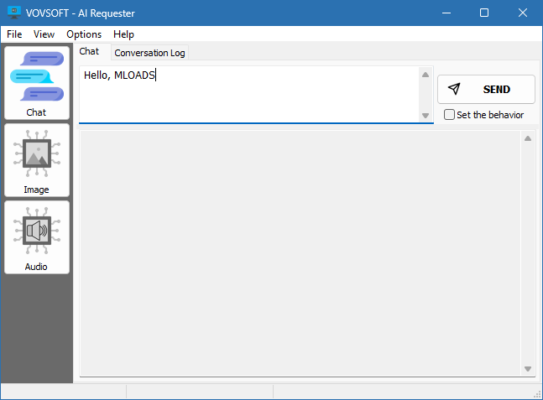
What Is VovSoft AI Requester 4.0?
VovSoft AI Requester 4.0 is a lightweight Windows application designed for developers, data scientists, and enthusiasts who work with artificial intelligence APIs. It provides a graphical interface to compose, send, and analyze HTTP requests to AI endpoints, saving time and eliminating the need for command-line tools or manual JSON editing.
With AI Requester, users can quickly test prompts, fine-tune parameters, and preview responses in real time. It’s especially useful for experimenting with generative models like ChatGPT, Claude, Gemini, or local LLMs that accept HTTP requests.
Key Features of VovSoft AI Requester 4.0
User-Friendly Interface
The software offers a clean, intuitive layout where users can easily input API URLs, headers, and JSON body data. This makes it ideal even for beginners who are new to AI development.Support for Popular AI APIs
VovSoft AI Requester works with all major AI services, including OpenAI API, Anthropic, Hugging Face, Mistral, and others, allowing you to test requests instantly.Real-Time Response Viewer
The response window displays raw JSON output or formatted text, so you can analyze the AI’s response structure and easily extract useful information.API Key Management
Save and reuse API keys securely within the app, avoiding the need to re-enter credentials for every session.Prompt Testing and Optimization
Experiment with prompts, temperature values, and tokens to optimize model output. This is perfect for developers fine-tuning LLM behavior or designing AI chatbots.Save and Reuse Requests
Store your commonly used API requests and load them later for quick access, increasing productivity during AI model testing.Lightweight and Offline-Friendly
The tool is small, fast, and requires no complex installation or background services, ensuring smooth performance on any Windows system.
Why Use VovSoft AI Requester 4.0?
For developers working with AI models, manually testing API requests through cURL or code snippets can be tedious and error-prone. VovSoft AI Requester removes that complexity by providing an all-in-one visual interface.
You can test API endpoints, debug responses, and adjust model parameters instantly — all without writing a single line of code. It’s a great time-saver for anyone developing AI-powered apps, plugins, or chatbots.
Additionally, it helps AI researchers and students understand how various API settings (like temperature, max tokens, or system messages) affect model performance.
How to Use VovSoft AI Requester 4.0
Open the program after installation.
Enter your API endpoint (e.g.,
https://api.openai.com/v1/chat/completions).Add authentication headers and parameters like
Content-Type: application/json.Compose your JSON request body, including model name and prompt text.
Click “Send Request” to view the AI’s response immediately.
You can modify and resend requests quickly to test different prompts and configurations.
System Requirements
Operating System: Windows 7, 8, 10, 11 (32-bit or 64-bit)
Processor: 1GHz or faster
RAM: 2GB minimum
Disk Space: 50MB free
Final Thoughts
VovSoft AI Requester 4.0 is a must-have tool for anyone exploring or developing with AI APIs. It provides an efficient, user-friendly interface that replaces complex command-line testing and speeds up AI workflow development.
Whether you’re working with OpenAI’s GPT models, Hugging Face transformers, or other AI services, VovSoft AI Requester gives you the flexibility and control needed to test, analyze, and refine your AI requests quickly.
For developers seeking simplicity and power in one package, this tool is an excellent companion for any AI project.
✔ Tested: This software was tested on Windows 10 & Windows 11 and works smoothly without issues.
Frequently Asked Questions
- Is this software free?
Yes, it can be downloaded and used for free. - Does it support Windows 11?
Yes, it works perfectly on Windows 10 and 11. - Is it safe to use?
Yes, the software was scanned and tested before publishing.
Last updated: January 2026