In today’s digital-first world, having a mobile or web application is essential for businesses, educators, freelancers, and entrepreneurs. But hiring developers or learning programming languages like Swift, Kotlin, or JavaScript can be expensive and time-consuming and buy.
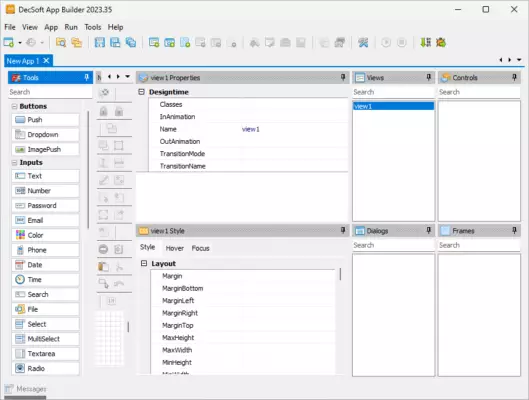
That’s where App Builder 2025.16 comes in — a no-code, visual development environment that empowers anyone to create fully functional mobile, web, and desktop applications without writing a single line of code.
Developed for Windows, this powerful tool combines a drag-and-drop interface, pre-built UI components, and cross-platform export capabilities to help users turn ideas into real apps — fast.
Whether you’re building a business app, a personal portfolio, a school project, or an internal tool, App Builder 2025.16 makes app development accessible to everyone.
Let’s explore how this innovative software is changing the way people create digital experiences.
📌 What Is App Builder 2025.16?
App Builder 2025.16 is a Windows-based integrated development environment (IDE) designed for visual, no-code app creation. It allows users to design app interfaces, add logic using visual actions, and deploy apps to multiple platforms — all from a single workspace.
It’s ideal for:
- Small businesses creating customer apps
- Teachers building interactive learning tools
- Freelancers prototyping ideas
- Developers speeding up workflows
- Students learning app logic
The software supports:
- Progressive Web Apps (PWA)
- Android APKs
- Windows Desktop Apps
- iOS (via web clip or hybrid export)
No prior coding experience required.
🛠️ Key Features of App Builder 2025.16
1. 🖱️ Drag-and-Drop Visual Designer
Build app screens by dragging buttons, text, images, lists, and forms onto a canvas. Resize and style elements with a familiar interface similar to web design tools.
2. ⚙️ Visual Logic & Event System
Add functionality using a flow-based logic engine:
- On button click → Open screen, send email, play sound
- On app start → Load data, check internet
- On swipe → Navigate between pages
No JavaScript or Java needed.
3. 📱 Cross-Platform Export
Publish your app as:
- APK file (for Android)
- Executable (.exe) for Windows
- PWA (installable web app for any device)
- Responsive HTML5 site
Reach users on phones, tablets, and desktops.
4. 🧩 Pre-Built Templates & Themes
Jumpstart development with ready-to-use templates for:
- Business directories
- To-do lists
- News readers
- E-commerce catalogs
- QR code scanners
Customize colors, fonts, and layouts easily.
5. 📥 Data Integration
Connect to:
- Local storage (device)
- Web APIs (JSON/REST)
- Google Sheets (via URL)
- Firebase (limited support)
Display dynamic content like news, prices, or user data.
6. 🔔 Native Device Features
Access device capabilities such as:
- Camera
- GPS location
- Vibration
- Contacts
- Notifications
- File system
Even without coding.
7. 👁️ Real-Time Preview
Test your app instantly on the desktop or via a QR code on your smartphone — see changes as you make them.
8. 🧩 Plugins & Extensions
Extend functionality with add-ons for:
- Ads (AdMob)
- Analytics
- Social sharing
- In-app purchases
Available in the built-in marketplace.
9. 🖼️ Web App & PWA Support
Export your project as a Progressive Web App — installable on any device, works offline, and indexed by Google.
Perfect for SEO-friendly business apps.
10. 💾 Lightweight & Fast
Runs smoothly on Windows 10/11 with minimal system requirements — no heavy IDE or SDKs needed.
👥 Who Should Use App Builder 2025.16?
- Entrepreneurs: Launch MVP apps without hiring developers.
- Educators: Create interactive quizzes and learning tools.
- Small Businesses: Build customer apps for services or menus.
- Students & Hobbyists: Learn app logic and UI design.
- Nonprofits & Churches: Share events, sermons, and contacts.
- IT Staff: Build internal tools for inventory or reporting.
🖥️ System Requirements
- Operating System: Windows 10 / 11 (64-bit)
- RAM: 4 GB minimum (8 GB recommended)
- Hard Disk Space: 500 MB free space
- Browser: Chrome or Edge (for web preview)
- Internet Connection: Required for export and plugins
✅ No Android Studio or Xcode required.
📈 Why Choose App Builder 2025.16?
- ✅ No Coding Required – Truly Accessible
- ✅ Fast Development & Instant Preview
- ✅ Publish to Android, Web, and Windows
- ✅ Affordable Alternative to App Developers
- ✅ Regular Updates & Active Community
- ✅ Ideal for Prototyping & Small Projects
✅ Final Thoughts
App Builder 2025.16 is more than just a toy for beginners — it’s a serious no-code platform that democratizes app development. With its intuitive interface, powerful logic engine, and multi-platform export, it empowers users to bring their digital ideas to life — without the complexity or cost of traditional coding.
If you’ve ever thought, “I wish I could make an app,”App Builder 2025.16 turns that wish into reality.
For anyone who wants to build, test, and publish apps quickly and easily, this tool is definitely worth trying.
✔ Tested: This software was tested on Windows 10 & Windows 11 and works smoothly without issues.
Frequently Asked Questions
- Is this software free?
Yes, it can be downloaded and used for free. - Does it support Windows 11?
Yes, it works perfectly on Windows 10 and 11. - Is it safe to use?
Yes, the software was scanned and tested before publishing.
Last updated: January 2026