Disk2vhd 2.02: The Fastest Way to Turn a Physical PC into a Virtual Machine 🔄💻
Need to migrate a physical Windows machine to a virtual environment? Or create a bootable backup of your system for testing or recovery? Disk2vhd 2.02—a free, lightweight utility from Microsoft Sysinternals—lets you convert live physical disks into VHD or VHDX files while Windows is running, with zero downtime.
Trusted by IT pros, sysadmins, and tech enthusiasts, Disk2vhd is the go-to tool for Physical-to-Virtual (P2V) conversion, system archiving, and safe software testing.
🎯 What Is Disk2vhd?
Developed by Mark Russinovich (CTO of Microsoft Azure) and part of the legendary Sysinternals suite, Disk2vhd captures your entire system drive—including OS, apps, and data—and saves it as a virtual hard disk compatible with:
- Hyper-V (Microsoft’s native hypervisor)
- VirtualBox
- VMware (with minor conversion)
- Azure (for cloud migration)
Best of all: no reboot required, and it works on live, running systems.
✨ Key Features of Disk2vhd 2.02
⚡ 1. Live System Conversion
- Run Disk2vhd on a booted Windows PC (Windows 7 to 11, Server 2008–2022)
- Uses Volume Shadow Copy (VSS) to ensure consistent, non-corrupted snapshots
- No need to boot from USB or external media
💾 2. VHD & VHDX Support
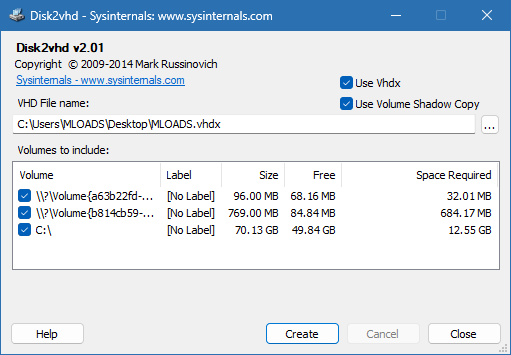
- Choose VHD (legacy) or VHDX (modern, supports >2TB, better resilience)
- Compress output to save space (optional)
- Select specific volumes (e.g., only C: drive, not recovery partitions)
🛠️ 3. Simple & Portable
- Single .exe file (under 1 MB)—no installation needed
- Clean, minimal interface: check drives → choose destination → click “Create”
- Runs on 32-bit and 64-bit Windows
🔒 4. Safe & Official
- Digitally signed by Microsoft
- No telemetry, no ads, no bloat
- Free for personal and commercial use
🛠️ Common Use Cases
- IT Migration: Move old workstations to Hyper-V for centralized management
- Disaster Recovery: Archive a working system before hardware failure
- Software Testing: Test apps in an isolated VM without risking your main OS
- Legacy System Preservation: Keep Windows XP/7 machines alive in virtual form
- Cloud Prep: Convert on-prem systems for upload to Azure
💡 Tip: After conversion, disable hardware-specific drivers (e.g., chipset, GPU) in the VM to avoid boot issues.
🆚 Disk2vhd vs. Other P2V Tools
Disk2vhd remains the fastest, safest, and most reliable option for Microsoft-centric environments.
💡 Final Thoughts: Virtualize in Minutes—Not Hours
Disk2vhd 2.02 proves that powerful tools don’t need to be complex. With a single click, you can preserve, migrate, or repurpose any Windows system as a virtual machine—ideal for modern IT workflows, legacy support, or personal backups.
🔄 Physical today. Virtual tomorrow.
🌐 Download free from Microsoft:
https://learn.microsoft.com/en-us/sysinternals/downloads/disk2vhd
✔ Tested: This software was tested on Windows 10 & Windows 11 and works smoothly without issues.
Frequently Asked Questions
- Is this software free?
Yes, it can be downloaded and used for free. - Does it support Windows 11?
Yes, it works perfectly on Windows 10 and 11. - Is it safe to use?
Yes, the software was scanned and tested before publishing.
Last updated: January 2026