
Managing disk partitions is a critical task for IT technicians, system administrators, and power users. The default Windows Disk Management utility offers basic functions but lacks advanced features required for professional maintenance and buy.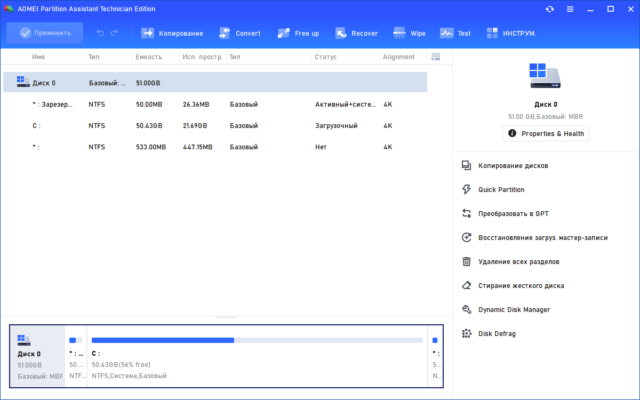
AOMEI Partition Assistant Technician 10.8.2 is a robust disk management solution designed specifically for IT experts. It provides comprehensive tools for partition resizing, migration, cloning, and advanced disk operations, making it an essential utility for managing storage effectively.
What is AOMEI Partition Assistant Technician?
AOMEI Partition Assistant Technician is a professional-grade partition manager tailored for businesses, IT service providers, and organizations that manage multiple systems. Unlike the standard edition, the Technician version includes enterprise-level features, unlimited usage across PCs and servers, and commercial license support.
It allows technicians to optimize storage space, troubleshoot disk issues, and ensure smooth system performance with minimal downtime.
Key Features of AOMEI Partition Assistant Technician 10.8.2
1. Advanced Partition Management
Resize, move, merge, split, and format partitions without data loss.
Convert between NTFS and FAT32 easily.
Align SSD partitions for maximum performance.
2. Disk Cloning and Migration
Clone entire disks or individual partitions.
Migrate OS to SSD without reinstalling Windows.
Upgrade to larger storage without data loss.
3. Professional Disk Utilities
Convert MBR to GPT and vice versa.
Create bootable media for offline partition management.
Securely wipe data to protect sensitive information.
4. Server and Enterprise Support
Designed for unlimited PCs and servers.
Supports both Windows client and server operating systems.
Ideal for IT service providers handling multiple clients.
What’s New in Version 10.8.2?
Improved SSD alignment and performance optimization.
Enhanced OS migration wizard for faster transfers.
Better compatibility with the latest Windows 11 updates.
Minor bug fixes and overall stability improvements.
Benefits of Using AOMEI Partition Assistant Technician
For IT Technicians
Manage multiple systems efficiently with one toolkit.
Provide professional partition services to clients.
For Businesses
Optimize storage resources across workstations and servers.
Reduce downtime with quick migration and partition adjustments.
For Power Users
Gain advanced control over personal storage.
Easily manage SSDs, HDDs, and external drives.
How to Use AOMEI Partition Assistant Technician 10.8.2
Step 1: Install the Software
Download and install the Technician version on your Windows PC or server.
Step 2: Select a Disk or Partition
Choose the drive you want to manage from the intuitive interface.
Step 3: Apply Advanced Operations
Resize, clone, migrate, or format partitions as required.
Step 4: Commit Changes
Preview actions before execution and confirm to apply changes safely.
Why Choose AOMEI Partition Assistant Technician?
Compared to standard disk management tools, AOMEI Partition Assistant Technician 10.8.2 offers:
Unlimited commercial use across PCs and servers.
Data-safe operations with minimal risk.
Powerful migration and cloning features for seamless upgrades.
Comprehensive partition utilities beyond Windows’ built-in features.
It is a cost-effective solution for IT professionals who need reliable and flexible disk management software.
Conclusion
AOMEI Partition Assistant Technician 10.8.2 is a powerful and professional disk management solution that goes far beyond the basic tools provided by Windows. With features like partition resizing, OS migration, disk cloning, and enterprise-level support, it is the ideal tool for IT technicians, businesses, and advanced users.
If you are looking for a complete partition manager with unlimited usage rights and enterprise support, AOMEI Partition Assistant Technician 10.8.2 is one of the best choices available today.
✔ Tested: This software was tested on Windows 10 & Windows 11 and works smoothly without issues.
Frequently Asked Questions
- Is this software free?
Yes, it can be downloaded and used for free. - Does it support Windows 11?
Yes, it works perfectly on Windows 10 and 11. - Is it safe to use?
Yes, the software was scanned and tested before publishing.
Last updated: January 2026