
💻 UniGetUI 3.3.5 – Unified Interface for Windows Package Managers
🚀 UniGetUI 3.3.5 is a modern, open-source graphical interface that brings together multiple Windows package managers — including Winget, Scoop, and Chocolatey — into one clean and easy-to-use dashboard. Instead of typing long terminal commands, UniGetUI allows you to install, update, or uninstall software visually with just a few clicks.
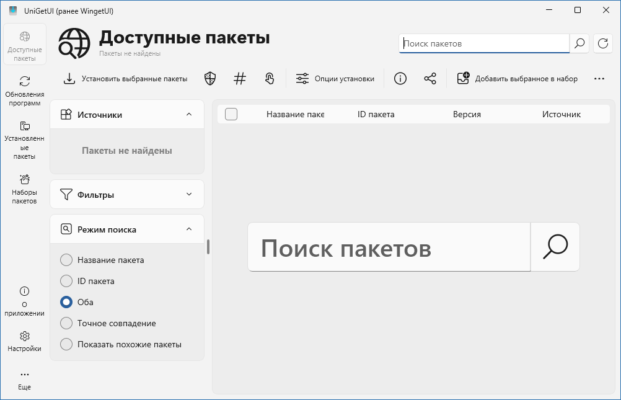
This tool is designed for developers, system administrators, and tech enthusiasts who want the power of command-line tools without their complexity. With UniGetUI, you get total control over all software packages on your system in a simple, beautiful interface.
🌟 Key Features of UniGetUI 3.3.5
🧰 1. Unified Package Management
Manage multiple package managers from one place — Winget, Scoop, Chocolatey, and MSIX are all supported. No need to switch between different tools.
⚡ 2. Fast Software Search & Install
Search for any app instantly and install it with a single click. UniGetUI automatically detects which package manager supports the software and handles installation seamlessly.
🔄 3. Batch Updates and Automation
Update all your installed programs at once! You can also automate daily updates to ensure your system always runs the latest software versions.
🎨 4. User-Friendly Interface
Unlike command-line interfaces, UniGetUI offers a clean, modern GUI with sorting, filtering, and dark mode support — perfect for beginners and professionals alike.
📦 5. View Installed Packages
Get detailed information about each installed app, including version, installation source, and available updates.
🔍 6. Smart Search Filters
Filter by package manager, update availability, or software type. It saves time and keeps your workflow organized.
🧩 7. Open-Source & Lightweight
UniGetUI is 100% open source and lightweight. It runs smoothly without slowing down your computer or consuming unnecessary resources.
💡 Why Choose UniGetUI?
✅ Simplifies Software Management: Instead of juggling multiple tools, UniGetUI centralizes everything.
✅ Ideal for Developers: Quickly install IDEs, libraries, and dependencies through any supported manager.
✅ Safe and Transparent: Being open source, users can verify its code and ensure no hidden components.
✅ Saves Time: Automate updates and manage your entire software library in minutes.
Whether you’re setting up a new Windows environment or maintaining multiple systems, UniGetUI 3.3.5 offers convenience, speed, and control that no single manager can provide alone.
⚙️ System Requirements
💻 Operating System: Windows 10, Windows 11
🧠 Memory: 2 GB RAM minimum
💽 Storage: 100 MB free disk space
🔧 Dependencies: Requires .NET Desktop Runtime 6.0 or newer
These lightweight requirements make UniGetUI suitable for virtually any modern Windows machine.
📊 How UniGetUI Benefits Power Users
🖥️ Developers: Quickly install tools like Visual Studio Code, Git, Node.js, and Python using Winget or Scoop.
🏢 IT Administrators: Manage software deployment and updates across multiple PCs.
📦 General Users: Update all apps (e.g., browsers, utilities) automatically in one step.
💡 The interface even shows version differences, changelogs, and installation sources, helping you make informed decisions before updating software.
🌍 Final Thoughts
💫 UniGetUI 3.3.5 transforms Windows software management into a simple, centralized experience.
By combining the flexibility of Winget, Scoop, and Chocolatey, it eliminates the hassle of command-line complexity while maintaining full control over your system.
If you want a faster, safer, and smarter way to handle software installation and updates on Windows, UniGetUI is an essential tool in your productivity toolkit.
📦 Version: 3.3.5
💻 Platform: Windows 10 / 11
🔐 License: Open Source / Free
📅 Last Update: 2025
🔗 Official Website:https://github.com/marticliment/UniGetUI
✔ Tested: This software was tested on Windows 10 & Windows 11 and works smoothly without issues.
Frequently Asked Questions
- Is this software free?
Yes, it can be downloaded and used for free. - Does it support Windows 11?
Yes, it works perfectly on Windows 10 and 11. - Is it safe to use?
Yes, the software was scanned and tested before publishing.
Last updated: January 2026