
Overview of CareUEyes Pro 2.4.10
CareUEyes Pro 2.4.10 is a lightweight yet powerful eye protection software designed to make computer use more comfortable and healthy. It automatically adjusts screen brightness, filters harmful blue light, and reminds users to take regular breaks — helping prevent digital eye strain and fatigue caused by long hours in front of a screen.
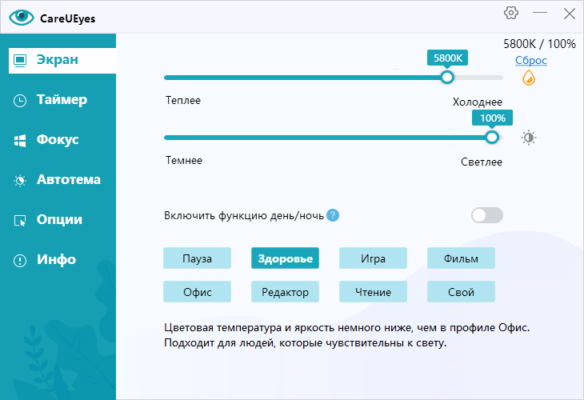
With its intuitive design and advanced customization options, CareUEyes is suitable for anyone who works or studies on a computer for extended periods. Whether you are an office worker, developer, or designer, this tool ensures that your eyes stay protected and your productivity remains high.
Key Features
Blue Light Filter
CareUEyes reduces the emission of blue light from your monitor, which is known to cause visual discomfort and interfere with sleep cycles. The software provides multiple color temperature modes that can be adjusted manually or automatically based on the time of day.
Screen Brightness Adjustment
Unlike standard brightness settings, CareUEyes allows you to fine-tune brightness levels beyond your monitor’s default range. This feature helps you create optimal lighting conditions whether you’re working in a bright office or a dark room.
Eye Protection Modes
The program includes several preset modes such as Office, Reading, Gaming, and Night. Each mode optimizes color temperature and brightness for different scenarios, ensuring the best visual comfort throughout the day.
Smart Break Reminder
CareUEyes encourages healthy computer habits by reminding you to take short breaks at regular intervals. These reminders help prevent computer vision syndrome (CVS), dry eyes, and headaches caused by continuous screen exposure.
Focus Feature
The Focus mode darkens the background while keeping the active window bright. This minimizes distractions and helps you stay concentrated on your current task — perfect for studying, coding, or writing.
Automatic Scheduling
Users can configure CareUEyes to automatically switch modes according to the time of day. For example, a warm filter can be applied at night to promote better sleep, while a cooler tone can be used during the day for clarity.
What’s New in Version 2.4.10
The latest version introduces several performance and usability improvements:
Enhanced compatibility with Windows 10 and 11
Smoother mode transitions and brightness control
Improved break reminder notifications
Optimized CPU and RAM usage for low power consumption
Updated user interface for easier navigation
Benefits of Using CareUEyes Pro
Protect Your Eyes All Day
By filtering harmful blue light and reducing glare, CareUEyes helps prevent fatigue, irritation, and long-term damage to your vision.
Boost Focus and Productivity
Healthy eyes mean higher focus and better performance. With customizable schedules and focus tools, you can maintain concentration throughout your workday.
Improve Sleep Quality
By reducing blue light exposure during evening hours, CareUEyes promotes the natural production of melatonin, helping you fall asleep more easily.
Conclusion
CareUEyes Pro 2.4.10 is more than just a blue light filter — it’s a comprehensive eye protection solution for modern computer users. Its intelligent brightness control, health reminders, and customizable filters make it an essential companion for anyone who spends long hours at a screen. With CareUEyes, you can work smarter, stay focused, and keep your eyes healthy every day.
✔ Tested: This software was tested on Windows 10 & Windows 11 and works smoothly without issues.
Frequently Asked Questions
- Is this software free?
Yes, it can be downloaded and used for free. - Does it support Windows 11?
Yes, it works perfectly on Windows 10 and 11. - Is it safe to use?
Yes, the software was scanned and tested before publishing.
Last updated: January 2026