
In the digital workspace, reading and reviewing PDFs is a daily task — but simply viewing them isn’t enough. Often, you need to highlight key points, add handwritten comments, underline text, or sketch ideas directly on the page . That’s where PDF Annotator 9.0.0.96 shines and buy.
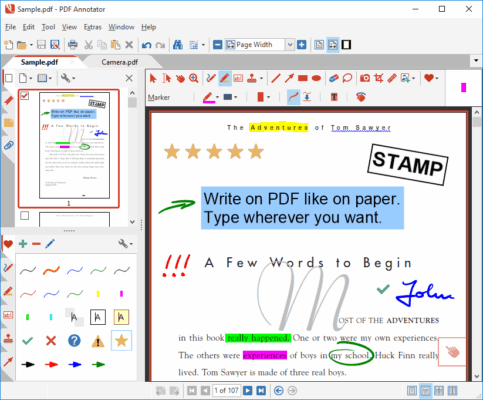
Developed by GRAHL software design, PDF Annotator 9.0.0.96 is a lightweight yet powerful tool that allows users to annotate PDF documents naturally , as if they were using a pen and paper. Whether you’re using a mouse, touchscreen, or graphics tablet, this software makes it easy to mark up any PDF with precision and flexibility.
Let’s explore why PDF Annotator 9.0.0.96 remains one of the most intuitive tools for professionals who rely on visual feedback and hand-written input.
📌 What Is PDF Annotator 9.0.0.96?
PDF Annotator 9.0.0.96 is a Windows-based application designed specifically for adding annotations to PDF files without altering the original content. Unlike full-featured PDF editors that focus on text editing and form filling, PDF Annotator focuses on natural interaction : writing, drawing, highlighting, and commenting.
It’s ideal for:
- Teachers grading assignments
- Lawyers reviewing contracts
- Architects marking up blueprints
- Students taking digital notes
- Designers providing visual feedback
And thanks to its optimized performance, it works smoothly even on older PCs.
🛠️ Key Features of PDF Annotator 9.0.0.96
1. ✍️ Write & Draw Like on Paper
Use your mouse, stylus, or touchscreen to write directly on any part of the PDF. The software supports pressure-sensitive pens (e.g., Wacom, Surface Pen) for realistic ink flow.
2. 🎨 Multiple Annotation Tools
Choose from a variety of tools:
- Text Highlighter (yellow, green, pink, etc.)
- Pen (with customizable thickness and color)
- Pencil (for sketches)
- Typewriter (insert typed text boxes)
- Shapes (arrows, rectangles, circles)
- Eraser (delete entire strokes or partial marks)
3. 💬 Sticky Notes & Callouts
Add pop-up notes to explain complex sections or leave reminders without cluttering the page.
4. 🔍 Zoom & Navigation
Zoom in for detailed work and navigate through large documents easily with thumbnails and bookmarks.
5. 🧩 Layer-Based Annotations
All your marks are stored on separate layers — meaning you can show, hide, edit, or remove annotations at any time without affecting the underlying document.
6. 📁 Save & Export Options
Save annotated files as standard PDFs (compatible with all readers), or export pages as images (JPG, PNG). You can also print annotated versions.
7. 🖥️ Works Offline – No Internet Required
Your data stays private and secure on your device — no uploading or cloud dependency.
8. 🧼 Simple & Focused Interface
Minimalist design keeps distractions away. Everything you need is accessible via toolbar or right-click menu.
9. 📎 Full PDF Compatibility
Opens any PDF file regardless of how it was created — no issues with scanned documents, forms, or encrypted files (if opened).
10. ⚙️ Customizable Tool Presets
Create and save your favorite pen settings (e.g., “Blue Pen – Medium”, “Red Marker”) for quick access across projects.
👥 Who Should Use PDF Annotator 9.0.0.96?
- Educators: Grade papers and provide personalized feedback.
- Legal Professionals: Mark up contracts, depositions, and case files.
- Students & Researchers: Take handwritten-style notes on research PDFs.
- Engineers & Architects: Comment on technical drawings and schematics.
- Remote Workers: Collaborate visually on reports and proposals.
- Artists & Designers: Sketch over layouts or mockups.
✅ Especially useful for users with tablets or touch-enabled laptops.
🖥️ System Requirements
- Operating System: Windows 10 or 11 (64-bit recommended)
- RAM: 2 GB minimum (4 GB recommended)
- Hard Disk Space: 100 MB free space
- Graphics: DirectX 9 or later compatible GPU
- Input Devices: Mouse, stylus, touchscreen, or graphics tablet
❗ Not available for macOS or mobile platforms.
📈 Why Choose PDF Annotator 9.0.0.96?
- ✅ Natural Handwriting Experience
- ✅ Lightweight & Fast Launch Time
- ✅ No Subscription – One-Time Purchase
- ✅ Preserves Original PDF Integrity
- ✅ Ideal for Touch & Pen Users
- ✅ Trusted by Millions Since 2004
✅ Final Thoughts
PDF Annotator 9.0.0.96 doesn’t try to do everything — it does one thing exceptionally well : letting you interact with PDFs the way you would with printed paper. With its responsive ink engine, clean interface, and focus on usability, it continues to be a top choice for anyone who values handwritten clarity and digital convenience .
If you frequently review, teach, or collaborate using PDFs — and want to write directly on them — PDF Annotator 9.0.0.96 is definitely worth using .
✔ Tested: This software was tested on Windows 10 & Windows 11 and works smoothly without issues.
Frequently Asked Questions
- Is this software free?
Yes, it can be downloaded and used for free. - Does it support Windows 11?
Yes, it works perfectly on Windows 10 and 11. - Is it safe to use?
Yes, the software was scanned and tested before publishing.
Last updated: January 2026