
What is EaseUS Video Editor Pro 2.4.0?
EaseUS Video Editor Pro 2.4.0 is a professional yet easy-to-use video editing software designed for Windows users who want to create stunning videos without needing advanced skills. It provides a full set of editing tools, including trimming, cutting, merging, rotating, and adding special effects, allowing anyone to produce professional-quality videos effortlessly.
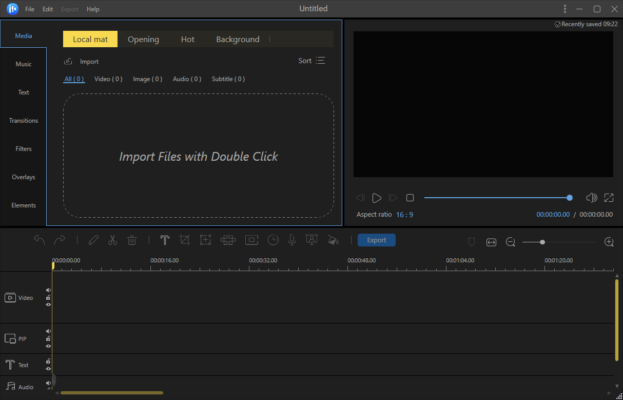
This version improves both performance and stability, making it an excellent choice for beginners, content creators, and professionals who need reliable editing software for social media, YouTube, or business use.
Key Features of EaseUS Video Editor Pro 2.4.0
Simple and Intuitive Interface
The program offers a clean and modern layout, helping users quickly access all tools without confusion. You can drag and drop clips directly to the timeline for faster editing.
Rich Video Effects and Transitions
EaseUS Video Editor includes a wide selection of transitions, filters, overlays, and visual effects to give your videos a creative touch. You can apply cinematic filters or add animated text to enhance storytelling.
Multi-Layer Timeline
The software supports multiple tracks for video, audio, and text, allowing you to synchronize elements precisely. You can also overlay images, music, or narration to make your project more dynamic.
Audio Editing and Sound Control
Users can import background music, remove noise, or adjust volume levels. It also allows adding voiceovers directly from a microphone for personalized projects.
Export and Format Support
EaseUS Video Editor supports exporting videos in various formats, including MP4, AVI, MOV, and WMV. You can also optimize videos for platforms like YouTube, TikTok, Facebook, or Instagram.
What’s New in Version 2.4.0
Improved Performance
The 2.4.0 update enhances rendering speed and overall editing responsiveness, ensuring smoother previews and faster exports.
New Video Templates
EaseUS added new pre-made templates for quick video creation. These templates help beginners start projects without building everything from scratch.
Enhanced Compatibility
It now supports 4K UHD editing and handles larger files more efficiently, making it ideal for professional-grade content.
How to Use EaseUS Video Editor Pro 2.4.0
Step 1: Import Media Files
Start by importing your videos, images, and audio files into the project. You can drag and drop them directly into the media library.
Step 2: Edit and Enhance
Place clips on the timeline, cut unwanted sections, add transitions, filters, and captions. Adjust speed or apply effects as needed.
Step 3: Export and Share
Once you finish editing, export your video in your desired format or upload it directly to social media platforms.
System Requirements
Operating System: Windows 7, 8, 10, or 11
Processor: Intel i3 or higher
RAM: Minimum 4 GB (8 GB recommended)
Storage: At least 1 GB free disk space
Graphics: Intel HD, NVIDIA, or AMD GPU
Conclusion
EaseUS Video Editor Pro 2.4.0 is one of the most user-friendly and efficient video editing tools available for Windows. It combines professional-grade features with an intuitive interface, making it ideal for both beginners and advanced users. Whether you’re editing vlogs, marketing videos, or short films, this version provides everything you need to produce visually impressive and high-quality results quickly and efficiently.
✔ Tested: This software was tested on Windows 10 & Windows 11 and works smoothly without issues.
Frequently Asked Questions
- Is this software free?
Yes, it can be downloaded and used for free. - Does it support Windows 11?
Yes, it works perfectly on Windows 10 and 11. - Is it safe to use?
Yes, the software was scanned and tested before publishing.
Last updated: January 2026