
Tarma InstallMate 9.12.7815.9227: Build Professional Windows Installers—Fast & Code-Free 🚀
For software developers and small ISVs (Independent Software Vendors), delivering a smooth, reliable installation experience is critical. Tarma InstallMate 9.12.7815.9227 is a powerful yet intuitive setup authoring tool that lets you create professional Windows installers without writing a single line of code.
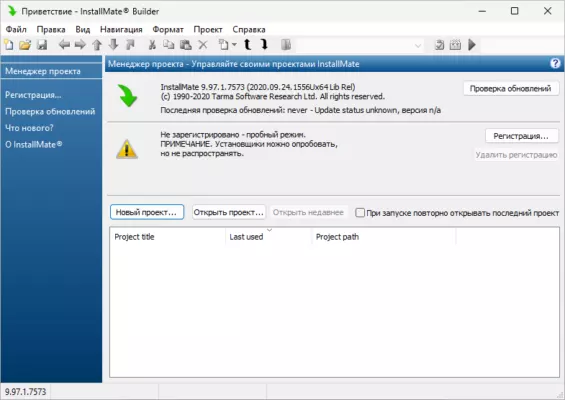
Unlike complex tools like InstallShield or WiX, InstallMate combines visual design, robust scripting, and enterprise-grade features in a streamlined interface—perfect for desktop applications, utilities, and internal tools.
🎯 Why Choose Tarma InstallMate?
- ✅ No programming required – drag-and-drop interface
- ✅ Generates native EXE installers (no MSI dependency)
- ✅ Full support for 64-bit, UAC, and Windows 11/10
- ✅ Lightweight and fast—ideal for small to mid-sized projects
- ✅ One-time purchase (no subscriptions)
Whether you’re shipping a commercial app or deploying internal software, InstallMate ensures your users get a clean, branded, and error-free setup.
✨ Key Features of Version 9.12.7815.9227
🧩 1. Visual Project Designer
- Organize files, folders, and registry entries in a tree view
- Define installation types (Typical, Custom, Portable)
- Set conditional logic (e.g., install component only on Windows 10+)
⚙️ 2. Advanced Installation Logic
- Run pre/post-install scripts (batch, PowerShell, or custom EXEs)
- Create desktop/start menu shortcuts automatically
- Handle file associations (e.g., open .myapp files with your program)
🔐 3. Security & Compliance Ready
- Digital signature support for trusted installers
- UAC elevation handled automatically
- Silent/unattended installation mode (
/Sswitch) for IT deployment
🌐 4. Localization & Branding
- Multi-language support (English, German, French, Spanish, etc.)
- Fully customizable setup dialogs with your logo and colors
- License agreement editor with RTF support
📦 5. Smart File Management
- Detect and replace in-use files on reboot (via MoveFileEx)
- Verify file versions to avoid downgrades
- Compress files using LZMA for smaller installers
🛠️ Ideal For:
- Independent developers shipping desktop apps
- Small software companies needing affordable setup tools
- IT teams creating internal deployment packages
- Legacy app maintainers updating old installers (e.g., from NSIS or Inno Setup)
💡 InstallMate projects are stored in XML format, making them easy to version-control with Git or SVN.
🆚 InstallMate vs. Popular Alternatives
InstallMate stands out as the best balance of power, simplicity, and affordability for professional developers.
💡 Final Thoughts: Ship with Confidence
Tarma InstallMate 9.12.7815.9227 removes the headache from software deployment. With its clean interface, robust feature set, and reliable output, it empowers you to focus on your code—not your installer.
📦 Build once. Install everywhere. Impress every user.
ℹ️ Available for Windows only. Free trial and detailed documentation at: https://www.tarma.com/installmate
✔ Tested: This software was tested on Windows 10 & Windows 11 and works smoothly without issues.
Frequently Asked Questions
- Is this software free?
Yes, it can be downloaded and used for free. - Does it support Windows 11?
Yes, it works perfectly on Windows 10 and 11. - Is it safe to use?
Yes, the software was scanned and tested before publishing.
Last updated: January 2026