
Apktool M v2.4.0 is a powerful, mobile-optimized version of the popular Apktool utility, bringing full APK decompilation and recompilation capabilities to Android devices. Designed for developers, modders, and security researchers, this app allows you to decode resources, analyze smali code, modify app behavior, and rebuild modified APKs — all without needing a PC.
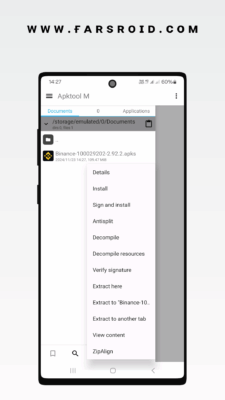
While the original Apktool runs on Java (Windows/macOS/Linux), Apktool M adapts this functionality for smartphones and tablets, making it an essential tool for on-the-go Android customization and learning.
⚠️ Note: This tool is intended for educational, development, and ethical use only. Modifying apps may violate terms of service or copyright laws.
What Is Apktool M?
Apktool M is a port of the original Apktool (by iBotPeaches) for Android, enhanced with a user-friendly interface and mobile-specific optimizations. It leverages AAPT2 (Android Asset Packaging Tool) and Smali/Baksmali to:
- Decode
resources.arsc,AndroidManifest.xml, layouts, and assets - Decompile DEX code into readable smali (Android assembly)
- Modify app code and resources
- Rebuild into a new, installable APK
- Sign the output APK for testing
It’s ideal for:
- Learning how Android apps work
- Creating custom mods (e.g., ad-free versions)
- Debugging or analyzing app behavior
- Localizing apps (adding new languages)
- Security testing (penetration testing)
Key Features of Apktool M v2.4.0
1. Full APK Decompilation
Load any APK and extract:
AndroidManifest.xml(decoded for readability)- Layout files (
activity_main.xml, etc.) - Strings, colors, dimensions
- Drawables, icons, and raw assets
resources.arsc(compiled resource table)
All files are organized in a clear directory structure.
2. Smali Code Editing
After disassembling DEX files, view and edit smali code — the low-level representation of Java/Kotlin code on Android.
Example: Modify a conditional check like
if-eqzto bypass license verification (for educational purposes).
3. Resource Modification
Change app resources such as:
- App name, icon, theme
- Strings (e.g., “Upgrade to Pro” → “Free Mode”)
- Colors and layouts
- Splash screens or logos
Perfect for personalizing or theming apps.
4. Rebuild & Recompile
After making changes:
- Tap “Rebuild” to generate a new APK
- The tool compiles smali back to DEX and repackages resources
- Output APK is unsigned by default
Use built-in APK Signer (v1/v2/v3) to make it installable.
5. Built-in File Manager
Browse internal storage, SD card, and Apktool working directories with a simple file browser. Supports:
- Copy, move, rename
- Text editing (for XML/smali)
- Syntax highlighting (basic)
6. Support for Modern Android Features
Apktool M v2.4.0 supports:
- Android 13+ (API 33) resources
- App Bundles (AAB) – extract base APKs
- Multiple DEX files (multidex support)
- Vector drawables and adaptive icons
7. No Root Required (Basic Use)
You can decompile and view APKs without root. However, rebuilding and signing may require storage permissions and external tools for advanced signing.
How to Use Apktool M v2.4.0
Step 1: Install the APK
- Download Apktool M v2.4.0 APK from a trusted source.
- Enable “Install Unknown Apps” in settings.
- Install and open the app.
Step 2: Load an APK
- Tap “Decode”.
- Browse and select an APK file (e.g., from Downloads).
- Choose options: decode resources, smali, or both.
Step 3: Modify Files
- Navigate to the decoded folder.
- Edit
AndroidManifest.xmlor smali files. - Change assets or strings as needed.
Step 4: Rebuild & Sign
- Tap “Build” to recompile.
- Once built, use “Sign APK” to generate a signed version.
- Install the modified APK on your device.
🔐 Always scan modified APKs with antivirus tools before installation.
Who Should Use Apktool M?
✅ Android Developers – Learn how apps are structured
✅ Modders – Create custom APKs (e.g., disabled ads, unlocked features)
✅ Students & Learners – Study Android internals and smali
✅ Security Researchers – Analyze malware or app vulnerabilities
✅ Custom ROM Developers – Modify system apps
Risks & Ethical Considerations
❌ Legal Issues: Modifying copyrighted apps may violate EULA or laws
❌ Malware Risk: Modified APKs can contain hidden threats
❌ Account Bans: Games or services may detect tampering
✅ Use only on apps you own or for educational purposes
Apktool M vs. PC Apktool
Apktool M is less powerful but far more accessible for mobile users.
Final Thoughts
Apktool M v2.4.0 APK brings the power of Android reverse engineering directly into your hands — literally. While it may not replace the full flexibility of a PC-based workflow, it’s an excellent tool for learning, quick edits, and on-device analysis.
Whether you’re a beginner exploring how apps work or a seasoned modder testing changes, Apktool M opens the door to deeper Android customization — right from your smartphone.
🔧 Download Apktool M v2.4.0 today and start exploring the inner workings of Android apps — responsibly and securely.
✔ Tested: This software was tested on Windows 10 & Windows 11 and works smoothly without issues.
Frequently Asked Questions
- Is this software free?
Yes, it can be downloaded and used for free. - Does it support Windows 11?
Yes, it works perfectly on Windows 10 and 11. - Is it safe to use?
Yes, the software was scanned and tested before publishing.
Last updated: January 2026