
Exportizer Enterprise 10.1.8.427 is a robust, feature-rich database utility developed by Vitaliy Levchenko that enables users to export, convert, and manage data from various database formats to a wide range of output formats. Designed for database administrators, developers, and data analysts, this tool simplifies the process of migrating, backing up, and sharing database content with high precision and efficiency and buy.
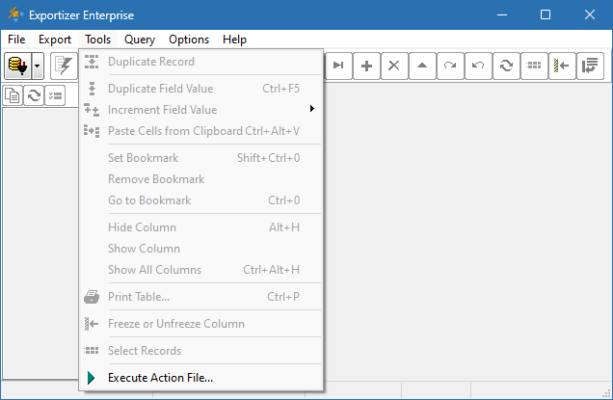
Whether you’re working with DB, DBF, MDB, ACCDB, SQLite, Firebird, CSV, TXT, or Excel files, Exportizer Enterprise makes it easy to export data to HTML, PDF, XML, CSV, JSON, XLSX, RTF, and more — all with a clean, intuitive interface and support for batch operations.
Why Choose Exportizer Enterprise?
While basic export tools are built into some database systems, they often lack flexibility and format support. Exportizer Enterprise 10.1.8.427 stands out with:
- ✅ Support for 20+ input and output formats
- ✅ Direct export from databases (ODBC, Firebird, SQLite)
- ✅ Command-line interface (CLI) for automation
- ✅ Advanced field mapping and filtering
- ✅ Batch export and scheduling
- ✅ Unicode and UTF-8 support
Perfect for:
- Data migration projects
- Generating reports
- Converting legacy databases
- Preparing data for web or mobile apps
Key Features of Exportizer Enterprise 10.1.8.427
1. Wide Database Format Support
Read from:
- DB/DBF (dBase, FoxPro, Clipper)
- MDB/ACCDB (Microsoft Access)
- SQLite
- Firebird
- CSV, TXT, XML
- ODBC data sources
No need to import into another app — open directly.
2. Multiple Export Formats
Save data to:
- 📄 HTML – For web publishing
- 📊 CSV / TXT – For spreadsheets and scripts
- 📁 XML / JSON – For API integration
- 🖨️ PDF – Printable reports
- 📈 XLSX (Excel) – Compatible with Microsoft Office
- 📝 RTF – For word processors
- 🗃️ DBF – Legacy system compatibility
Choose the format that fits your workflow.
3. Advanced Data Filtering & Field Mapping
- Select specific fields and records to export
- Apply WHERE clauses to filter data
- Rename or reorder columns
- Convert data types (e.g., date formatting)
Ensures clean, targeted output.
4. Command-Line Interface (CLI)
Automate exports using scripts:
Ideal for:
- Scheduled tasks (via Windows Task Scheduler)
- Integration into development pipelines
- Bulk processing of multiple files
5. Batch Export Mode
Export multiple tables or files in one session:
- Select all tables in a database
- Export each to a separate file
- Use naming templates (e.g.,
table_*.csv)
Saves time on repetitive tasks.
6. Rich Export Options
Customize every export with:
- Font, color, and page settings (for HTML/PDF)
- Delimiter selection (CSV: comma, tab, semicolon)
- Encoding (UTF-8, ANSI, etc.)
- Header row inclusion
- Image embedding (in HTML/PDF)
7. Enterprise-Grade Features
The Enterprise version includes:
- ✅ Database connection pooling
- ✅ Advanced security (encrypted connections)
- ✅ Multi-user support
- ✅ Priority technical support
- ✅ Silent installation (MSI)
- ✅ Integration with ERP/CRM systems
Tailored for business and development teams.
How to Use Exportizer Enterprise 10.1.8.427
- Install the Software
- Download from the official site: https://www.vitaliy-levchenko.com
- Run the installer (supports Windows 7/8/10/11)
- Open a Database
- Click “Open” and select your DB, DBF, Access, or SQLite file
- Or connect via ODBC
- Preview Data
- View table contents in grid mode
- Sort, search, and filter records
- Choose Export Settings
- Click “Export”
- Select output format and destination
- Adjust field mapping and options
- Run Export
- Click “Export” to save the file
- View log for success or errors
- Automate (Optional)
- Use CLI to schedule exports via Task Scheduler
Who Should Use This Tool?
✅ Database Administrators – Migrate or back up data
✅ Developers – Extract data for testing or APIs
✅ Data Analysts – Convert DB content to Excel or JSON
✅ System Integrators – Transfer data between platforms
✅ Business Users – Generate PDF/HTML reports from legacy DBs
Exportizer vs. Alternatives
Exportizer offers the best balance of power and usability.
Final Thoughts
Exportizer Enterprise 10.1.8.427 is an indispensable tool for anyone who regularly works with database files. Its versatile format support, powerful export options, and automation capabilities make it far superior to built-in export tools or manual conversion methods.
Whether you’re converting old dBase files, generating reports, or feeding data into modern applications, Exportizer delivers accuracy, speed, and reliability — all in a lightweight, easy-to-use package.
💾 Download Exportizer Enterprise 10.1.8.427 today from the official website and streamline your data export workflow — professional results with minimal effort.
✔ Tested: This software was tested on Windows 10 & Windows 11 and works smoothly without issues.
Frequently Asked Questions
- Is this software free?
Yes, it can be downloaded and used for free. - Does it support Windows 11?
Yes, it works perfectly on Windows 10 and 11. - Is it safe to use?
Yes, the software was scanned and tested before publishing.
Last updated: January 2026