Overview of VMware InstallBuilder Enterprise 25.10.1
VMware InstallBuilder Enterprise 25.10.1 is a professional software tool designed to help developers package and deploy applications across multiple platforms—Windows, macOS, Linux, and many Unix-like operating systems. With a single project file and unified build environment, it supports creating graphical installers, silent/unattended installs, RPM and DEB packages, and even multi-platform CDs/DVDs. This powerful version aims to streamline the deployment process for software vendors and in-house development teams alike.
Key Features
Multi-Platform Output
InstallBuilder enables builds for Windows, macOS, Linux, Solaris, FreeBSD, HP-UX and more—allowing developers to maintain one project file while generating installers for diverse target platforms.
Flexible Project Definition
Developers can use its GUI or edit the underlying XML project file directly. This flexibility allows fine-tuned control over installation logic, including prerequisites, component selection, licensing, and conditions.
Batch & Automated Builds
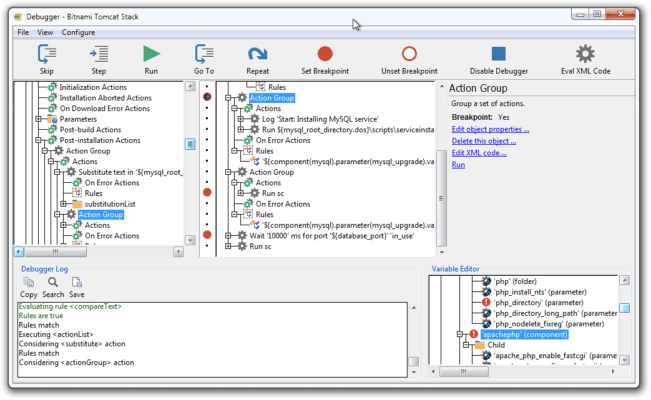
Built-in command-line support and integration with CI/CD pipelines let teams automate the build process. The tool supports debugging of installers, unattended mode, and downloadable components to optimize package size and complexity.
Native Look & Feel
Installers created with InstallBuilder mimic the native UI conventions of each operating system, ensuring professional appearance and user experience consistency across platforms.
What’s New in Version 25.10.1
In version 25.10.1, VMware InstallBuilder introduces enhancements in performance, updated platform compatibility, and improved build outputs. Noteworthy improvements include refined environment detection, faster build times, and extended support for modern macOS and Linux distributions.
Why Choose VMware InstallBuilder Enterprise 25.10.1?
For software vendors or in-house dev teams, this tool offers a robust and scalable packaging solution:
Reduces maintenance by using a single project file for all target platforms.
Ensures consistent installer behavior across desktop and server environments.
Integrates into automated build pipelines, reducing manual tasks and errors.
Enables professional deployment with GUI, text-mode, and silent installs.
Getting Started
To begin using InstallBuilder:
Create a new installer project in the GUI or import an existing XML definition.
Define components, prerequisites (e.g., .NET, Java), actions, and UI pages.
Select target platforms and build configurations.
Run the build process; test using the built-in debugger or command line.
Distribute the resulting package: executable installer, RPM/DEB, or multi-platform media.
System Requirements
Operating System: Windows 7/8/10/11, macOS 10.12+ (64-bit), various Linux distros.
Disk Space: Minimum ~400 MB free for build environment.
Conclusion
VMware InstallBuilder Enterprise 25.10.1 is a streamlined, enterprise-grade installer creator built for cross-platform deployment. Its mixture of visual tools, XML flexibility, CI/CD integration and broad platform coverage makes it a smart choice for developers and organizations that distribute software across diverse environments. If you need to package applications professionally for multiple operating systems while minimizing overhead, this version of InstallBuilder delivers.
✔ Tested: This software was tested on Windows 10 & Windows 11 and works smoothly without issues.
Frequently Asked Questions
- Is this software free?
Yes, it can be downloaded and used for free. - Does it support Windows 11?
Yes, it works perfectly on Windows 10 and 11. - Is it safe to use?
Yes, the software was scanned and tested before publishing.
Last updated: January 2026