RawTherapee 5.12 — Advanced RAW Image Editing Software
Overview
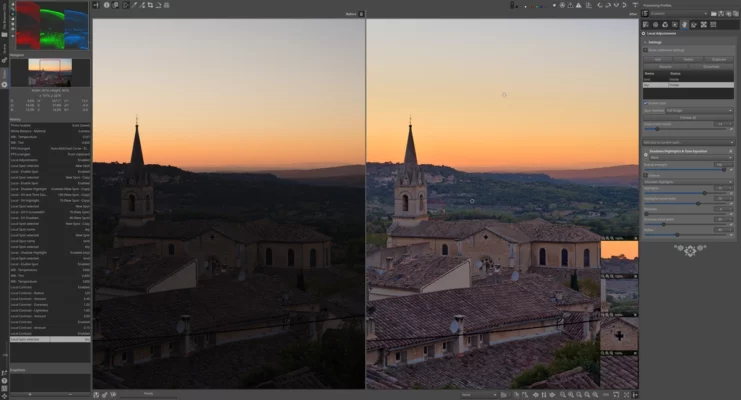
RawTherapee 5.12 is a professional-grade open-source photo editing software designed to handle RAW image processing with exceptional precision. Built for photographers who demand full control over image quality, it offers advanced color correction, lens adjustments, noise reduction, and sharpening tools — all while maintaining non-destructive editing.
Key Features
1. Powerful RAW Processing Engine
RawTherapee 5.12 supports a wide range of camera formats, enabling users to extract the maximum amount of detail and dynamic range from their photos. It uses a high-quality demosaicing algorithm to deliver natural and crisp image results.
2. Comprehensive Color Management
With support for ICC color profiles, RawTherapee ensures accurate color reproduction. You can adjust white balance, tone curves, exposure, and saturation with precise control, making it ideal for color-critical work.
3. Advanced Noise Reduction and Sharpening
The software includes advanced noise suppression and edge sharpening tools that help photographers clean up images captured in low-light conditions without losing fine details.
4. Batch Processing Capability
One of RawTherapee’s strengths is its efficient batch processing engine. You can edit multiple images simultaneously using predefined profiles, saving time while maintaining consistent results.
5. Cross-Platform and Open Source
RawTherapee 5.12 is available for Windows, macOS, and Linux. Being open-source, it’s completely free and supported by a community of developers and photographers worldwide.
What’s New in Version 5.12
Improved color rendering for modern camera sensors.
Enhanced lens correction database.
Optimized export speed for JPEG and TIFF formats.
Stability improvements and bug fixes.
System Requirements
OS: Windows 7/8/10/11, macOS, or Linux
Processor: Dual-core CPU or higher
RAM: 4 GB minimum (8 GB recommended)
Storage: 200 MB free disk space
Conclusion
RawTherapee 5.12 continues to be one of the best free RAW editors available. With its powerful editing tools, open-source flexibility, and support for professional workflows, it stands as a serious alternative to commercial photo editors like Adobe Lightroom or Capture One.
✔ Tested: This software was tested on Windows 10 & Windows 11 and works smoothly without issues.
Frequently Asked Questions
- Is this software free?
Yes, it can be downloaded and used for free. - Does it support Windows 11?
Yes, it works perfectly on Windows 10 and 11. - Is it safe to use?
Yes, the software was scanned and tested before publishing.
Last updated: January 2026