
Overview of Gilisoft Image Watermark Master 10.1
Gilisoft Image Watermark Master 10.1 is a versatile tool for managing watermarks and unwanted elements in digital images. Whether you want to protect your own photos by adding text or logo watermarks, or clean up images by removing stamps, logos, blemishes, or other unwanted objects – this software offers a flexible and user-friendly solution. It supports a wide range of image formats and simplifies tasks often tedious in larger graphics editors.
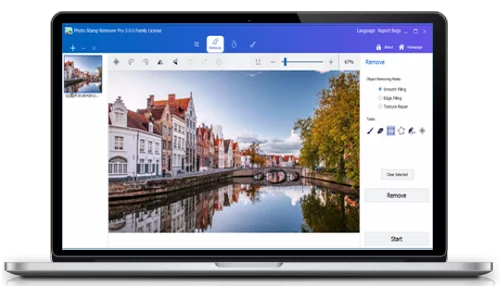
Key Features of Gilisoft Image Watermark Master
Batch Watermark Application
One of the standout capabilities is its ability to apply text, image, or shape watermarks across many files at once. Users can select a folder of photos, configure watermark style (position, opacity, size), and apply the watermark in a single process—saving significant time when working with large collections.
Removing Unwanted Objects from Photos
Gilisoft’s software allows you to erase logos, watermarks, text, stamps, and even unwanted people or objects from images as if they were never there. The built-in restoration engine helps recreate the background, making the edit look natural and clean.
Multiple Format Support and Export
The program supports all popular image formats (JPG, PNG, BMP, TIFF etc.) and allows you to export or save in the original format or in other formats as needed. This ensures compatibility and flexibility in how you handle your photo collection.
Easy Customization & Editing Tools
Beyond watermarking and removal, the tool offers basic image-editing features: cropping, rotating, flipping, adjusting colors, filters and more. This makes it not just a watermark tool but a lightweight photo editor for quick adjustments.
What’s New in Version 10.1
In version 10.1, Gilisoft has introduced improved algorithms for object-removal and background blending, leading to more natural results when removing watermarks or unwanted elements. The update also enhances processing speed for batch tasks and adds improved support for modern image formats and high-resolution images, making it more suitable for contemporary workflows.
Why Choose Gilisoft Image Watermark Master?
If you regularly work with photo libraries—whether to protect your brand with watermarks, or clean up old images by removing logos or objects—this software offers a balanced blend of ease-of-use and power. It avoids the complexity of full-scale graphic design suites while delivering specialized functions targeted at photo watermarking and object removal. For photographers, social-media managers, and content creators, it becomes a practical addition to the workflow.
How to Use It (Getting Started)
Launch the program and import your images or a folder of images you’ll work on.
Choose your goal: either Add Watermark or Remove Object.
If adding a watermark: select text/logo/shape, customize position, size, opacity, style.
If removing objects: mark the target area (logo, stamp, etc.), choose removal mode and let the engine process.
Preview results, then export the files with chosen format and destination.
(Optional) Use batch mode to process a whole folder with identical settings in one click.
Conclusion
Gilisoft Image Watermark Master 10.1 stands out by offering both watermarking and object-removal capabilities in one intuitive package. Its batch processing features make it efficient for large image sets, and the removal engine ensures clean results without lengthy editing. Whether you’re protecting your photos or cleaning up legacy images, it’s a practical tool suited for both beginners and professionals.
✔ Tested: This software was tested on Windows 10 & Windows 11 and works smoothly without issues.
Frequently Asked Questions
- Is this software free?
Yes, it can be downloaded and used for free. - Does it support Windows 11?
Yes, it works perfectly on Windows 10 and 11. - Is it safe to use?
Yes, the software was scanned and tested before publishing.
Last updated: January 2026