
What Is Windows Service Auditor?
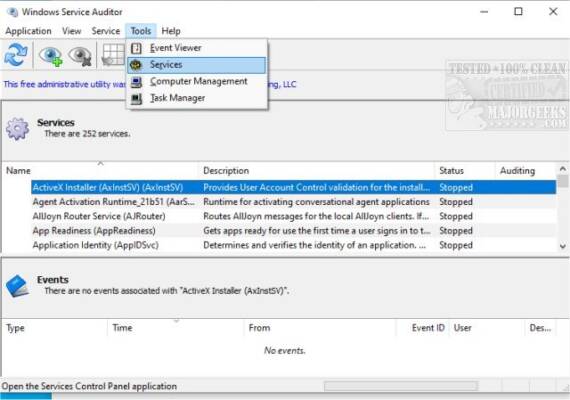
Windows Service Auditor, developed by Core Technologies Consulting, is a free, portable tool that audits Windows services by probing the Event Logs and offering a user-friendly interface to monitor service changes—like start, stop, deletion, and errors . It simplifies digging through complex Event Viewer data and lets both system admins and advanced users discover “who did what” with services.
New in Version 4.1.0.39 (Released September 5, 2024)
🔔 Added Features
“Startup Type” column now visible in the services list.
Disabled services displayed in italics, with auditing-enabled ones in bold .
🛠️ Fixes & Improvements
Better non-English UI support.
Switched to SHA‑256 digital signature; dropped SHA‑1.
Improved logging and service‑list loading speed.
Fixed handling of read‑only services and performance glitch when parsing huge Event Logs.
Enhanced compatibility with services lacking descriptions.
Prevented starting disabled services .
Key Features
Easily Track Service Events
Select a service to instantly view all related events—timestamps, types, sources, Event IDs, and descriptions—in a clean, split-pane UI. Double-click to see full details and copy to clipboard .
Enable or Disable Auditing
One click enables Windows’ Advanced Security Audit Policies, tracking who started/stopped/updated services. Windows Service Auditor also restores User Information in logs once auditing is set .
Export Services to XML or CSV
You can export all or selected services—including dependencies, executable hashes, recovery settings, etc.—to XML for documentation or analysis .
Portable & Lightweight
No installation required. Runs directly from the EXE (approx. 1.9 MB), uses about 10–25 MB RAM, and is easy to carry on USB sticks .
Why Use It?
🎯 For System Administrators
Quickly troubleshoot critical service issues—find out who stopped a service, when, and if any errors occurred—without diving deep into Event Viewer.
🧠 For Auditing & Compliance
Enforce service-related security policies, detect unauthorized modifications, and easily export findings for audits or review.
🛡️ For Personal or IT Power Users
Learn more about how Windows services behave—debug background issues, monitor service events, and gain transparency over system changes.
How to Use It – Quick Start
Download
WindowsServiceAuditor.exe.Run directly—no install needed.
Select a service to view its recent event history.
To track user account, enable auditing via Service → Enable Auditing—the tool adjusts security audit settings automatically .
View auditing details in the lower pane or export services via Services → Export (XML).
System Requirements & Technical Info
| Feature | Specification |
|---|---|
| OS | Windows 7 / 8 / 8.1 / 10 / 11 / Server 2016–2025Core Technologies |
| RAM Usage | ~10–25 MB |
| File Size | ~1.9 MB executable |
| License | Freeware, portable |
✔ Tested: This software was tested on Windows 10 & Windows 11 and works smoothly without issues.
Frequently Asked Questions
- Is this software free?
Yes, it can be downloaded and used for free. - Does it support Windows 11?
Yes, it works perfectly on Windows 10 and 11. - Is it safe to use?
Yes, the software was scanned and tested before publishing.
Last updated: January 2026