
WinTools Explorer Commander 1.3.0.20 is a feature-rich, dual-pane file management tool designed to replace the default Windows File Explorer with a faster, smarter, and more efficient interface. Inspired by classic tools like Total Commander and Directory Opus, this utility brings professional-grade file handling to everyday users, developers, system administrators, and IT professionals and buy.
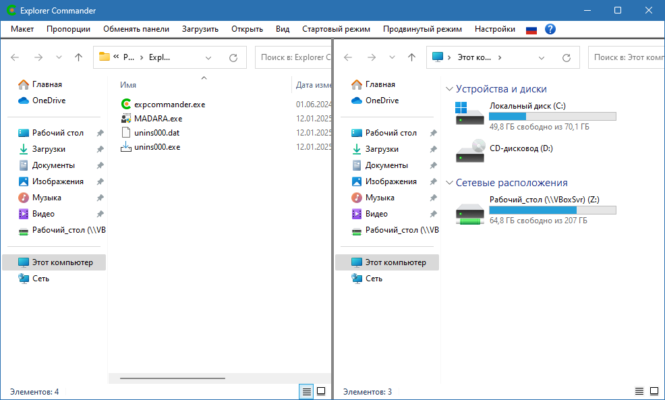
With tabbed browsing, built-in archive support, FTP/SFTP client, cloud integration, and advanced search, WinTools Explorer Commander turns Windows into a powerhouse for managing files, folders, and network resources.
Why Choose WinTools Explorer Commander?
While Windows Explorer works for basic tasks, it lacks advanced functionality for power users. WinTools Explorer Commander 1.3.0.20 solves this with:
- ✅ Dual-pane layout for easy file transfers
- ✅ Tabbed interface (like a web browser)
- ✅ Built-in support for ZIP, RAR, 7z, ISO, and more
- ✅ Network and cloud storage access
- ✅ Lightweight and fast – runs smoothly on older PCs
- ✅ Customizable toolbars and keyboard shortcuts
It’s the perfect tool for anyone who regularly moves, renames, compresses, or organizes large amounts of data.
Key Features of WinTools Explorer Commander 1.3.0.20
1. Dual-Pane File Management
Work with two directories side by side:
- Copy, move, or synchronize files with drag-and-drop
- Compare folder contents
- Preview files before transferring
- Perform batch rename operations
Ideal for organizing media, migrating data, or syncing backups.
2. Tabbed Browsing
Open multiple folders in tabs — just like Chrome or Firefox:
- Switch between projects instantly
- Group related directories (e.g., Work, Photos, Downloads)
- Pin frequently used locations
Boosts productivity for multitaskers.
3. Archive Support (ZIP, RAR, 7z, TAR, ISO)
No need for WinRAR or 7-Zip:
- Browse inside archives without extraction
- Extract specific files or entire folders
- Create new ZIP or 7z files
- Password-protected archive support
Perfect for game mods, software installers, and backup files.
4. FTP, SFTP & WebDAV Client
Connect to remote servers securely:
- Upload/download files via FTP/SFTP
- Manage website content directly
- Mount remote folders as virtual drives
- Save connection profiles for quick access
Great for web developers and system admins.
5. Cloud Storage Integration
Access your cloud files alongside local storage:
- Google Drive
- Dropbox
- OneDrive
- Box
- Nextcloud / ownCloud (via WebDAV)
Manage everything from one unified interface.
6. Advanced File Search
Find files faster with filters:
- By name, size, date, or file type
- Regular expression (RegEx) search
- Content search inside text files
- Results appear in real time
Say goodbye to slow Windows search.
7. File Preview & Quick View
Preview documents, images, and videos without opening them:
- Text files (.txt, .log, .json)
- Images (.jpg, .png, .gif)
- PDFs and Office files (if installed)
- Audio and video thumbnails
Saves time and system resources.
8. Customization & Automation
Tailor the app to your workflow:
- Create custom toolbars and menus
- Assign keyboard shortcuts
- Run scripts or batch commands
- Use internal command line for advanced tasks
Supports user-defined plugins for extended functionality.
How to Install WinTools Explorer Commander 1.3.0.20
- Download the installer from the official WinTools website or trusted source.
- Run
WinToolsExplorerCommander_Setup.exe. - Follow the installation wizard (choose installation folder and options).
- Launch the app and configure your favorite folders, themes, and connections.
- Start managing files like a pro!
💡 Tip: Set WinTools as your default file manager using the “Replace Explorer” option (optional).
Who Should Use This Tool?
✅ System Administrators – Manage servers and network drives
✅ Developers – Handle code, logs, and deployment files
✅ Designers & Editors – Organize large media libraries
✅ IT Technicians – Diagnose and repair systems
✅ Power Users – Replace clunky File Explorer with a faster alternative
WinTools vs. Other File Managers
WinTools offers excellent value with modern features at a competitive price.
Final Thoughts
WinTools Explorer Commander 1.3.0.20 is more than just a file manager — it’s a complete digital workspace for Windows users who demand speed, precision, and control. Whether you’re moving terabytes of data, managing remote servers, or simply tired of Windows Explorer’s limitations, this tool delivers a professional-grade experience with an intuitive design.
With its dual-pane interface, tabbed browsing, and deep integration with archives and networks, it stands out as one of the best Total Commander alternatives available today.
📁 Download WinTools Explorer Commander 1.3.0.20 now and take full command of your Windows file system — faster, smarter, and more efficiently than ever before.
✔ Tested: This software was tested on Windows 10 & Windows 11 and works smoothly without issues.
Frequently Asked Questions
- Is this software free?
Yes, it can be downloaded and used for free. - Does it support Windows 11?
Yes, it works perfectly on Windows 10 and 11. - Is it safe to use?
Yes, the software was scanned and tested before publishing.
Last updated: January 2026