
Windows and Office Genuine ISO Verifier 12.24.48.25 – Ensure Your ISO Files Are Authentic
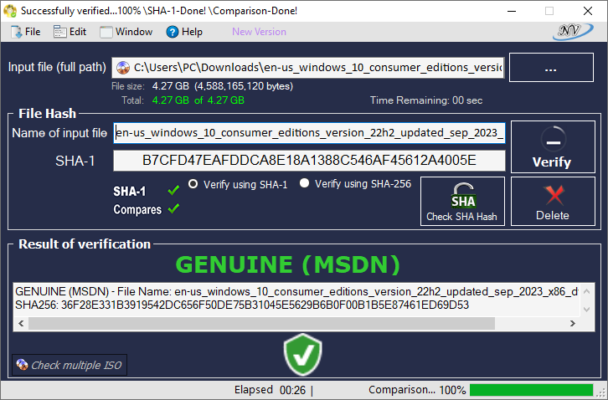
When downloading Windows or Microsoft Office ISO files from the internet, one of the biggest concerns is authenticity. Corrupted or modified ISOs can lead to system instability, security risks, and wasted time during installation. This is where Windows and Office Genuine ISO Verifier 12.24.48.25 comes into play. It is a lightweight yet powerful tool designed to verify the integrity and originality of ISO files for Microsoft products.
Why Authenticity Matters in ISO Files
Installing Windows or Office from an unreliable ISO file can compromise your system. Fake or tampered ISOs may contain malware, missing files, or altered system components. Using a verification tool ensures that the file you downloaded matches Microsoft’s official release, giving you peace of mind before installation.
Key Features of Genuine ISO Verifier 12.24.48.25
1. Accurate File Verification
The program uses cryptographic hash values (SHA-1, SHA-256, MD5) to check whether an ISO file is genuine. It compares your file’s checksum with official Microsoft records.
2. Wide Compatibility
Supports all major Microsoft ISO files, including:
Windows 7, 8.1, 10, and 11
Windows Server editions
Microsoft Office 2007, 2010, 2013, 2016, 2019, and 2021
3. Lightweight and Fast
The tool is portable and does not require installation. Simply run the executable, select your ISO, and the verification process completes in seconds.
4. Easy-to-Use Interface
Its clean interface makes it accessible even for beginners. All you need to do is load your ISO file, and the software instantly provides results.
5. Regular Updates
Version 12.24.48.25 comes with updated hash databases, ensuring compatibility with the latest Windows and Office releases.
How Windows and Office Genuine ISO Verifier Works
Open the program.
Load the ISO file you want to verify.
The software calculates the hash values of the ISO.
It then compares them against the official Microsoft hash database.
A message confirms whether the ISO is genuine or altered.
This process guarantees that the installation media you are about to use is 100% authentic.
Benefits of Using Version 12.24.48.25
Security: Protects against malware-infected ISO files.
Accuracy: Uses verified hash values from official sources.
Speed: Delivers results within seconds.
Convenience: Works without installation and requires minimal system resources.
Reliability: Trusted by IT professionals and system administrators worldwide.
System Requirements
Operating System: Windows 7, 8, 10, 11 (32-bit & 64-bit)
RAM: 1 GB minimum
Disk Space: Less than 20 MB
Other: Internet connection recommended for database updates
Conclusion
Windows and Office Genuine ISO Verifier 12.24.48.25 is an essential tool for anyone who works with Microsoft ISO files. Whether you are a system administrator, IT technician, or everyday user, verifying your installation files before use is a smart and secure practice.
With its speed, accuracy, and simplicity, this tool provides confidence that your ISO files are genuine and unaltered. It saves time, enhances security, and ensures that your Windows or Office installations go smoothly every time.
✔ Tested: This software was tested on Windows 10 & Windows 11 and works smoothly without issues.
Frequently Asked Questions
- Is this software free?
Yes, it can be downloaded and used for free. - Does it support Windows 11?
Yes, it works perfectly on Windows 10 and 11. - Is it safe to use?
Yes, the software was scanned and tested before publishing.
Last updated: January 2026