
In enterprise IT environments, deploying operating systems, managing software updates, and recovering from system failures must be fast, consistent, and scalable. Doing this manually on hundreds of computers is inefficient and error-prone and buy.
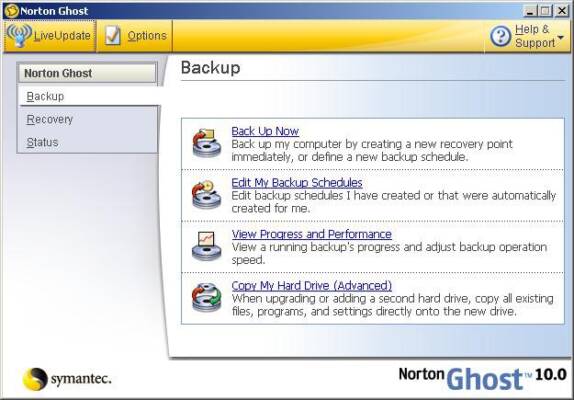
That’s where Symantec Ghost 12.0.0.11761 comes in — a professional-grade disk imaging and system deployment tool developed by Broadcom (formerly Symantec) for large organizations, educational institutions, and government agencies.
Also known as part of the Ghost Solution Suite , this version delivers robust capabilities for cloning hard drives, creating system images, performing bare-metal restores, and deploying standardized configurations across multiple machines over a network .
Let’s explore why Symantec Ghost 12.0.0.11761 remains a trusted solution for IT administrators managing complex PC fleets.
📌 What Is Symantec Ghost 12.0.0.11761?
Symantec Ghost 12.0.0.11761 is a comprehensive imaging platform that allows IT teams to capture an exact copy (image) of a computer’s hard drive — including the OS, applications, settings, and data — and deploy it to one or thousands of other devices.
It supports:
- Disk-to-disk cloning
- Network-based multicast imaging
- Bare-metal recovery
- Hardware-independent restore (HIR)
Unlike consumer tools like Macrium Reflect or Clonezilla, Ghost is built for enterprise scalability , offering centralized management, task scheduling, hardware abstraction, and integration with Active Directory and PXE boot servers.
It’s ideal for:
- Rolling out new employee workstations
- Upgrading operating systems
- Recovering from malware or crashes
- Standardizing lab or kiosk PCs
🛠️ Key Features of Symantec Ghost 12.0.0.11761
1. 💾 Full System Imaging
Capture complete disk or partition images in a single file (.gho or .sdr), preserving boot sectors, hidden partitions, and UEFI configurations.
2. 🌐 Network Deployment (Multicast)
Deploy images to multiple computers simultaneously over the network using UDP Multicast , reducing bandwidth usage and speeding up large-scale rollouts.
Perfect for schools, call centers, or corporate offices.
3. 🖥️ Hardware-Independent Restore (HIR)
Restore an image to a machine with different hardware (e.g., new motherboard, storage controller) without driver conflicts — automatically injects necessary drivers during boot.
4. ⚙️ Centralized Management Console
Use the Ghost Console to manage imaging tasks, monitor progress, schedule jobs, and generate reports — all from a single interface.
5. 🔄 Bare-Metal Recovery
Restore a full system image to a blank or failed hard drive — even if no OS is installed.
Critical for disaster recovery scenarios.
6. 🔐 Secure Boot & Encryption Support
Imaging process supports UEFI Secure Boot and integrates with BitLocker, ensuring compatibility with modern security standards.
7. 🧩 Task Sequencing & Automation
Chain multiple operations (e.g., wipe disk → deploy image → install apps → join domain) into automated workflows.
8. 📦 Driver Management
Store and inject device drivers dynamically based on target hardware — ensures compatibility across diverse PC models.
9. 🖼️ Incremental & Differential Backups
After the initial full image, perform faster incremental backups that only save changed blocks — saves time and storage space.
10. 🖥️ PXE Boot Environment
Boot client machines over the network using PXE without needing CDs, USBs, or DVDs — enables fully automated deployments.
👥 Who Should Use Symantec Ghost 12.0.0.11761?
- IT Administrators: Deploy standardized images across departments.
- System Engineers: Perform large-scale OS migrations.
- Help Desk Teams: Recover corrupted systems quickly.
- Educational Institutions: Maintain computer labs with consistent setups.
- Government & Healthcare: Ensure compliance and fast recovery of critical systems.
🖥️ System Requirements
- Server: Windows Server 2016/2019/2022 (for Ghost Console)
- Clients: Windows 11, 10, 8.1, 7 (32-bit & 64-bit), Windows Server editions
- RAM: 2 GB minimum (4 GB recommended)
- Storage: 10 GB free space (image storage varies)
- Network: Gigabit Ethernet recommended
- PXE Server: Required for network booting
✅ Supports BIOS and UEFI boot modes.
📈 Why Choose Symantec Ghost 12.0.0.11761?
- ✅ Enterprise-Grade Scalability
- ✅ Fast Network Multicast Deployment
- ✅ Hardware Independence
- ✅ Centralized Control & Reporting
- ✅ Proven Reliability Across Millions of Devices
- ✅ Long-Standing Industry Standard Since the 1990s
✅ Final Thoughts
Symantec Ghost 12.0.0.11761 is not just another cloning tool — it’s a mission-critical solution for enterprise IT infrastructure . With its powerful imaging engine, network deployment capabilities, and hardware-independent recovery, it continues to be a cornerstone of system administration in large organizations.
While newer tools have emerged, Ghost remains unmatched in reliability, control, and deep integration with enterprise environments .
If you’re responsible for managing dozens or thousands of Windows PCs and need a proven, scalable way to deploy and recover systems, Symantec Ghost 12.0.0.11761 is definitely worth implementing .
✔ Tested: This software was tested on Windows 10 & Windows 11 and works smoothly without issues.
Frequently Asked Questions
- Is this software free?
Yes, it can be downloaded and used for free. - Does it support Windows 11?
Yes, it works perfectly on Windows 10 and 11. - Is it safe to use?
Yes, the software was scanned and tested before publishing.
Last updated: January 2026