Core Temp 1.19.5.69: The Essential Tool for Real-Time CPU Temperature Monitoring 🌡️🔥
Is your PC running hot? Experiencing crashes during gaming or rendering? Core Temp 1.19.5.69 is a free, lightweight, and highly accurate Windows utility that displays the real-time temperature of each individual CPU core—helping you prevent overheating, optimize cooling, and ensure system stability.
Trusted by gamers, overclockers, IT professionals, and everyday users since 2006, Core Temp delivers critical thermal data in a clean, unobtrusive interface—without bloating your system.
🎯 Why Use Core Temp?
- ✅ Per-core temperature readings (not just an average)
- ✅ Extremely lightweight (<2 MB RAM usage)
- ✅ No installation needed (portable version available)
- ✅ Supports all modern CPUs: Intel, AMD, Ryzen, Threadripper, EPYC
- ✅ Free for personal and commercial use
Unlike bulky system monitors, Core Temp does one thing—and does it perfectly.
✨ Key Features of Version 1.19.5.69
🌡️ 1. Real-Time Core-Level Monitoring
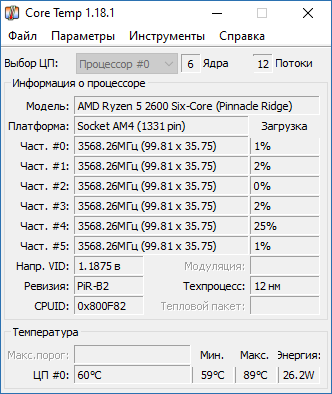
- See temperature for each CPU core independently
- Displays minimum, current, and maximum temps
- Shows CPU load percentage per core
📊 2. System Tray Integration
- Runs quietly in the background
- Temperature visible in the Windows taskbar (e.g., “Core #0: 62°C”)
- Click to open full window or access settings
⚠️ 3. Overheat Protection Alerts
- Set custom temperature thresholds
- Get on-screen notifications or email alerts when temps exceed limits
- Optional automatic shutdown to prevent hardware damage
📤 4. Logging & Reporting
- Log temperature data to CSV or TXT for analysis
- Track thermal performance over time (e.g., during stress tests)
- Export reports for troubleshooting or sharing
🖥️ 5. Broad Hardware Compatibility
- Supports Intel (Core i3/i5/i7/i9, Xeon, Pentium)
- Full AMD support (Ryzen 3000–9000, Threadripper, EPYC)
- Works on Windows 7, 8, 10, 11 (32-bit & 64-bit)
🛠️ Who Should Use Core Temp?
- Gamers: Monitor temps during long sessions
- Overclockers: Validate cooling after tuning
- PC Builders: Test thermal performance post-assembly
- Laptop Users: Detect dust-clogged fans or thermal throttling
- IT Admins: Diagnose overheating in office workstations
💡 Tip: Use Core Temp alongside stress tests (like Prime95 or Cinebench) to check thermal limits.
🆚 Core Temp vs. Other Monitoring Tools
Core Temp remains the gold standard for pure, focused CPU temperature monitoring.
💡 Final Thoughts: Know Your CPU’s True Temperature
Core Temp 1.19.5.69 is more than a utility—it’s a preventive maintenance tool that helps you avoid costly hardware damage. By giving you instant insight into your CPU’s thermal behavior, it empowers you to cool smarter, push harder, and compute safer.
🌡️ Small app. Big protection.
🌐 Official download (free): https://www.alcpu.com/CoreTemp
💻 Open-source components | No telemetry | No bundled software
✔ Tested: This software was tested on Windows 10 & Windows 11 and works smoothly without issues.
Frequently Asked Questions
- Is this software free?
Yes, it can be downloaded and used for free. - Does it support Windows 11?
Yes, it works perfectly on Windows 10 and 11. - Is it safe to use?
Yes, the software was scanned and tested before publishing.
Last updated: January 2026