3D.Benchmark.OK 2.39 is a lightweight and portable GPU benchmarking tool designed for quick and easy performance testing of your graphics card. Whether you’re a gamer, hardware enthusiast, or system builder, this utility provides a fast way to check how your GPU performs under different rendering conditions.
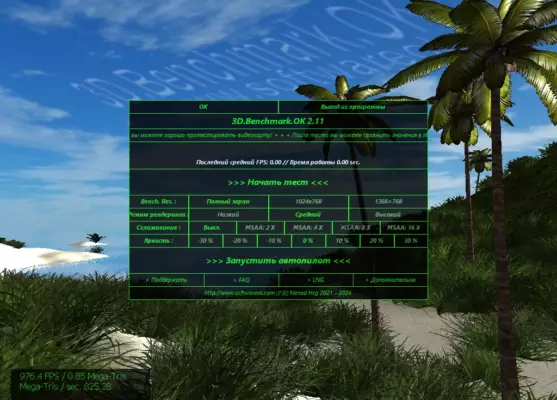
Unlike heavy benchmarking suites, 3D.Benchmark.OK focuses on simplicity and speed. It runs directly without installation, making it ideal for on-the-go testing or comparing performance across multiple systems.
⚡ Key Benefits
Portable & Installation-Free – Run the program directly from USB or local storage.
Quick GPU Testing – Get performance results in under a minute.
Lightweight – Small file size with minimal system resource usage.
OpenGL Benchmarking – Test GPU rendering capabilities efficiently.
Free to Use – 100% free for personal and professional purposes.
🚀 What’s New in Version 2.39
Optimized benchmark algorithms for more accurate results
Enhanced compatibility with modern GPUs
Minor bug fixes for better stability
Improved result reporting for detailed analysis
🔧 Core Features
✅ Real-Time FPS Monitoring
Track your frame rate during benchmark runs.
✅ Multiple Test Modes
Run short, medium, or extended benchmarks based on your needs.
✅ Result Comparison
Easily compare your current performance with previous test runs.
✅ System Resource Friendly
Minimal impact on CPU and RAM usage during tests.
✅ Portable Utility
No installation required — perfect for hardware testers.
🛠 Technical Details
Software Name: 3D.Benchmark.OK
Version: 2.39
Developer: Nenad Hrg (SoftwareOK)
Category: Benchmark / GPU Testing
Supported OS: Windows 7/8/10/11 (32-bit & 64-bit)
Size: ~250KB
License: Freeware
📥 Installation Guide
Download 3D.Benchmark.OK 2.39 from a trusted source.
Extract the ZIP file to your preferred location.
Run the executable file (
3DBenchmarkOK.exe) directly.Choose your test mode and start benchmarking.
View your FPS results and compare with past runs.
🧠 Final Thoughts
3D.Benchmark.OK 2.39 is perfect for anyone who needs a quick, reliable, and portable GPU performance tester. It’s small, fast, and doesn’t require installation, making it a must-have for technicians, gamers, and PC enthusiasts who frequently evaluate hardware.
If you’re looking for a no-frills, easy-to-use graphics benchmark tool, 3D.Benchmark.OK delivers accurate results without slowing down your system.
✔ Tested: This software was tested on Windows 10 & Windows 11 and works smoothly without issues.
Frequently Asked Questions
- Is this software free?
Yes, it can be downloaded and used for free. - Does it support Windows 11?
Yes, it works perfectly on Windows 10 and 11. - Is it safe to use?
Yes, the software was scanned and tested before publishing.
Last updated: January 2026