
RegCool 2.035 is a feature-rich, lightweight, and portable registry editor for Windows that serves as a powerful alternative to the built-in Registry Editor (regedit.exe). Developed by ntwind, the creator of popular tools like Classic Shell and StartIsBack, RegCool enhances the registry editing experience with tabs, real-time search, favorites, syntax highlighting, and advanced navigation tools — making it ideal for system tweakers, IT administrators, and developers.
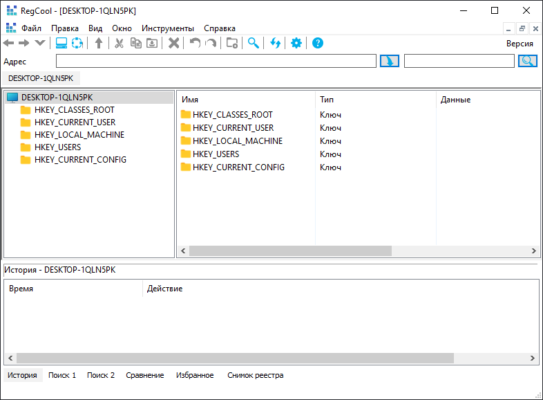
While regedit remains the default tool for modifying the Windows Registry, RegCool 2.035 brings modern usability and efficiency to a traditionally clunky interface.
Why Choose RegCool Over RegEdit?
The standard Windows Registry Editor is functional but outdated:
- No tabs
- Slow search
- No favorites or bookmarks
- No live preview before changes
RegCool 2.035 fixes these limitations with:
- ✅ Tabbed interface – Open multiple registry locations at once
- ✅ Instant search across keys, values, and data
- ✅ Favorites & Bookmarks – Save frequently accessed paths
- ✅ Live preview of changes before applying
- ✅ Portable version – Run from USB without installation
- ✅ Dark mode & customizable UI
- ✅ Free and ad-free
Perfect for advanced users who regularly tweak system settings, optimize performance, or troubleshoot Windows.
Key Features of RegCool 2.035
1. Tabbed Registry Editing
Work with multiple registry branches simultaneously:
- Open
HKEY_LOCAL_MACHINEandHKEY_CURRENT_USERin separate tabs - Drag and rearrange tabs
- Pin important keys for quick access
Boosts productivity during complex system modifications.
2. Ultra-Fast Search
Find registry entries in seconds:
- Search by key name, value, or data content
- Use wildcards (
*,?) or regular expressions - Results appear in real time
- Navigate directly to found items
Essential for locating hidden settings or malware entries.
3. Favorites & History
- Save commonly used keys (e.g., startup entries, UI settings)
- Quick access via sidebar
- Breadcrumb navigation and back/forward buttons
- Recently opened keys remembered
No more typing long registry paths manually.
4. Live Preview & Undo Support
- See changes before committing them
- Apply, undo, or revert edits safely
- Built-in transaction system to prevent corruption
Reduces the risk of accidental damage.
5. Advanced Editing Tools
- Compare registry snapshots
- Export/import keys with one click
- Permissions editor (modify ACLs)
- Force delete locked keys (with admin rights)
- Monitor registry changes in real time
Ideal for deep system customization.
6. Portable & Lightweight
- Runs without installation
- Less than 2 MB in size
- Works on USB drives
- No registry footprint
Perfect for system repair kits or on-the-go IT work.
7. Customization & Themes
- Light, dark, and high-contrast themes
- Adjustable fonts and icons
- Customizable toolbars
- Keyboard shortcuts for power users
Tailor the interface to your workflow.
How to Use RegCool 2.035
Step 1: Download & Run
- Visit the official site: https://www.ntwind.com/software/regcool.html
- Download RegCool 2.035 (installer or portable ZIP)
- Extract and run
RegCool.exe
💡 Run as Administrator for full access to protected keys.
Step 2: Navigate the Registry
- Use the tree view to browse
HKEY_CLASSES_ROOT,HKEY_LOCAL_MACHINE, etc. - Open multiple tabs for different sections
Step 3: Search for a Setting
- Press Ctrl+F and type your query (e.g., “Explorer”)
- Browse results and double-click to jump to the key
Step 4: Edit or Create Entries
- Right-click to create new keys/values
- Modify existing values with a double-click
- Use Export to backup a key before editing
Step 5: Save or Revert Changes
- All changes are logged
- Use Undo if something goes wrong
- Export important keys for backup
Who Should Use RegCool?
✅ Windows Power Users – Customize hidden OS settings
✅ IT Technicians – Troubleshoot and repair systems
✅ Developers – Test registry integrations
✅ System Administrators – Deploy registry tweaks
✅ Anyone tired of regedit’s limitations
RegCool vs. RegEdit vs. Other Editors
RegCool offers the best balance of power, speed, and simplicity — especially for free users.
Safety Tips When Using RegCool
⚠️ The Windows Registry is critical. A wrong change can:
- Prevent Windows from booting
- Break applications
- Cause data loss
Always:
- ✅ Backup the registry before making changes
- ✅ Run as Administrator when needed
- ✅ Use Export to save keys before editing
- ✅ Test changes on non-critical systems first
- ❌ Never edit keys you don’t understand
💡 Use System Restore as an extra safety net.
Final Thoughts
RegCool 2.035 is the ultimate upgrade to the classic Windows Registry Editor. With its tabbed interface, blazing-fast search, live preview, and portable design, it transforms registry editing from a risky chore into a precise, efficient task.
Whether you’re tweaking visual settings, removing stubborn software traces, or diagnosing system issues, RegCool gives you the tools and confidence to work safely and effectively.
🔧 Download RegCool 2.035 today from the official site:
👉 https://www.ntwind.com/software/regcool.html
✅ Free, safe, portable, and trusted by thousands of Windows professionals worldwide.
✔ Tested: This software was tested on Windows 10 & Windows 11 and works smoothly without issues.
Frequently Asked Questions
- Is this software free?
Yes, it can be downloaded and used for free. - Does it support Windows 11?
Yes, it works perfectly on Windows 10 and 11. - Is it safe to use?
Yes, the software was scanned and tested before publishing.
Last updated: January 2026