
ManyCam 9.1.0.5 Overview
ManyCam 9.1.0.5 is a powerful live streaming and virtual camera software that allows users to enhance their video chats, online classes, and live broadcasts with creative tools and effects. Designed for professionals, educators, and streamers, it provides full control over multiple video sources, audio mixing, and virtual backgrounds for a polished, studio-like experience.
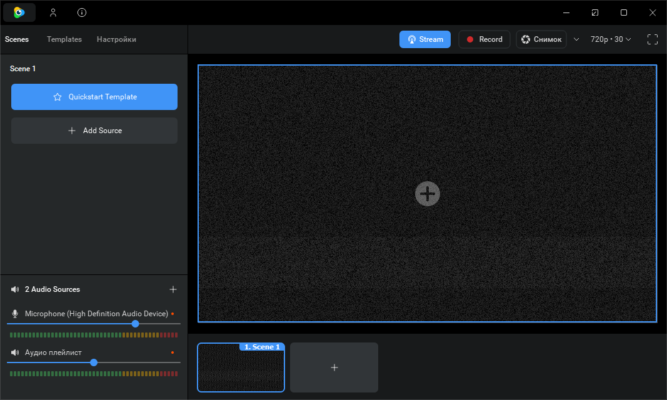
Whether you’re teaching online, streaming games, or hosting business meetings, ManyCam 9.1.0.5 offers everything you need to create engaging, high-quality video content.
Professional Live Streaming Made Easy
With ManyCam, users can stream to multiple platforms simultaneously, including YouTube, Facebook, Twitch, and Zoom. The intuitive interface allows you to add multiple video sources such as webcams, videos, images, PowerPoint slides, and even screen captures — all switchable in real time.
This makes it an excellent tool for educators, marketers, and streamers who need flexibility and professional-grade performance.
Key Features of ManyCam 9.1.0.5
🎥 Virtual Camera & Effects – Add filters, 3D masks, text overlays, and backgrounds to your live video.
🌐 Multi-Platform Streaming – Broadcast to Facebook Live, YouTube, Twitch, and other platforms at once.
💻 Multiple Video Sources – Combine webcams, IP cameras, media files, and your desktop in a single session.
🎧 Audio Mixing Tools – Manage microphones, sound effects, and background music with precision.
🧠 Virtual Backgrounds & Chroma Key – Replace your background easily with any image or video using AI.
📊 Picture-in-Picture Mode – Layer multiple video feeds for presentations or tutorials.
⚙️ Custom Presets – Save camera setups and scene layouts for quick switching.
💾 HD Recording & Local Save – Record high-quality video directly to your PC for later use.
Optimized for Education and Remote Work
ManyCam 9.1.0.5 is widely used by teachers, trainers, and online presenters. Its features are tailored for virtual classrooms, making lessons interactive and visually engaging. You can share your screen, add presentation slides, and even include a webcam overlay while explaining.
For business users, the software integrates seamlessly with major platforms like Zoom, Microsoft Teams, Google Meet, and Skype, improving communication and presentation quality.
Performance and Compatibility
ManyCam 9.1.0.5 has been optimized for both performance and stability. It supports Full HD and 4K resolution, ensuring crisp, professional-looking video output. Thanks to GPU acceleration, it delivers smooth streaming without lag — even when handling multiple sources simultaneously.
It runs efficiently on Windows 10 and 11, with minimal CPU usage, making it suitable for extended streaming sessions.
Conclusion
ManyCam 9.1.0.5 is a complete virtual camera and live streaming solution that combines creativity, flexibility, and reliability. From professional broadcasts to online classes, it allows anyone to create engaging video content effortlessly.
With advanced features like multi-platform streaming, AI background removal, and professional-grade effects, ManyCam remains one of the best live streaming tools for Windows in 2025.
✔ Tested: This software was tested on Windows 10 & Windows 11 and works smoothly without issues.
Frequently Asked Questions
- Is this software free?
Yes, it can be downloaded and used for free. - Does it support Windows 11?
Yes, it works perfectly on Windows 10 and 11. - Is it safe to use?
Yes, the software was scanned and tested before publishing.
Last updated: January 2026