
Remote Desktop Protocol (RDP) is an essential tool for IT administrators and businesses, but it also opens doors to cyber threats if not properly secured. Hackers often exploit vulnerable RDP ports to launch brute-force attacks or gain unauthorized access. TSplus Advanced Security 7.3.6.27 is designed to prevent such risks by offering a comprehensive security layer for remote desktop servers and buy.
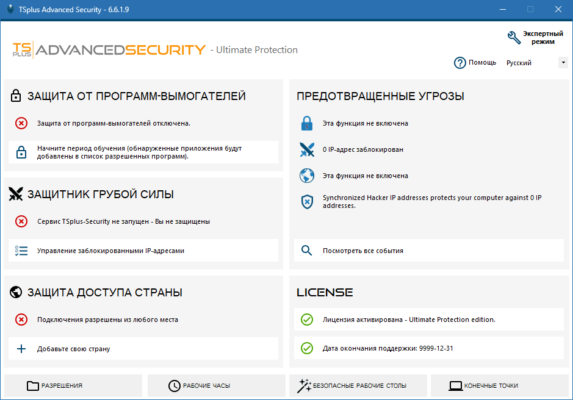
What is TSplus Advanced Security?
TSplus Advanced Security is a specialized solution that enhances the security of remote desktop environments. It provides real-time protection, intelligent blocking, and advanced monitoring to safeguard RDP connections against cyberattacks. With customizable features and user-friendly controls, administrators can secure their infrastructure without adding complexity.
Key Features of TSplus Advanced Security 7.3.6.27
1. Brute-Force Attack Protection
Detects and blocks repeated failed login attempts.
Prevents unauthorized access through strong IP filtering.
2. Homeland Protection
Restricts access to only selected countries.
Blocks foreign IPs automatically to reduce attack vectors.
3. IP and User Whitelisting
Easily manage trusted users and networks.
Configure custom access rules for better control.
4. Ransomware Protection
Detects suspicious behavior and prevents ransomware execution.
Real-time alerts for quick action.
5. Working Hours Restrictions
Limit user access to specific days and hours.
Prevents unauthorized logins outside business hours.
6. Advanced Monitoring & Reporting
Get detailed logs of login attempts, blocked IPs, and user activity.
Provides actionable insights for IT administrators.
What’s New in Version 7.3.6.27?
Improved brute-force attack detection algorithms.
Enhanced compatibility with the latest Windows Server editions.
Optimized performance for large-scale deployments.
UI improvements for easier rule configuration.
Bug fixes and stability enhancements.
Benefits of Using TSplus Advanced Security
For IT Administrators
Simplifies RDP security management.
Reduces manual monitoring with automated blocking.
For Businesses
Protects sensitive data and prevents costly breaches.
Ensures compliance with cybersecurity standards.
For Remote Teams
Secure access without compromising convenience.
Flexible configuration for different departments and roles.
How to Use TSplus Advanced Security 7.3.6.27
Step 1: Install and Configure
Download and install the software on your Windows server hosting RDP sessions.
Step 2: Enable Protection Modules
Activate brute-force blocking, homeland restrictions, and ransomware protection.
Step 3: Customize Security Policies
Set user-specific restrictions, working hours, and IP access rules.
Step 4: Monitor and Maintain
Use real-time dashboards and logs to monitor activity and respond to threats quickly.
Why Choose TSplus Advanced Security Over Alternatives?
While firewalls and antivirus software are essential, TSplus Advanced Security 7.3.6.27 is specifically built for RDP environments. Its advantages include:
Tailored security for remote desktop connections.
Automation that reduces IT workload.
Comprehensive features covering brute-force, ransomware, and IP restrictions.
Scalability for small businesses and enterprise servers alike.
Conclusion
Remote desktop servers remain a prime target for cybercriminals, but with TSplus Advanced Security 7.3.6.27, organizations can significantly reduce their exposure to risks. By combining advanced monitoring, automated IP blocking, ransomware defense, and flexible user policies, it provides a robust security shield for Windows RDP environments.
For IT professionals and businesses looking for a reliable and easy-to-deploy security tool, TSplus Advanced Security is a smart investment to keep data and infrastructure safe.
✔ Tested: This software was tested on Windows 10 & Windows 11 and works smoothly without issues.
Frequently Asked Questions
- Is this software free?
Yes, it can be downloaded and used for free. - Does it support Windows 11?
Yes, it works perfectly on Windows 10 and 11. - Is it safe to use?
Yes, the software was scanned and tested before publishing.
Last updated: January 2026