
VirtualBox is one of the most popular and versatile virtualization platforms, widely used by developers, IT professionals, and students around the world. While the core version of VirtualBox provides essential virtualization capabilities, many advanced features require an additional component: the VirtualBox Extension Pack. The latest release, VirtualBox Extension Pack 7.2.0, brings enhanced stability, improved compatibility, and a set of powerful tools that extend VirtualBox’s functionality.
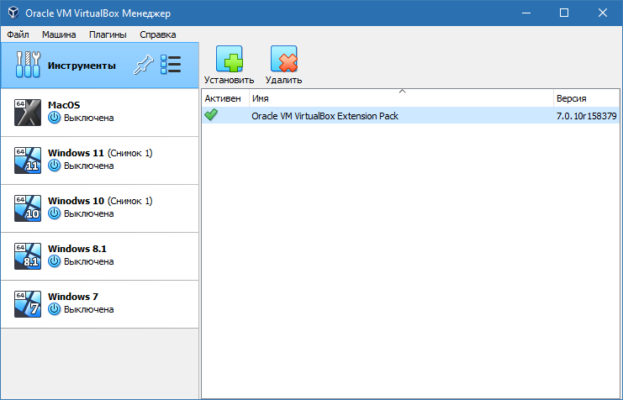
In this article, we will explore what the VirtualBox Extension Pack offers, its key features, system requirements, installation steps, and why upgrading to version 7.2.0 is beneficial for anyone using VirtualBox.
What is VirtualBox Extension Pack?
The VirtualBox Extension Pack is an official add-on developed by Oracle that enhances the core capabilities of VirtualBox. While VirtualBox itself is open-source and free, the Extension Pack provides additional features under the Personal Use and Evaluation License (PUEL). This means it is free for personal use, but businesses may require a commercial license.
Some of the most important functions enabled by the Extension Pack include:
USB 2.0 and USB 3.0 support for connecting external devices to virtual machines.
VirtualBox Remote Desktop Protocol (VRDP) for accessing VMs remotely.
Disk image encryption to secure virtual environments.
NVMe and PXE boot for Intel cards, useful for advanced networking and storage configurations.
Host webcam passthrough, allowing video conferencing or testing apps inside a VM.
Without the Extension Pack, users are limited to basic virtualization features, making it an essential tool for professionals who rely on VirtualBox for daily tasks.
Key Features of VirtualBox Extension Pack 7.2.0
The 7.2.0 release of the VirtualBox Extension Pack introduces several enhancements and bug fixes:
Improved USB Support – Enhanced compatibility with USB 3.0 devices, ensuring faster data transfers and fewer connection issues.
Better Remote Access – Updates to VRDP improve responsiveness and reduce latency when controlling virtual machines remotely.
Encryption Enhancements – Stronger encryption methods for securing sensitive virtual machine data.
Stability Fixes – Multiple bug fixes improve reliability across Windows, Linux, and macOS hosts.
Expanded Hardware Support – Better handling of modern hardware configurations, ensuring smooth virtualization experiences.
These improvements make VirtualBox Extension Pack 7.2.0 a must-have update for anyone who relies on virtualization in their workflow.
System Requirements
To use the VirtualBox Extension Pack 7.2.0, you must have the matching version of VirtualBox 7.2.0 installed on your system. It is compatible with:
Operating Systems: Windows, Linux, macOS, and Solaris
Processor: Intel or AMD with virtualization support (VT-x/AMD-V)
RAM: Minimum 4 GB (8 GB or more recommended for multiple VMs)
Storage: At least 200 MB for installation, plus VM storage needs
How to Install VirtualBox Extension Pack 7.2.0
Download VirtualBox 7.2.0 from the official Oracle website.
Download the Extension Pack that matches the installed version.
Open VirtualBox, go to File > Preferences > Extensions.
Click the Add button and select the downloaded Extension Pack file.
Accept the license agreement and wait for installation to complete.
Restart VirtualBox to apply the changes.
Once installed, you can immediately start using the advanced features, such as USB device passthrough and encrypted virtual machines.
Why Upgrade to 7.2.0?
Upgrading to VirtualBox Extension Pack 7.2.0 ensures better performance, security, and compatibility with the latest operating systems. Whether you are testing applications, running multiple operating systems, or managing virtualized environments for work, the new features and fixes will greatly improve your experience.
For developers and IT professionals, the enhanced USB and encryption support provide both flexibility and peace of mind. For students and casual users, the ability to connect webcams and USB devices makes VirtualBox more practical for everyday use.
Conclusion
The VirtualBox Extension Pack 7.2.0 is an essential add-on for anyone looking to maximize the capabilities of Oracle VirtualBox. From advanced USB support to encrypted virtual machines and remote desktop access, it provides powerful tools that are invaluable for virtualization tasks.
If you are already using VirtualBox, upgrading to the latest Extension Pack is highly recommended to take advantage of new features, improved performance, and enhanced stability.
✔ Tested: This software was tested on Windows 10 & Windows 11 and works smoothly without issues.
Frequently Asked Questions
- Is this software free?
Yes, it can be downloaded and used for free. - Does it support Windows 11?
Yes, it works perfectly on Windows 10 and 11. - Is it safe to use?
Yes, the software was scanned and tested before publishing.
Last updated: January 2026