
Working with DBF (Database File) formats can be challenging without the right tools. Many database applications, such as dBase, FoxPro, and Clipper, rely on DBF files for data storage. However, opening and editing these files often requires specialized software. DBF Viewer 2000 8.80 is a powerful and user-friendly solution that allows users to view, edit, and convert DBF files quickly and buy.
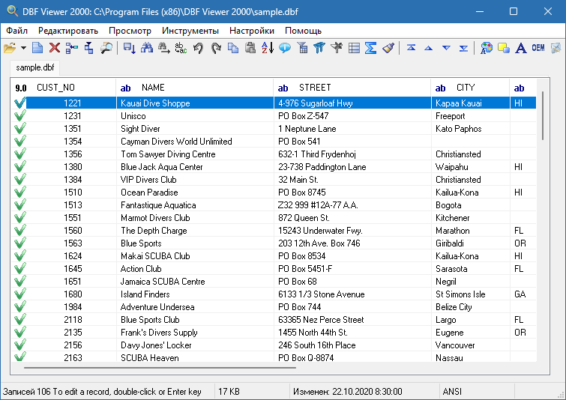
With a lightweight design and advanced capabilities, DBF Viewer 2000 is trusted by professionals across industries who work with database files regularly.
What is DBF Viewer 2000?
DBF Viewer 2000 is a Windows-based application designed for database administrators, programmers, and business users who need to access DBF files without relying on heavy database software.
Unlike standard text editors, DBF Viewer 2000 recognizes the structure of DBF files and allows seamless editing, searching, filtering, and conversion. The latest release, version 8.80, adds performance enhancements and improved compatibility with modern Windows systems.
Key Features of DBF Viewer 2000 8.80
1. Fast DBF File Access
Open large DBF files instantly without performance slowdowns.
2. Advanced Editing Tools
Edit, delete, or insert records directly into your DBF files.
3. Data Filtering & Sorting
Apply custom filters and sorting rules to analyze data more efficiently.
4. Export & Conversion Options
Convert DBF files into popular formats such as XLS/XLSX, CSV, TXT, HTML, or SQL.
5. Batch Processing
Handle multiple DBF files at once, saving time on repetitive tasks.
6. Printing Support
Easily print data tables or export them for reports.
7. Unicode Support
Seamlessly manage DBF files containing international characters.
What’s New in Version 8.80?
Optimized performance for handling very large databases.
Improved export functionality to Excel and CSV.
Better compatibility with Windows 11.
Enhanced stability and bug fixes.
Faster batch file operations for enterprise use.
Benefits of Using DBF Viewer 2000
For Developers
Quickly test and modify DBF structures without launching full-scale database environments.
For Businesses
Easily manage customer records, financial data, or inventory stored in DBF format.
For Data Analysts
Use powerful filters and sorting tools to extract valuable insights from legacy databases.
For Everyday Users
Open DBF files without requiring complex database knowledge.
How to Use DBF Viewer 2000 8.80
Step 1: Install the Software
Download and install DBF Viewer 2000 from the official website.
Step 2: Open a DBF File
Launch the software and load your DBF file for instant access.
Step 3: Edit & Manage Data
Modify records, apply filters, or sort data as needed.
Step 4: Export or Convert
Choose from multiple export options to use your data in Excel, SQL, or other formats.
Step 5: Automate with Batch Processing
Save time by applying bulk edits or conversions to multiple DBF files at once.
Why Choose DBF Viewer 2000 Over Other Tools?
Many database management systems can open DBF files, but they often require technical expertise and consume significant system resources. DBF Viewer 2000 8.80 stands out because it is:
Lightweight and fast – handles large files effortlessly.
User-friendly – simple interface suitable for non-technical users.
Flexible – supports a wide range of export formats.
Reliable – designed specifically for DBF file management.
Conclusion
DBF Viewer 2000 8.80 is an essential tool for anyone working with DBF databases. Whether you are a developer, business professional, or data analyst, it provides the tools you need to view, edit, and convert DBF files efficiently.
With advanced editing features, batch processing, and export options, it ensures compatibility with modern workflows while maintaining the simplicity that users appreciate. For anyone dealing with legacy database formats, DBF Viewer 2000 remains a top choice.
✔ Tested: This software was tested on Windows 10 & Windows 11 and works smoothly without issues.
Frequently Asked Questions
- Is this software free?
Yes, it can be downloaded and used for free. - Does it support Windows 11?
Yes, it works perfectly on Windows 10 and 11. - Is it safe to use?
Yes, the software was scanned and tested before publishing.
Last updated: January 2026