
SourceTree 3.4.24: The Visual Git Client That Makes Version Control Simple 🖥️✨
Working with Git from the command line can be powerful, but it can also be intimidating and complex, especially for beginners or when managing complex branching and merging workflows. SourceTree 3.4.24 by Atlassian is a free, comprehensive graphical client that brings the power of Git and Mercurial to your desktop with an intuitive, visual interface.
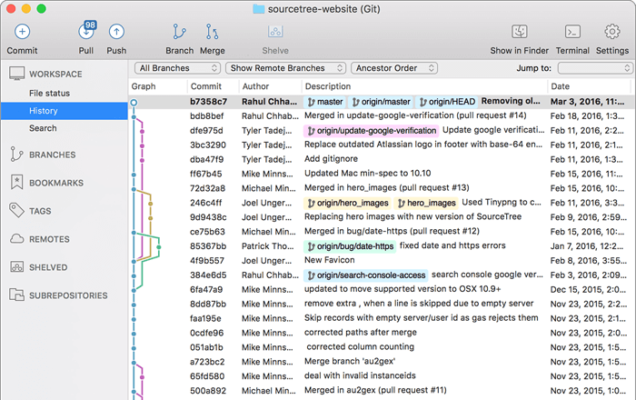
Whether you’re a solo developer or part of a collaborative team, SourceTree streamlines repository management, branching, merging, and history visualization—making Git accessible and efficient.
🎯 Why Use SourceTree?
- ✅ Free & Open Source – No cost for individuals and teams
- ✅ Visual Git Management – See your repository history, branches, and commits graphically
- ✅ Integrates with Popular Platforms – Works seamlessly with Bitbucket, GitHub, GitLab
- ✅ Supports Git & Mercurial – Manage both version control systems
- ✅ Powerful Branching Tools – Visualize and manage complex branching workflows
- ✅ Built-in Terminal – Access command line when needed
Perfect for developers, designers, project managers, and anyone needing a GUI for Git.
✨ Key Features of Version 3.4.24
📊 1. Intuitive Visual Interface
- Visual commit history graph – Understand project evolution at a glance
- Interactive staging area – Review and commit changes easily
- Clear branch visualization – See how branches diverge and merge
🔄 2. Advanced Git Workflows
- Merge, Rebase, Cherry-pick – Perform complex operations visually
- Submodule Management – Handle dependencies within your project
- Stash & Pop – Temporarily save work without committing
🔗 3. Cloud Platform Integration
- Connect directly to Bitbucket, GitHub, GitLab
- Clone repositories with a single click
- Push, pull, fetch changes seamlessly
- Manage pull requests (integration varies)
🧩 4. Comprehensive Repository Management
- Clone, create, and manage repositories
- View file diffs in a user-friendly way
- Search commits and branches
- Tag and release management
🛠️ 5. Developer-Friendly Tools
- Built-in terminal for command-line tasks
- Git Flow support for standardized workflows
- Customizable workflows and layouts
- SSH key management
🛠️ Ideal For:
- New Git Users: Learn Git concepts visually
- Teams: Collaborate on projects with a clear visual history
- Developers: Manage complex branching and merging
- Anyone: Preferring a GUI over command-line Git
💡 Tip: Use the visual branching graph to understand and manage your feature branches and releases effectively.
🆚 SourceTree vs. Command-Line Git
SourceTree provides a bridge between the power of Git and ease of use.
⚠️ Important Notes
- SourceTree is free for personal and commercial use
- Requires Git to be installed on your system
- Compatible with Windows and macOS
- Some advanced features might require familiarity with Git concepts
💡 Final Thoughts: Visualize Your Code History
SourceTree 3.4.24 transforms the potentially daunting task of Git version control into a manageable and visual process. By providing a clear, graphical representation of your repository, it empowers developers to collaborate more effectively and manage their code with confidence.
🔧 Clone. Commit. Merge. Visually.
🌐 Official website: https://www.sourcetreeapp.com (Note: Verify exact download page)
💻 Compatible with Windows and macOS.
✔ Tested: This software was tested on Windows 10 & Windows 11 and works smoothly without issues.
Frequently Asked Questions
- Is this software free?
Yes, it can be downloaded and used for free. - Does it support Windows 11?
Yes, it works perfectly on Windows 10 and 11. - Is it safe to use?
Yes, the software was scanned and tested before publishing.
Last updated: January 2026