In today’s fast-paced digital world, artificial intelligence is no longer just a futuristic concept — it’s a practical tool that can save time, improve quality, and automate repetitive tasks. From content creators and marketers to office professionals and students, everyone can benefit from AI-powered software.
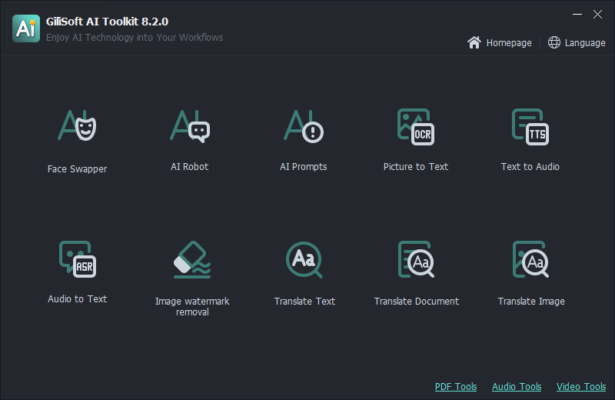
That’s where Gilisoft AI Toolkit 10.5 comes in — a powerful, all-in-one software suite that bundles multiple AI-driven utilities into a single, easy-to-use platform. Developed by Gilisoft International, this toolkit eliminates the need to download and manage dozens of separate apps by offering a complete set of intelligent tools for media enhancement, file security, speech processing, and more.
Whether you’re editing photos, transcribing interviews, creating videos, or protecting sensitive data, Gilisoft AI Toolkit 10.5 delivers smart, fast, and reliable results — right from your Windows desktop.
Let’s explore what makes this suite a must-have for modern PC users.
📌 What Is Gilisoft AI Toolkit 10.5?
Gilisoft AI Toolkit 10.5 is a multi-functional AI software bundle designed for Windows users who want to leverage artificial intelligence without complexity. It integrates several standalone Gilisoft products into one unified interface, offering tools for:
- Image enhancement and background removal
- Speech-to-text and audio transcription
- Video upscaling and noise reduction
- File encryption and folder locking
- Screen recording with AI noise suppression
All tools are powered by deep learning models and optimized for offline use, ensuring your data stays private and secure on your local machine.
Perfect for:
- Content creators
- Educators and students
- Remote workers
- Small businesses
- Home users
No internet connection required — your files never leave your PC.
🛠️ Key Features of Gilisoft AI Toolkit 10.5
1. 🖼️ AI Image Enhancer & Background Remover
Automatically:
- Upscale low-resolution images up to 4x
- Remove backgrounds with one click
- Enhance facial details and textures
- Convert photos to sketches or artistic styles
Ideal for social media, e-commerce, and presentations.
2. 🎙️ AI Voice to Text Converter
Transcribe audio and video files into editable text with high accuracy. Supports:
- MP3, WAV, M4A, and video formats
- Multiple languages
- Speaker identification (dual-channel audio)
Great for interviews, lectures, and subtitles.
3. 🎥 AI Video Enhancer
Improve video quality by:
- Upscaling resolution (720p → 1080p or 4K)
- Reducing compression artifacts
- Stabilizing shaky footage
- Enhancing brightness and contrast
Perfect for old recordings or low-quality webcam videos.
4. 🔇 AI Noise Suppression
Clean audio by removing:
- Background noise (fans, traffic)
- Echo and reverb
- Keyboard clicks and microphone hiss
Useful for podcasters, streamers, and remote meetings.
5. 🔐 File & Folder Encryption Tool
Secure sensitive documents with AES-256 encryption. Lock folders with a password — no trace left behind.
Protect personal photos, financial records, or business files.
6. 📹 Smart Screen Recorder
Record your screen with AI-powered enhancements:
- Auto-highlight cursor
- Noise-free audio capture
- Scheduled recording
- Webcam overlay
Ideal for tutorials, gameplay, and online courses.
7. 🧩 Batch Processing Support
Apply AI enhancements to multiple files at once — save hours when processing large media libraries.
8. 🖥️ Offline & Private Operation
All AI processing happens locally on your PC — no uploading, no cloud dependency, no privacy risks.
9. 🧼 Clean, Unified Interface
Single dashboard with intuitive tabs for each tool — no need to switch between apps.
10. 💾 Lightweight & Fast
Optimized for performance — runs smoothly even on mid-range PCs.
👥 Who Should Use Gilisoft AI Toolkit 10.5?
- Content Creators: Enhance images, transcribe videos, record tutorials.
- Students & Educators: Convert lectures to text, improve presentation visuals.
- Remote Workers: Clean audio for meetings, secure documents.
- Marketers & Designers: Remove backgrounds, upscale product images.
- Home Users: Organize photos, protect private files, record gameplay.
🖥️ System Requirements
- Operating System: Windows 10 / 11 (64-bit)
- RAM: 8 GB minimum (16 GB recommended for video)
- Graphics Card: Dedicated GPU with CUDA support (NVIDIA) for best AI performance
- Hard Disk Space: 1 GB free space (more for large media files)
- No Internet Required: Full offline functionality
✅ Compatible with both Intel and AMD processors.
📈 Why Choose Gilisoft AI Toolkit 10.5?
- ✅ All-in-One AI Solution – No More App Switching
- ✅ Offline Processing = Maximum Privacy
- ✅ High Accuracy in Transcription & Enhancement
- ✅ User-Friendly for Beginners
- ✅ Affordable Alternative to Multiple Premium Tools
- ✅ Regular Updates & Strong Support
✅ Final Thoughts
Gilisoft AI Toolkit 10.5 isn’t just another software bundle — it’s a smart digital assistant that brings the power of artificial intelligence to your desktop. With its wide range of AI-powered tools, offline operation, and focus on usability, it simplifies complex tasks and boosts productivity across multiple domains.
If you’re tired of juggling different apps for transcription, image editing, or file security, Gilisoft AI Toolkit 10.5 offers a faster, smarter, and safer way to get things done.
For anyone who wants AI at their fingertips — without the cloud or subscription fees — this toolkit is definitely worth trying.
✔ Tested: This software was tested on Windows 10 & Windows 11 and works smoothly without issues.
Frequently Asked Questions
- Is this software free?
Yes, it can be downloaded and used for free. - Does it support Windows 11?
Yes, it works perfectly on Windows 10 and 11. - Is it safe to use?
Yes, the software was scanned and tested before publishing.
Last updated: January 2026