
Fast File Encryptor 13.10: Secure Your Data Instantly 🖥️🔒
Need to protect sensitive files, personal documents, or confidential business data from prying eyes? Fast File Encryptor 13.10 is a lightweight, easy-to-use encryption tool for Windows that allows you to quickly encrypt individual files or entire folders using strong encryption algorithms.
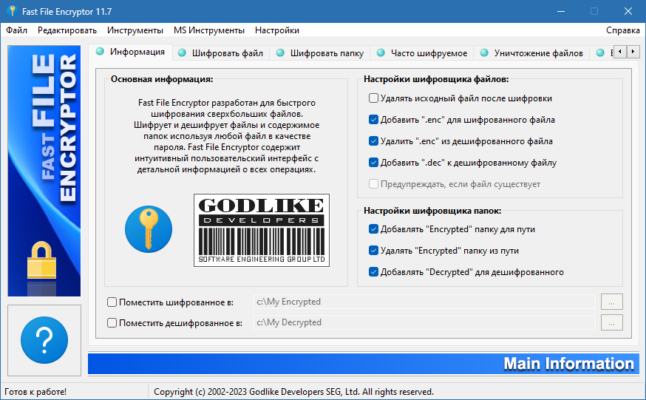
Whether you’re securing financial records, private photos, or proprietary work files, Fast File Encryptor provides a fast, reliable way to lock away your data and maintain your privacy.
🎯 Why Use Fast File Encryptor?
- ✅ Strong Encryption: Uses industry-standard AES (Advanced Encryption Standard)
- ✅ Lightning Fast: Encrypts files and folders in seconds
- ✅ Simple Interface: Drag-and-drop or right-click to encrypt
- ✅ No Installation Required: Portable version available (often)
- ✅ Password Protection: Only you control access to your files
- ✅ Batch Processing: Encrypt multiple files at once
Perfect for home users, freelancers, small businesses, and anyone needing quick, local file encryption.
✨ Key Features of Version 13.10
🔐 1. Strong AES Encryption
- AES-256 bit encryption – the same standard used by governments and banks
- Military-grade security for your personal files
- Password-protected – only those with the password can decrypt
⚡ 2. Fast & Efficient
- Encrypts large files quickly
- Minimal impact on system resources
- Batch encryption for multiple files/folders
📁 3. Easy File & Folder Encryption
- Drag and drop files/folders into the program
- Right-click context menu integration for quick access
- Encrypt individual files or entire directory structures
🔄 4. Simple Decryption
- Decrypt files using the same tool and your password
- No complex key management – just remember your password
- Decryption verification to ensure file integrity
🛡️ 5. Security & Privacy
- No internet connection required – works offline
- No data uploaded – encryption happens locally
- No hidden processes – transparent operation
🛠️ How to Encrypt Files in 3 Steps
- 📥 Load: Add files or folders to the encryptor.
- 🔑 Set Password: Enter a strong, memorable password.
- 🔒 Encrypt: Click ‘Encrypt’ and wait for completion.
💡 Tip: Store your encryption password in a secure password manager to avoid losing access to your files.
🆚 Fast File Encryptor vs. Built-in Windows Tools
Fast File Encryptor offers a good balance of simplicity and strong file-level encryption.
⚠️ Important Security Notes
- Remember your password – lost passwords mean permanently lost files.
- Use a unique, strong password for encryption.
- Always download from official or trusted sources to avoid malware-infected versions.
- Combine with backups – encrypted files can still be lost due to hardware failure.
💡 Final Thoughts: Protect Your Data, Your Way
Fast File Encryptor 13.10 provides a straightforward, effective method for encrypting your files locally on Windows. By using strong AES encryption and a simple workflow, it ensures your sensitive data stays private without complexity.
🔐 Encrypt. Secure. Relax.
🔗 (Note: Verify the exact official source for Fast File Encryptor 13.10, as multiple tools may share similar names.)
💻 Compatible with Windows 11/10/8.1/8/7/Vista/XP (32-bit & 64-bit).
✔ Tested: This software was tested on Windows 10 & Windows 11 and works smoothly without issues.
Frequently Asked Questions
- Is this software free?
Yes, it can be downloaded and used for free. - Does it support Windows 11?
Yes, it works perfectly on Windows 10 and 11. - Is it safe to use?
Yes, the software was scanned and tested before publishing.
Last updated: January 2026