
In today’s digital workspace, the ability to create PDF files quickly and efficiently is essential. Whether you’re printing reports, saving web pages, or sharing documents, PDF format ensures consistency across devices and platforms . One of the simplest and most trusted tools for this task is doPDF 11.9.492 — a free, lightweight, and powerful PDF creator for Windows.
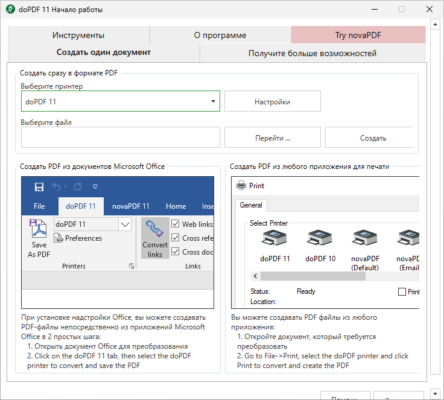
Unlike paid software suites, doPDF offers a no-cost solution that works seamlessly with any application that supports printing. Let’s dive into what makes doPDF 11.9.492 a top choice for millions of users worldwide.
📌 What Is doPDF 11.9.492?
doPDF 11.9.492 is a free virtual PDF printer developed by Softland. Once installed, it appears as a printer option in your system. Whenever you “print” a document from any application — such as Microsoft Word, Excel, Chrome, or Notepad — you can select doPDF as the printer to generate a PDF file instead of printing on paper.
It’s an ideal tool for students, professionals, and home users who need to create PDFs quickly without paying for expensive software .
🛠️ Key Features of doPDF 11.9.492
1. 🖨️ Works as a Virtual PDF Printer
After installation, doPDF integrates into your system as a print driver. Simply press Ctrl + P , choose doPDF , and save your document as a PDF.
2. 📄 High-Quality PDF Output
The software supports multiple resolution settings (from 72 DPI to 2400 DPI), allowing you to balance file size and quality based on your needs.
3. 🧼 Lightweight & Fast Installation
doPDF has a small footprint and installs quickly without slowing down your PC. It doesn’t include bloatware or unnecessary add-ons.
4. 🔄 Compatible with All Windows Versions
Supports Windows 11, 10, 8.1, 8, 7, Vista, and XP (both 32-bit and 64-bit), making it suitable for older and newer systems alike.
5. 📁 Customizable PDF Settings
You can set default page sizes (including A4, Letter, Legal), compression levels, and output folder locations to suit your workflow.
6. 🏷️ Automatic File Naming
doPDF can automatically name your PDF files using templates like {document_title}_{date}.pdf, helping keep your files organized.
7. 🌍 Multi-Language Support
Available in over 40 languages , including English, Spanish, French, German, Arabic, Russian, and Chinese.
8. 🔐 PDF Compatibility
Generates PDF files compliant with PDF/A standards , ideal for archiving and long-term storage.
9. 📎 No Watermarks or Ads
Unlike many free tools, doPDF adds no watermarks, banners, or advertisements to your generated PDFs.
👥 Who Should Use doPDF 11.9.492?
- Students: To convert assignments, notes, and research papers into shareable PDFs.
- Office Workers: For creating professional invoices, reports, and contracts.
- Home Users: To save emails, web articles, or receipts as PDFs.
- Developers & IT Staff: For generating documentation or automated PDF creation tasks.
🖥️ System Requirements
- Operating System: Windows 11, 10, 8.1, 8, 7, Vista, XP (32-bit & 64-bit)
- RAM: 256 MB minimum (512 MB recommended)
- Hard Disk Space: 50 MB free space
- .NET Framework: 4.0 or higher (automatically installed if missing)
📈 Why Choose doPDF 11.9.492?
- ✅ 100% Free – No hidden costs or premium upgrades required.
- ✅ No Internet Required – Works offline, keeping your data private.
- ✅ Trusted & Safe – Developed by Softland, also known for novaPDF.
- ✅ Easy to Use – Just print → select doPDF → save as PDF.
- ✅ Lightweight & Secure – Fast performance without compromising system security.
✅ Final Thoughts
doPDF 11.9.492 is one of the best free PDF creation tools available for Windows users. It combines simplicity, reliability, and high-quality output in a completely free package — making it perfect for everyday use.
Whether you’re converting a single webpage or automating batch document exports, doPDF delivers consistent results without clutter or cost .
If you’re looking for a fast, secure, and free way to create PDFs from any printable document, doPDF 11.9.492 is a smart and trustworthy choice .
✔ Tested: This software was tested on Windows 10 & Windows 11 and works smoothly without issues.
Frequently Asked Questions
- Is this software free?
Yes, it can be downloaded and used for free. - Does it support Windows 11?
Yes, it works perfectly on Windows 10 and 11. - Is it safe to use?
Yes, the software was scanned and tested before publishing.
Last updated: January 2026