⚡ Quick Access Popup 12.0 – Smart, Fast, and Customizable Access Tool
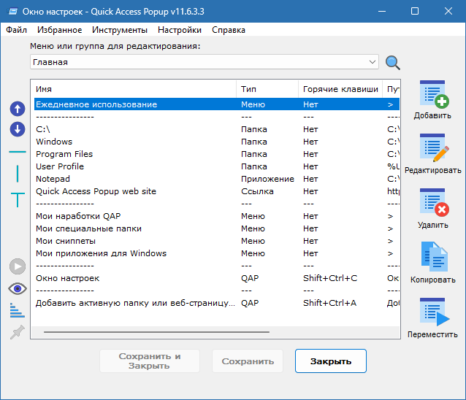
Quick Access Popup 12.0 is a powerful productivity utility for Windows that allows users to quickly open folders, files, applications, and web links through a simple popup menu. With a single shortcut, you can access everything you use most — no more wasting time navigating deep folder structures or searching through cluttered desktops.
Created by Jean Lalonde, Quick Access Popup (QAP) helps streamline your workflow and boost efficiency whether you’re a casual user or a professional multitasker.
⚙️ Key Features of Quick Access Popup 12.0
🖱️ Instant Access Menu:
Open your favorite folders, files, and websites instantly from any window or desktop.💼 Customizable Shortcuts:
Assign global keyboard shortcuts or mouse buttons to launch your popup menu anywhere.🔄 Portable and Lightweight:
No installation needed — run QAP from a USB drive or any folder for instant use.🔗 Smart Integration:
Works seamlessly with Windows Explorer, Directory Opus, and Total Commander.🧩 Add Any Item Type:
Create shortcuts for documents, programs, network folders, FTP links, or even control panel tools.🌐 Multi-Language Support:
Available in several languages for international users.
🚀 What’s New in Version 12.0
✅ Enhanced drag-and-drop customization for menu items
✅ Improved compatibility with Windows 11
✅ Faster menu response and reduced memory usage
✅ New icons and visual improvements for better navigation
💡 Why You’ll Love Quick Access Popup
If you frequently work with multiple folders and files, Quick Access Popup 12.0 saves you countless clicks. It’s perfect for:
💻 Developers managing project directories
🧑💼 Office workers accessing shared folders
🎨 Creatives organizing design or media assets
🧠 Power users looking to optimize workflow
Instead of pinning shortcuts all over your desktop, QAP centralizes everything in a clean, customizable popup menu.
🧰 System Requirements
Operating System: Windows 7, 8, 10, 11 (32-bit & 64-bit)
RAM: 512 MB or higher
Storage: 20 MB of free space
License: Freeware (personal use)
🌐 Official Website
🔗 https://www.quickaccesspopup.com
✔ Tested: This software was tested on Windows 10 & Windows 11 and works smoothly without issues.
Frequently Asked Questions
- Is this software free?
Yes, it can be downloaded and used for free. - Does it support Windows 11?
Yes, it works perfectly on Windows 10 and 11. - Is it safe to use?
Yes, the software was scanned and tested before publishing.
Last updated: January 2026