
Display Driver Uninstaller 18.1.3.1 Overview
Display Driver Uninstaller (DDU) 18.1.3.1 is a powerful and free utility designed to completely remove GPU drivers and related registry entries from Windows. Unlike the standard uninstaller, DDU ensures that no leftover files remain, which helps prevent conflicts when installing new drivers.
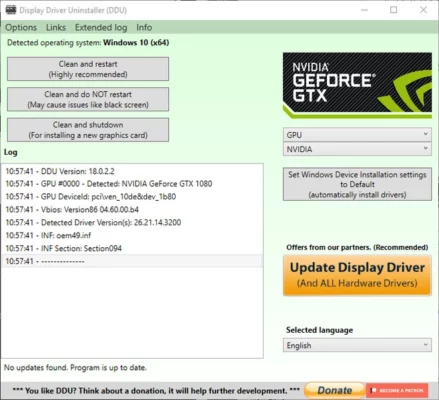
It supports NVIDIA, AMD, and Intel graphics drivers, making it an essential tool for gamers, PC technicians, and system enthusiasts who need a clean driver installation for better stability and performance.
Key Features of Display Driver Uninstaller 18.1.3.1
🧹 Complete Driver Removal – Deletes all traces of NVIDIA, AMD, and Intel GPU drivers.
🖥️ Safe Mode Support – Can run in Windows Safe Mode for maximum efficiency.
⚡ Fix Installation Issues – Helps resolve driver conflicts and failed installations.
🎮 Improved Gaming Stability – Eliminates crashes caused by corrupted or outdated drivers.
🔄 Prepares for Clean Install – Ideal before upgrading or switching GPU brands.
💻 Lightweight & Portable – No installation required, just run and use.
What’s New in Version 18.1.3.1
Improved AMD driver cleanup routines.
Updated support for the latest NVIDIA and Intel drivers.
Enhanced registry cleaning for stability.
Minor bug fixes and optimizations.
System Requirements
OS: Windows 7, 8, 10, 11 (32-bit & 64-bit)
RAM: 2 GB minimum
CPU: Intel/AMD dual-core or higher
GPU: NVIDIA, AMD, or Intel
Conclusion
Display Driver Uninstaller (DDU) 18.1.3.1 is the best solution for anyone who wants to remove GPU drivers completely before performing a clean installation. It ensures a fresh start, free of driver conflicts, making it a must-have utility for PC gamers and technicians.
✔ Tested: This software was tested on Windows 10 & Windows 11 and works smoothly without issues.
Frequently Asked Questions
- Is this software free?
Yes, it can be downloaded and used for free. - Does it support Windows 11?
Yes, it works perfectly on Windows 10 and 11. - Is it safe to use?
Yes, the software was scanned and tested before publishing.
Last updated: January 2026