
Handling a large collection of images can be challenging without the right tools. Whether you are a photographer, graphic designer, or a casual user, having a reliable image viewer and organizer is essential.
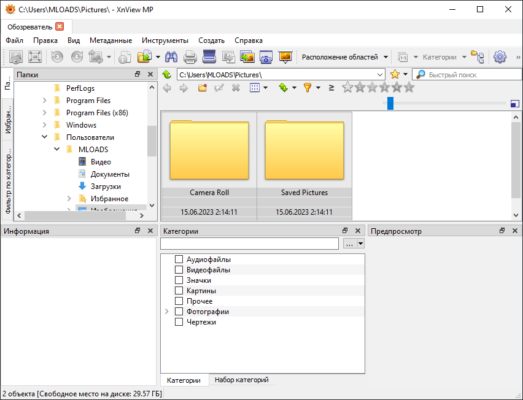
XnViewMP 1.9.3 is a versatile and powerful software that lets you view, organize, and convert images quickly and efficiently. With support for more than 500 image formats and advanced features, it is a must-have tool for anyone who works with digital photos.
What is XnViewMP?
XnViewMP is the extended version of the classic XnView software. It is a cross-platform image viewer, converter, and organizer available for Windows, macOS, and Linux. The “MP” stands for Multi-Platform and buy.
With its intuitive interface and robust functionality, XnViewMP has become a favorite alternative to commercial software like ACDSee or Adobe Bridge.
Key Features of XnViewMP 1.9.3
1. Wide Format Support
Supports over 500 image formats including JPEG, PNG, TIFF, GIF, BMP, PSD, RAW, and more.
Can also export images into 70+ file formats.
2. Powerful Image Viewer
Fast image browsing with thumbnail previews.
Full-screen view and slideshow mode.
Supports high-resolution and RAW images.
3. Image Organization Tools
Categorize images using tags, ratings, and color labels.
Advanced search filters to quickly locate specific files.
Batch renaming and sorting options.
4. Batch Conversion & Processing
Convert hundreds of images into different formats at once.
Apply edits such as resize, crop, rotate, and watermark.
Supports batch effects and adjustments.
5. Editing & Enhancement Features
Basic editing tools like brightness, contrast, and gamma correction.
Color adjustments and filters.
Metadata (EXIF, IPTC, XMP) editing support.
6. Cross-Platform & Multilingual
Available on Windows, macOS, and Linux.
Supports more than 20 languages.
What’s New in Version 1.9.3?
Enhanced RAW image support for the latest cameras.
Optimized performance for large image libraries.
Bug fixes for smoother batch processing.
Improved metadata handling and compatibility.
Benefits of Using XnViewMP 1.9.3
For Photographers
Manage and preview RAW images effortlessly.
For Designers
Batch convert images into required formats quickly.
For Regular Users
Organize photo collections and create slideshows easily.
How to Use XnViewMP 1.9.3
Step 1: Install the Software
Download and install XnViewMP on your preferred operating system.
Step 2: Import Images
Open folders or drag-and-drop images into the interface.
Step 3: Organize Files
Use categories, ratings, and tags to manage your photo library.
Step 4: Edit & Convert
Apply edits or use the batch conversion tool to process multiple images at once.
Step 5: Export & Share
Save your images in the desired format or share them directly.
Why Choose XnViewMP Over Other Image Viewers?
Compared to alternatives like IrfanView, FastStone, or Adobe Bridge, XnViewMP 1.9.3 offers:
Free license for personal use with powerful features.
Larger format support (500+).
Cross-platform compatibility.
Batch conversion and advanced organization tools.
Conclusion
XnViewMP 1.9.3 is more than just an image viewer—it is a complete photo management solution. With extensive format support, batch processing, advanced organization, and editing tools, it caters to both professionals and casual users.
Whether you need to view, organize, or convert images, XnViewMP is a lightweight yet powerful tool that makes handling photos effortless.
✔ Tested: This software was tested on Windows 10 & Windows 11 and works smoothly without issues.
Frequently Asked Questions
- Is this software free?
Yes, it can be downloaded and used for free. - Does it support Windows 11?
Yes, it works perfectly on Windows 10 and 11. - Is it safe to use?
Yes, the software was scanned and tested before publishing.
Last updated: January 2026