WinMerge 2.16.50.2 – Powerful File & Folder Comparison Tool for Windows
WinMerge 2.16.50.2 is a free and open-source tool designed to help users compare, analyze, and merge files or folders efficiently. It’s widely used by developers, editors, and anyone who needs to track changes in documents, code, or configurations. Whether you’re managing project updates or synchronizing files between directories, WinMerge provides a clear visual representation of differences and makes merging changes fast and reliable.
Key Features of WinMerge 2.16.50.2
WinMerge stands out as one of the best file comparison utilities thanks to its combination of simplicity, flexibility, and power. Below are its most important features:
File and Folder Comparison:
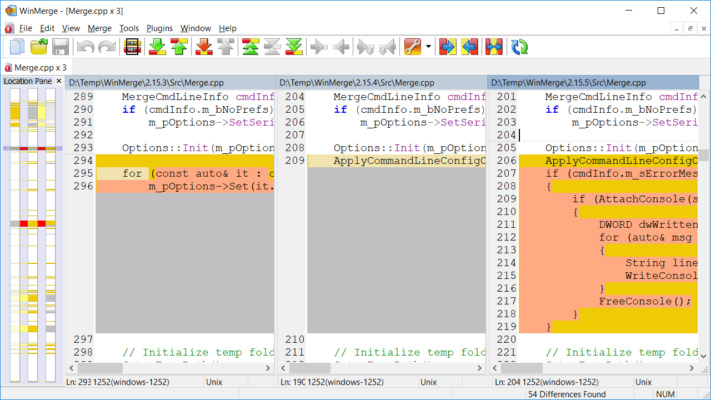
Quickly compare two files or entire directories side by side. WinMerge highlights the differences using colors and visual markers, making it easy to spot edits or missing lines.Syntax Highlighting:
Developers will appreciate syntax coloring for various programming languages, which makes reading and comparing code much more intuitive.Three-Way Merge:
Merge changes from different versions of a file easily — perfect for collaborative projects where multiple people edit the same files.Inline Editing:
Edit files directly within the comparison view. You can apply or reject changes line by line, making it extremely convenient for quick revisions.Patch File Creation:
Generate patch files for version control systems like Git or SVN. This helps maintain consistency across multiple versions of your code or documents.Plugins and Extensions:
WinMerge supports plugins for additional functionality, including archive file comparison (ZIP, 7z), image comparison, and even integration with Windows Explorer.Unicode and Windows Integration:
Full Unicode support ensures accurate comparison of international text, while right-click integration allows for fast access directly from the Windows context menu.
Why Choose WinMerge 2.16.50.2
WinMerge offers a combination of features that rival many paid tools — all in a lightweight, open-source package. Its visual interface and side-by-side comparison make it easy for anyone to understand changes without technical complexity. Developers, content creators, and system administrators all benefit from the efficiency and accuracy it provides.
It’s especially useful for:
Detecting changes in source code or configuration files
Comparing project folders before synchronization
Reviewing document revisions or backups
Managing updates between software versions
System Requirements
Operating System: Windows 11, 10, 8, 7
Processor: 1 GHz or faster
RAM: 512 MB minimum (1 GB recommended)
Disk Space: 20 MB of free space
How to Use WinMerge 2.16.50.2
Download and install the latest version of WinMerge.
Launch the program and select two files or folders to compare.
View highlighted differences in a clean, color-coded interface.
Use merge options to apply or reject individual changes.
Save or export your results as a patch file if needed.
Advantages of Using WinMerge
Completely free and open-source.
Supports custom filters for ignoring specific file types or content.
Can compare binary files, not just text.
Integrates smoothly with version control systems.
Provides side-by-side visualization for easy comprehension.
Conclusion
WinMerge 2.16.50.2 is an essential tool for developers, writers, and IT professionals who need to maintain file consistency and track modifications efficiently. With its clean interface, multi-format support, and strong merging features, WinMerge simplifies even the most complex comparison tasks. It’s lightweight, fast, and completely free — making it a must-have for anyone working with multiple file versions.
Official Website:
https://winmerge.org/
✔ Tested: This software was tested on Windows 10 & Windows 11 and works smoothly without issues.
Frequently Asked Questions
- Is this software free?
Yes, it can be downloaded and used for free. - Does it support Windows 11?
Yes, it works perfectly on Windows 10 and 11. - Is it safe to use?
Yes, the software was scanned and tested before publishing.
Last updated: January 2026