
StaxRip 2.48.3 is a free and open-source video encoding application for Windows that supports a wide range of formats and codecs, including HEVC, H.264, AV1, and VP9. It provides advanced tools for compressing, converting, and editing video while maintaining high quality.
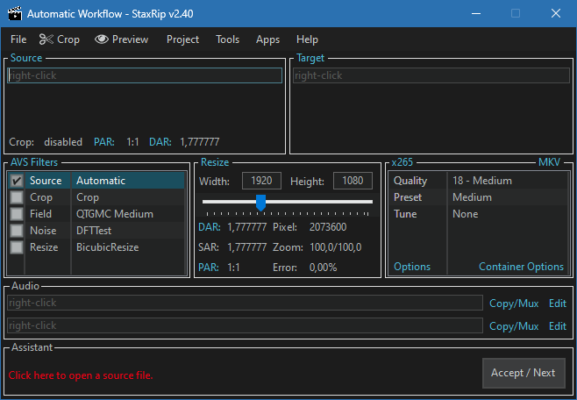
With a customizable interface and integration of popular encoding tools, StaxRip is ideal for video enthusiasts, editors, and content creators who want maximum control over their encoding process.
⚡ Key Benefits
Wide Format Support – Works with HEVC, H.264, AV1, VP9, MPEG-2, and more.
High-Quality Encoding – Maintains video quality with optimized compression.
Customizable Workflows – Full control over encoding settings.
Batch Processing – Convert multiple files at once.
Free & Open Source – No license fees or restrictions.
🚀 What’s New in Version 2.48.3
Updated codec libraries for improved performance
Enhanced compatibility with AV1 encoding
Fixed bugs related to audio track handling
Improved batch job processing stability
UI optimizations for smoother workflow
🔧 Core Features
✅ Multiple Codec Support
Encode videos using x265, x264, NVENC, QSV, AV1, and VP9.
✅ Subtitle & Audio Handling
Supports multiple audio tracks and embedded subtitles.
✅ GPU Acceleration
Take advantage of hardware encoding for faster processing.
✅ Advanced Filters
Integrates AviSynth and VapourSynth for powerful video filtering.
✅ Script Customization
Edit and customize encoding scripts for professional control.
🛠 Technical Details
Software Name: StaxRip
Version: 2.48.3
Developer: Stax76 & Community
Category: Video Tools / Encoding
Supported OS: Windows 7/8/10/11 (64-bit)
Size: ~200MB
License: Open Source (Free)
📥 Installation Guide
Download StaxRip 2.48.3 from the official site or a trusted source.
Extract the archive to your preferred folder.
Run the
StaxRip.exefile to start the program.Load your video file and select encoding settings.
Start the encoding process and save the output.
🧠 Final Thoughts
StaxRip 2.48.3 remains one of the best free tools for video encoding and conversion, offering flexibility, high-quality results, and extensive format support. Whether you’re a beginner or an advanced video editor, its customizable features and open-source nature make it an excellent choice for all your video processing needs.
✔ Tested: This software was tested on Windows 10 & Windows 11 and works smoothly without issues.
Frequently Asked Questions
- Is this software free?
Yes, it can be downloaded and used for free. - Does it support Windows 11?
Yes, it works perfectly on Windows 10 and 11. - Is it safe to use?
Yes, the software was scanned and tested before publishing.
Last updated: January 2026