
When it comes to managing PDF documents, basic tasks like splitting large files or merging multiple PDFs into one are among the most common needs — whether you’re organizing reports, combining contracts, or preparing study materials. While many tools offer these functions, PDFsam Pro 5.3.1 stands out as a professional-grade solution that combines simplicity with advanced functionality and buy.
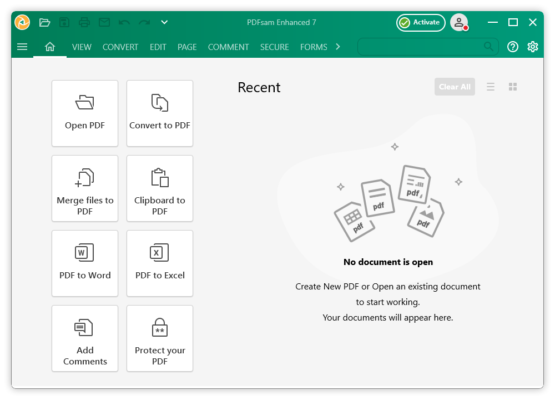
Developed by Andrea Vacondio, PDFsam (which stands for PDF Split and Merge ) has evolved from a simple utility into a full-featured PDF suite. The Pro version 5.3.1 adds powerful enhancements over the free edition, making it ideal for business users, educators, and IT professionals.
Let’s dive into what makes PDFsam Pro 5.3.1 a top choice for efficient and secure PDF handling.
📌 What Is PDFsam Pro 5.3.1?
PDFsam Pro 5.3.1 is an advanced PDF management tool designed to split, merge, rotate, extract, and rearrange pages in PDF documents. It also supports editing metadata, adding watermarks, encrypting files, and integrating with cloud storage .
Unlike many lightweight PDF tools, PDFsam Pro offers a modular interface where each function operates as a separate module, giving users precise control over their workflow without clutter.
It runs natively on Windows, macOS, and Linux , making it one of the few cross-platform professional PDF editors available.
🛠️ Key Features of PDFsam Pro 5.3.1
1. 🔗 Merge Multiple PDFs Easily
Combine several PDF files into a single document in any order. You can drag and drop files, set page ranges, and preview content before merging.
2. ✂️ Split Large PDFs into Smaller Parts
Split PDFs by page numbers, bookmarks, size, or after every odd/even page — perfect for dividing long reports or e-books.
3. 🔄 Rotate & Rearrange Pages
Rotate individual pages or entire documents. Drag and drop pages to reorder them within a file.
4. 📥 Extract Pages or Create Subsets
Extract specific pages or ranges from a PDF to create new documents — great for sharing only relevant sections.
5. 🧩 Advanced Modules Included
The Pro version includes exclusive modules such as:
- Alternate Mix : Combine two documents alternately (e.g., interleaving).
- Extract Bookmarks : Save navigation structure as a text file.
- Remove Pages : Delete unwanted pages based on conditions.
6. 🔐 Security & Encryption
Add passwords, restrict editing/printing, and apply AES-256 encryption to protect sensitive information.
7. 💧 Add Watermarks & Headers/Footers
Insert text or image watermarks, page numbers, dates, and headers/footers across multiple files.
8. ☁️ Cloud Integration
Directly open and save files from Google Drive, Dropbox, OneDrive, and Nextcloud , enabling seamless collaboration and remote access.
9. 📦 Batch Processing
Apply actions to multiple files at once using batch mode — saving time when working with large volumes of documents.
10. 🖋️ Edit Metadata & Properties
Modify document title, author, subject, keywords, and other metadata for better organization and SEO.
👥 Who Should Use PDFsam Pro 5.3.1?
- Business Professionals: For merging contracts, proposals, and invoices securely.
- Lawyers & Legal Teams: To manage case files, redact pages, and protect client data.
- Students & Educators: Organize research papers, thesis chapters, and course materials.
- IT & Admin Staff: Automate document workflows and process bulk PDFs efficiently.
- Freelancers & Designers: Prepare clean, organized PDF deliverables for clients.
🖥️ System Requirements
- Operating System: Windows 10+, macOS 10.14+, or Linux (64-bit)
- RAM: 4 GB minimum (8 GB recommended)
- Hard Disk Space: 200 MB free space
- Java: OpenJDK 17+ (bundled with installer)
- Internet Connection: Required for activation and cloud features
📈 Why Choose PDFsam Pro 5.3.1?
- ✅ Cross-Platform Support: Works on Windows, Mac, and Linux.
- ✅ Clean & Modular Interface: No clutter — choose only the tools you need.
- ✅ Batch & Automation-Friendly: Ideal for repetitive tasks.
- ✅ Strong Security Features: Full encryption and permissions control.
- ✅ Cloud Ready: Integrates with major cloud services.
- ✅ Regular Updates & Excellent Support: Actively maintained with responsive customer service.
✅ Final Thoughts
PDFsam Pro 5.3.1 is more than just a split-and-merge tool — it’s a complete professional PDF workstation . Whether you’re combining legal documents, extracting report sections, or securing confidential files, this software delivers speed, precision, and reliability.
If you’re looking for a powerful, cross-platform, and privacy-respecting alternative to Adobe Acrobat Pro, PDFsam Pro 5.3.1 is an excellent choice .
✔ Tested: This software was tested on Windows 10 & Windows 11 and works smoothly without issues.
Frequently Asked Questions
- Is this software free?
Yes, it can be downloaded and used for free. - Does it support Windows 11?
Yes, it works perfectly on Windows 10 and 11. - Is it safe to use?
Yes, the software was scanned and tested before publishing.
Last updated: January 2026