
🎤 TelePrompter 2.8 – Your Personal Digital Script Assistant
TelePrompter 2.8 is a professional-grade teleprompting software designed to help speakers, streamers, YouTubers, and broadcasters deliver smooth and confident presentations. 📺 Whether you’re recording a video, giving a live presentation, or broadcasting on social media, this software provides a modern, customizable script reader that enhances your delivery.
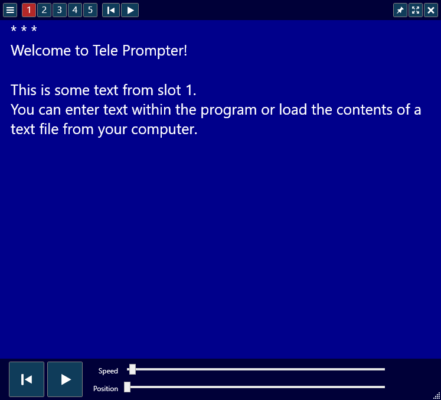
Developed by Appgineers Ltd, TelePrompter has become one of the most reliable tools for creating studio-quality performances without expensive hardware. It’s widely used by journalists, educators, and content creators who want to maintain natural eye contact with their audience while reading from a script. 👁️
⚙️ Key Features of TelePrompter 2.8
🧾 1. Adjustable Scrolling Speed
TelePrompter lets you set the scrolling speed of your text to perfectly match your speaking pace. 🎚️ You can increase or decrease the speed in real time during your performance using keyboard shortcuts or a remote control.
🔁 2. Mirror & Flip Modes
The software includes horizontal and vertical mirroring, making it compatible with teleprompter glass screens used in professional studios. This ensures your text appears correctly reflected while maintaining eye contact with the camera.
🎬 3. Full-Screen Presentation Mode
Switch to full-screen display for distraction-free reading. You can also adjust text alignment, margins, and colors for better visibility under different lighting conditions.
🎤 4. Script Management
Easily organize and load multiple scripts. 📂 The script library allows users to save and categorize texts, making it easy to switch between projects or update content instantly.
🖋️ 5. Custom Fonts & Formatting
Personalize your presentation with different fonts, sizes, and colors. Highlight important parts of your speech with bold, italic, or color-coded text to ensure you never miss a key line.
💡 Ideal for Professionals & Creators
TelePrompter 2.8 isn’t just for TV studios — it’s a versatile tool used by:
🎥 YouTubers who want to stay on script during video shoots.
🎤 Podcasters managing show notes and interview questions.
🧑🏫 Teachers & lecturers delivering clear lessons online.
🎙️ News anchors & journalists reading real-time updates.
Its intuitive interface makes it accessible for beginners while still offering advanced customization for professionals.
🧠 How to Use TelePrompter 2.8
🪄 Step 1 – Import Your Script
Load your script as a plain text or RTF file. The program supports simple copy-paste input as well.
⚙️ Step 2 – Customize Your View
Set the font style, color scheme, and window layout. Enable mirror mode if you’re using a beam-splitter glass setup.
🎮 Step 3 – Control Playback
Use the keyboard arrows, mouse wheel, or Bluetooth remote to start, pause, or adjust scroll speed while recording or presenting.
⚡ Performance & Compatibility
TelePrompter 2.8 runs smoothly on both Windows and macOS with minimal resource usage. It’s optimized for both single-screen and dual-screen setups, allowing one display for the prompter text and another for monitoring or video output.
It also supports multiple languages and character sets, including Arabic, Chinese, and Cyrillic scripts — making it a global solution for content creators worldwide. 🌍
🧩 Benefits of TelePrompter 2.8
✅ Professional text display and smooth scrolling
🎨 Fully customizable fonts and layouts
🪞 Mirror mode for physical teleprompter screens
🎧 Perfect for live streaming, video production, or classes
🔐 Works offline with no internet dependency
💻 System Requirements
OS: Windows 10 / 11 or macOS 12 and higher
Processor: Intel Core i3 or better
RAM: 2 GB minimum (4 GB recommended)
Storage: 150 MB free disk space
🌟 Why Choose TelePrompter 2.8
With its blend of simplicity and professional-grade features, TelePrompter 2.8 is an excellent tool for anyone who wants to present confidently, stay organized, and deliver a flawless on-screen performance. It’s your perfect digital assistant for public speaking and video production. 🎥
🌐 Official Website
https://www.teleprompterapp.com
✔ Tested: This software was tested on Windows 10 & Windows 11 and works smoothly without issues.
Frequently Asked Questions
- Is this software free?
Yes, it can be downloaded and used for free. - Does it support Windows 11?
Yes, it works perfectly on Windows 10 and 11. - Is it safe to use?
Yes, the software was scanned and tested before publishing.
Last updated: January 2026